
Setting Up Custom Events
Call track() or record() to capture the business actions autocapture can't see, with real-world examples for common use cases.
Overview
Autocapture, turned on the moment you connect a source, records page views, clicks, form activity, and sessions with no extra code. It can't see what those actions meant to your business though. A click is just a click until you tell Intempt it was "Purchase completed" or "Trial started." That's what a custom event is: you name the action and send it, with whatever data describes it. You can send one from anywhere in your codebase: a frontend button handler, a webhook, or a backend job.
How it works
The JavaScript SDK exposes two methods for sending a custom event:
track(params)sends a bare event plus data. BotheventTitleanddataare required, anddatacan't be an empty object.record(params)does the same thing, but also lets you attach auserIdand/oraccountId(plus their attributes) in the same call, so the event carries identity context immediately instead of relying on a separateidentify()call.
// track(): a bare event, no identity attached
intempt.track({
  eventTitle: 'Purchase completed',
  data: {
    orderId: 'order_123',
    amount: 99.99,
    currency: 'USD'
  }
});

// record(): the same event, with a user attached in one call
intempt.record({
  eventTitle: 'Purchase completed',
  userId: 'jane.doe@example.com',
  data: {
    orderId: 'order_123',
    amount: 99.99,
    currency: 'USD'
  }
});
📘 Good to know
data is required on track() and must be a non-empty object, an empty {} throws. If you don't have identity context yet, use track() and call identify() separately; if you already know who the user is, record() saves the extra call.
A handful of event titles are reserved and throw if you use them: auto-track, view page, leave page, change on, click on, submit on, identify, consent. Pick a name that describes the business action instead, like "Trial started" rather than "click on."
Getting started
-
Make sure a source with the SDK snippet is already connected. See Basic Intempt installation if you haven't done this yet.
-
Decide the moment in your code where the business action actually happens: a successful API response, a form submission handler, a webhook payload. Not just a click on a button that might fail validation afterward.
-
Call
track()orrecord()at that moment, passing aneventTitlethat names the action and adataobject with the details you'll want later in segments, journeys, or reports.
function completeCheckout(order) {
  return submitOrder(order).then((confirmedOrder) => {
    intempt.track({
      eventTitle: 'Purchase completed',
      data: {
        orderId: confirmedOrder.id,
        amount: confirmedOrder.total,
        currency: confirmedOrder.currency
      }
    });
  });
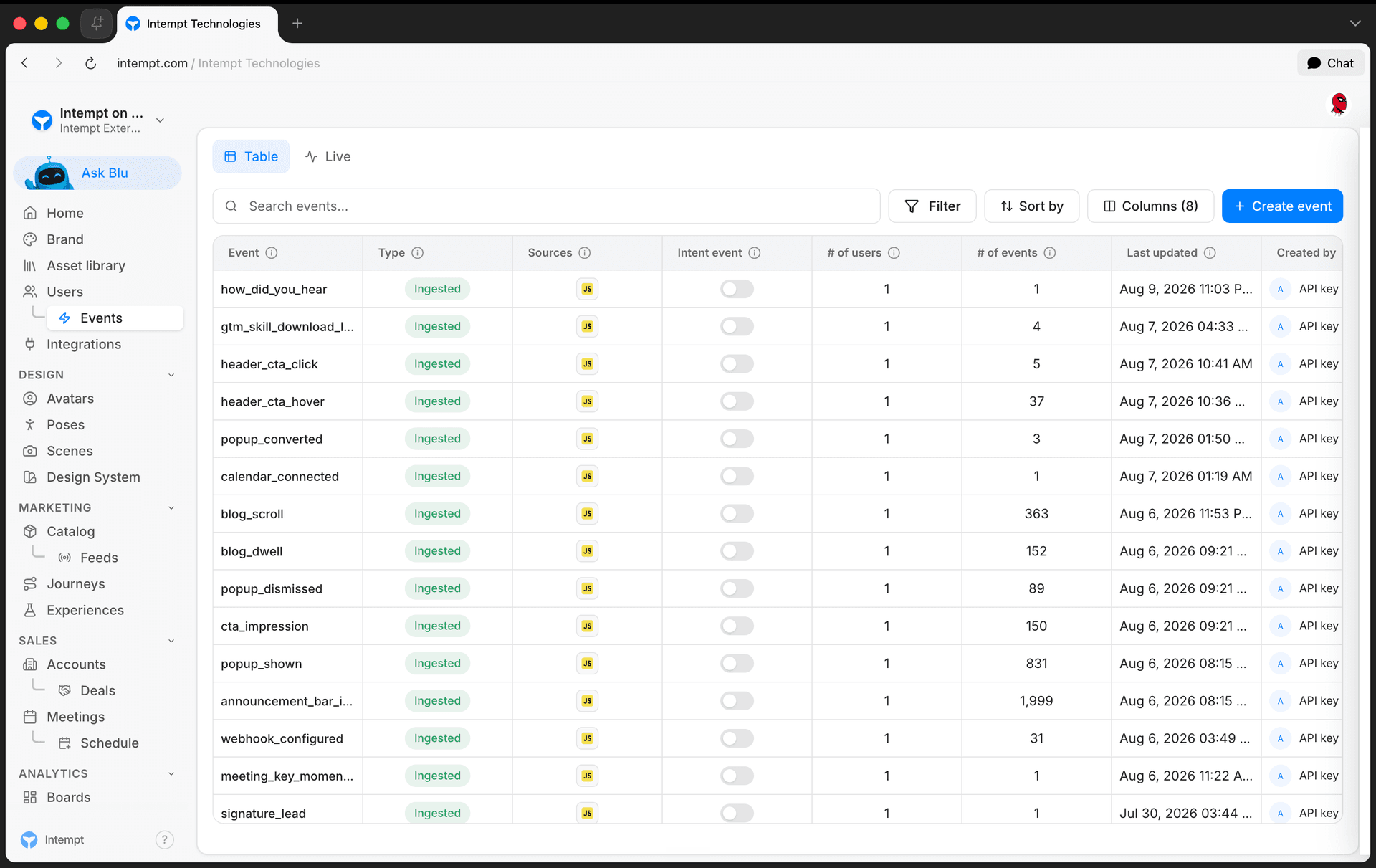
}- Trigger the action once in your app, then check the Events table to confirm it arrived.
Real-world examples
- E-commerce purchase. Fire this from your order-confirmation handler, after payment succeeds, not on checkout button click.
intempt.track({
  eventTitle: 'Purchase completed',
  data: { orderId: 'order_123', amount: 99.99, currency: 'USD' }
});- SaaS trial started. Fire this when a trial account is actually provisioned, so you're not counting abandoned sign-up forms.
intempt.record({
  eventTitle: 'Trial started',
  userId: 'jane.doe@example.com',
  data: { plan: 'pro', trialDays: 14 }
});- Plan upgraded. Useful for triggering upgrade-confirmation journeys or filtering reports to expansion revenue.
intempt.record({
  eventTitle: 'Plan upgraded',
  userId: 'jane.doe@example.com',
  data: { fromPlan: 'starter', toPlan: 'pro', mrrDelta: 49 }
});- Demo requested. Send this from your form's submit handler once the request is accepted server-side, not on every keystroke.
intempt.track({
  eventTitle: 'Demo requested',
  data: { companySize: '51-200', useCase: 'analytics' }
});- Video completed. Useful for content and onboarding funnels where watch-through matters more than a page view.
intempt.track({
  eventTitle: 'Video completed',
  data: { videoId: 'onboarding-101', durationSeconds: 184 }
});- Support ticket submitted. Lets you segment or follow up with users who hit friction, independent of whatever page they were on.
intempt.record({
  eventTitle: 'Support ticket submitted',
  userId: 'jane.doe@example.com',
  data: { category: 'billing', priority: 'high' }
});- Subscription cancelled. Fire this from the cancellation confirmation step, with enough context to understand why.
intempt.record({
  eventTitle: 'Subscription cancelled',
  userId: 'jane.doe@example.com',
  data: { plan: 'pro', reason: 'too_expensive', tenureDays: 210 }
});
Where to go next
- JavaScript SDK reference for the full
track()/record()parameter tables and error handling. - iOS SDK reference and Android SDK reference for the native equivalents.
- Identifying users across sessions for attaching identity to events with
identify()andalias(). - Complete guide to event tracking for how custom events fit alongside autocapture and verification.
- Creating an event to turn raw custom events into named, reusable events for segments and journeys.
Google Tag Manager
Deploy the Intempt JavaScript SDK through a Google Tag Manager container instead of editing your site's code directly.
Complete guide to event tracking
A step-by-step walkthrough of Intempt event tracking: installing autocapture, sending custom events with the SDK, verifying data, and turning raw events into named events.