
Migration Guide: Segment, Mixpanel, and Amplitude
How to move an existing Segment, Mixpanel, or Amplitude tracking setup to Intempt: the method mapping, connecting a source, and what to do with historical data.
Overview
Intempt doesn't have a one-click connector for Segment, Mixpanel, or Amplitude. Moving from one of them means three things: connecting an Intempt source for each platform you currently track (web, iOS, Android, or a server), re-implementing your identify, track, group, and alias calls against Intempt's SDK, and deciding what happens to your existing historical data.
This guide walks through all three, plus how to run Intempt alongside your current tool before you remove it.
How it works
Method mapping
Segment, Mixpanel, and Amplitude each have their own method names for identifying users and tracking events — they're not interchangeable. Here's what each one actually calls it, next to Intempt's equivalent:
| What you're doing | Segment | Mixpanel | Amplitude | Intempt method |
|---|---|---|---|---|
| Identify a user | analytics.identify(userId, traits) | mixpanel.identify(distinctId) + mixpanel.people.set(properties) | setUserId(userId) + identify(new Identify().set(...)) | intempt.identify({ userId, userAttributes }) |
| Track a custom event | analytics.track(event, properties) | mixpanel.track(event, properties) | track(eventType, eventProperties) | intempt.track({ eventTitle, data }), or intempt.record({ eventTitle, userId, accountId, data }) if the event needs user or account context attached in the same call |
| Associate a user with a company or account | analytics.group(groupId, traits) | mixpanel.set_group(groupKey, groupIds) | setGroup(groupType, groupName) | intempt.group({ accountId, accountAttributes }) |
| Merge two identifiers (for example, an anonymous ID with a known user ID after login) | analytics.alias(newId, previousId) | mixpanel.alias(alias) | No direct alias call — calling setUserId(userId) on an anonymous session is what merges that visitor's earlier activity into the identified user | intempt.alias({ userId, anotherUserId }) |
| Track a page view | analytics.page(), called manually | mixpanel.track_pageview(), called manually | Page View Tracking plugin, or a manual track('Page Viewed') | Not needed. Intempt's SDK auto-tracks page views on load and on every route change |
📘 Good to know
Intempt also ships purpose-built ecommerce methods your previous tool may have needed a custom event for: productAdd(), productOrdered(), and productView(). See the JavaScript SDK reference for their parameters.
Exact call syntax differs by platform. See the JavaScript SDK, iOS SDK, and Android SDK references for each method's full parameter table.
What auto-tracking replaces
Once an Intempt source is connected, the SDK automatically records page views, page exits, sessions, clicks, and form activity with no code required. If your current setup fires manual events for these (a page() call on every route, or a click handler that just logs a button name), you can drop them and rely on auto-tracking instead. Keep manual track()/record() calls only for events specific to your business, like a purchase or a plan upgrade.
Historical data
Intempt has no direct historical-data importer for Segment, Mixpanel, or Amplitude. Two options carry existing data over:
- CSV import, for historical users, accounts, or events. Drag a CSV into the Users, Accounts, or Events page and map its columns to Intempt attributes. See Data import for file requirements and the column-mapping flow.
- The Track Data API, for backfilling events from a server. Each event payload accepts an explicit
timestampfield, so backfilled events keep their original time instead of being stamped with the import time. See Track Data for the request schema.
Getting started
Step 1: Connect an Intempt source
Connect a source for each platform you're currently tracking with Segment, Mixpanel, or Amplitude.
- Go to Integrations and click Add Integration.
- Under Sources, click the JavaScript, Node JS, iOS, or Android tile, depending on where your existing tracking lives.
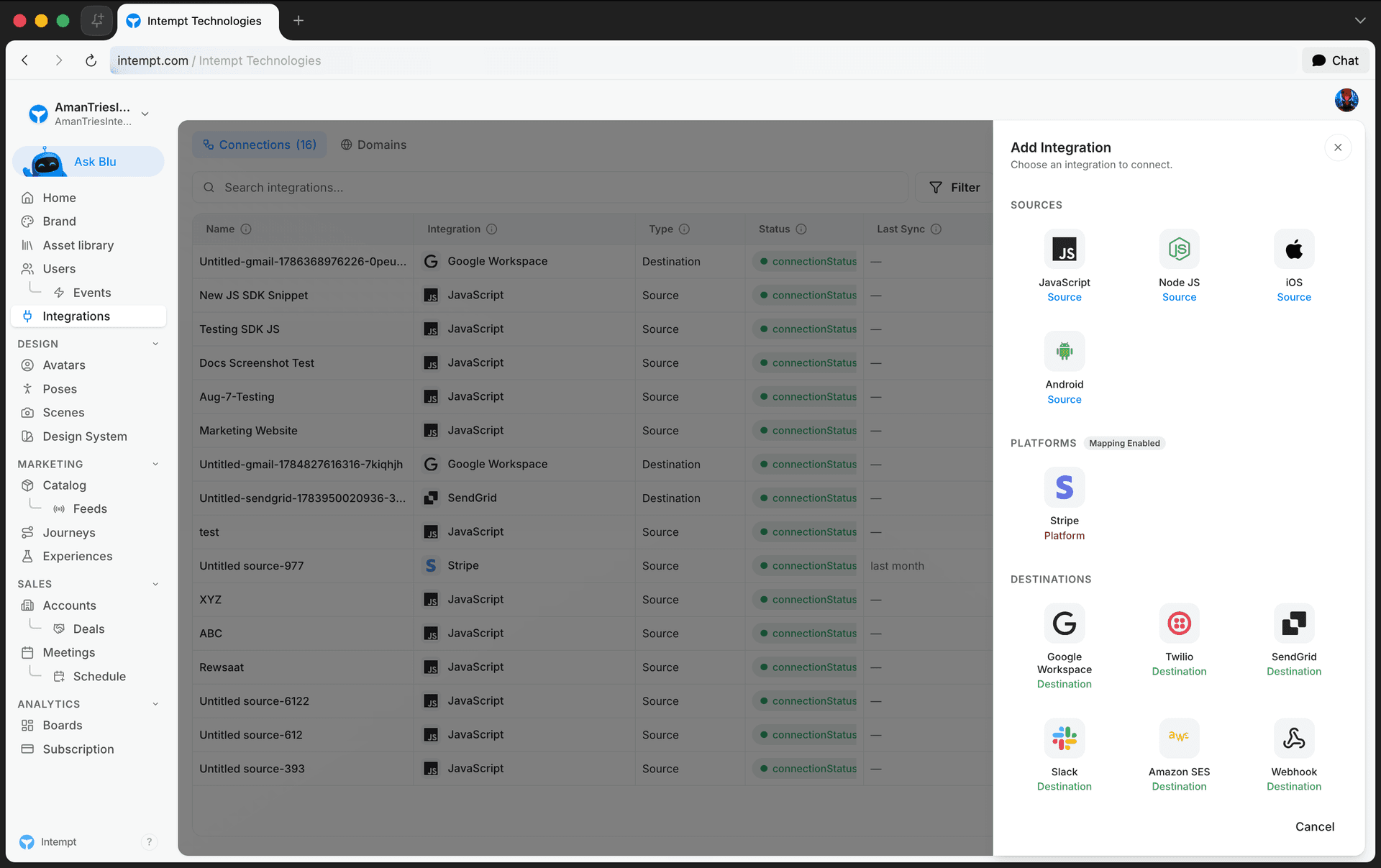
- Follow the setup panel for that source type and copy its installation snippet.
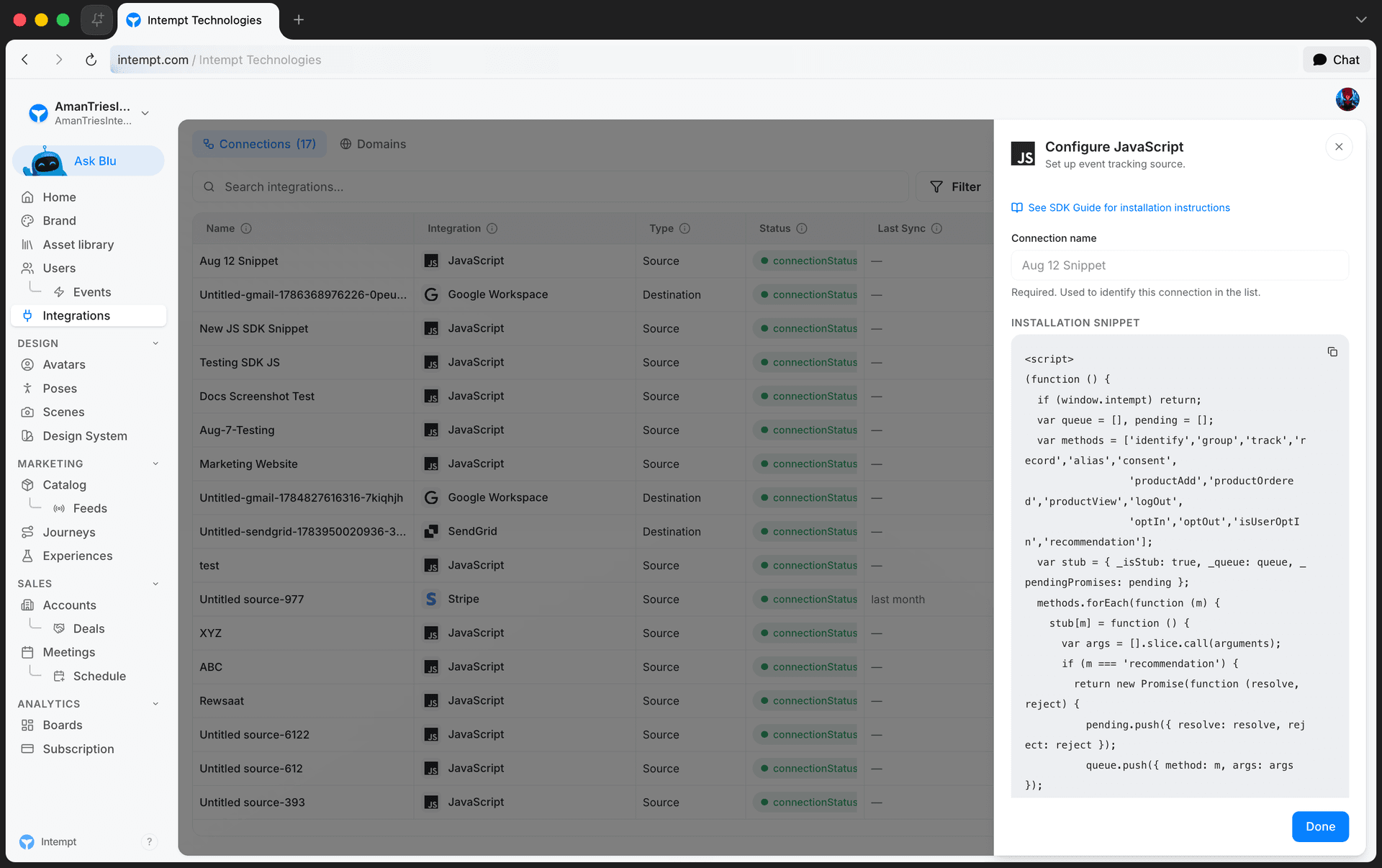
See Creating a Source for the full panel-by-panel walkthrough, and Basic Intempt installation for the JavaScript source end to end, including creating the API key the snippet needs.
Step 2: Re-implement your tracking calls
Go through the calls your current implementation makes and swap each one for its Intempt equivalent from the mapping table above. Here's the same identify call, from each platform:
// Before (Segment)
analytics.identify('user123', { email: 'user@example.com', plan: 'premium' });
// Before (Mixpanel)
mixpanel.identify('user123');
mixpanel.people.set({ email: 'user@example.com', plan: 'premium' });// Before (Amplitude)
setUserId('user123');
const identifyObj = new Identify();
identifyObj.set('email', 'user@example.com').set('plan', 'premium');
identify(identifyObj);All three become the same call on Intempt:
// After (Intempt)
intempt.identify({
  userId: 'user123',
  userAttributes: { email: 'user@example.com', plan: 'premium' }
});
Do the same for your track, group, and alias calls, using each platform's real method names from the mapping table above. Leave out any page() / track_pageview() calls your old tool needed. Intempt captures those automatically.
Step 3: Run both in parallel, then cut over
Keep your existing tool's tracking code in place while Intempt's snippet runs alongside it. Compare event volume and the attributes each tool captures for the same user actions. Once you've confirmed Intempt is receiving equivalent data, remove the old tool's snippet and API keys.
Step 4: Backfill historical data
If your reports need continuity across the cutover date, import what you need with a CSV (for user and account profiles, or a bulk event export) or the Track Data API (for server-side event backfills with their original timestamps). See the Historical data section above for which one fits.
Use cases
- Replacing Segment as your CDP while keeping the same identify/track/group vocabulary your team already writes code against.
- Consolidating Mixpanel funnels and Amplitude cohorts into Intempt's own analytics, instead of maintaining tracking code for two platforms.
- An ecommerce site swapping manual page and product events for Intempt's autocaptured page views and built-in
productAdd/productOrdered/productViewmethods. - A mobile team retiring Amplitude's iOS and Android SDKs in favor of Intempt's native iOS and Android sources.
- A backend service using Mixpanel's server-side library switching its event calls to the Track Data API.
- Merging an anonymous ID with a known user ID after login, using
alias()in place of the old tool's own alias call. - Backfilling last quarter's event history via CSV or the Track Data API so reports don't show a gap starting at the cutover date.
Where to go next
- JavaScript SDK for the full method reference, auto-tracking details, and error handling.
- iOS SDK and Android SDK for mobile method signatures.
- Event Tracking (SDK deep-dive) for when to use the browser SDK versus the Track Data API.
- Track Data for the server-side ingestion schema, including backfill timestamps.
- Creating a Source and Basic Intempt installation for connecting a new source.
- Data import for CSV-based historical backfills.