
Identity resolution
Identity resolution ties every event, device, and source a person uses back to one user profile, and every user to the account they belong to.
Overview
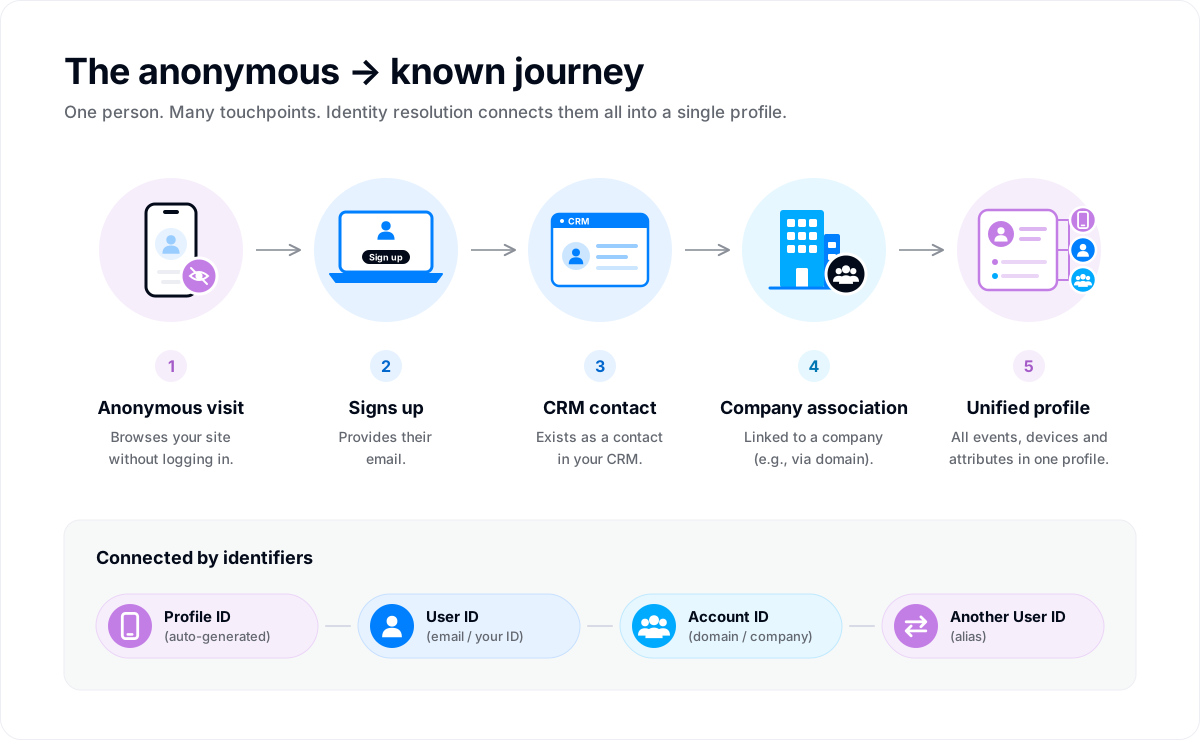
One person can reach you in many ways. They browse your site on their phone without logging in, sign up on a laptop a week later, and exist as a contact in your CRM. Without identity resolution, that's three records. With it, it's one user profile holding all of their events and attributes.
Identity resolution does two jobs:
- Users. It decides which events and records belong to the same person, and keeps them on one profile.
- Accounts. It links each user to the account (company, team, or workspace) they belong to, so you can see behavior at the account level too.
You don't run it yourself. It happens on every event Intempt receives from a Users and events source. Your part is sending the right identifiers, mostly through the identify and group calls.
📘 Good to know
An Events only source skips identity resolution. Its events are kept as raw events with no user or account, and identify and group calls from it build no profile. See What a source collects.
📘 Good to know
Prefer a walkthrough? Intempt Academy covers this page on a live profile: Identity resolution: how a visitor becomes a user.
How it works
The identifiers
Every event carries one or more identifiers. Intempt reads them to work out who the event belongs to.
| Identifier | What it is | Where it comes from |
|---|---|---|
| Profile ID | An anonymous ID for one browser or device. | The SDK creates it on the first visit and attaches it to every event automatically. You never set it. |
| User ID | Your ID for a known person, such as their email or the ID from your own database. | You send it with identify({ userId }) when the person signs up, logs in, or shares their details. |
| Another User ID | A second ID for the same person, such as an old ID after you change ID schemes. | You send it with alias({ userId, anotherUserId }). |
| Account ID | Your ID for a company or group, such as its domain. | You send it with group({ accountId }). |
A person usually has several Profile IDs (one per browser or device) and one User ID. Identity resolution is what connects them.
The primary identifier
Each project has one attribute that decides when two records are the same person, and one that decides when two records are the same account. This is the primary identifier.
| Object | Default primary identifier |
|---|---|
| Users | email |
| Accounts | domain |
If two records arrive with the same email, they're treated as the same user. If two accounts arrive with the same domain, they're the same account.
You can change the primary identifier in Project settings, under Basic info, to any text attribute on users or accounts. There's one catch: you can only change it while the project has no data. Once the first record arrives, the setting locks.
📘 Good to know
Pick the primary identifier before you connect your first source. A change applies to future records only. Records already matched keep their grouping and are never split or merged as a side effect. Re-matching your existing history is a separate operation Intempt runs for you, and it needs your written sign-off. Contact support to request it.
What happens when an event arrives
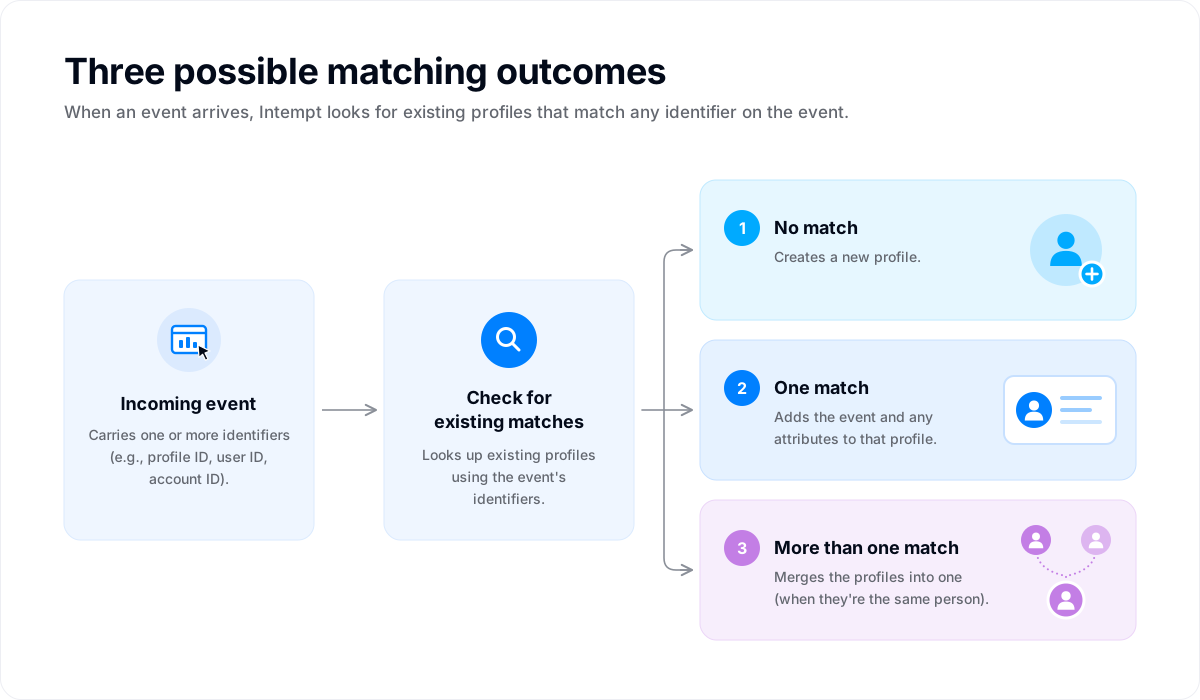
Intempt looks for existing profiles that match any identifier on the event. There are three possible outcomes:
- No match. Intempt creates a new profile.
- One match. The event, and any attributes on it, are added to that profile.
- More than one match. The event proves that two profiles are the same person, for example an anonymous browsing profile and a signed-up user. Intempt merges them into one.
When profiles merge, nothing is lost. The earlier events, attributes, and segment membership of the merged profile move to the one that remains, so reports and segments see one person with one history. The same applies when two accounts merge.
From anonymous visitor to known user
Here's a typical journey on your website:
| Step | What the person does | What your code sends | Identifiers on the event |
|---|---|---|---|
| 1 | Lands on your homepage from an ad | Nothing. The SDK tracks the page view. | Profile ID p_1 |
| 2 | Browses three product pages | Nothing. The SDK tracks each view. | Profile ID p_1 |
| 3 | Signs up with jane@acme.com | identify({ userId: "jane@acme.com" }) | Profile ID p_1, User ID jane@acme.com |
| 4 | Comes back two days later, same browser | Nothing. The SDK still has p_1. | Profile ID p_1 |
At step 3, the event carries both the Profile ID and the new User ID, which connects them. The anonymous page views from steps 1 and 2 become part of Jane's profile. This merge happens in real time, so her profile shows the full history as soon as she signs up. Step 4 is still recognised as Jane, because the browser kept its Profile ID.
This only works while the browser keeps its Profile ID. If the person clears their cookies or uses a private window, the SDK creates a new Profile ID. That new visit stays anonymous until they log in again.
Across devices
Each device gets its own Profile ID, so a person on your website and your mobile app starts as two anonymous profiles. They're joined when the person identifies on both.
| Scenario | Result |
|---|---|
| Signs up on the web, never logs in to the app | Web activity is on Jane's profile. App activity stays on a separate anonymous profile. |
| Signs up on the web, later logs in to the app | Both are identified with the same User ID, so web and app activity end up on one profile. |
Joining devices through the User ID isn't instant. It takes about 30 seconds after the second device identifies for its activity to appear on the same profile.
This is why you should call identify in every app and on every platform where a person can log in, not just the one where they sign up.
Logging out and shared devices
When someone logs out, call logOut(). It starts a fresh anonymous identity on that device, so the next person to use it doesn't inherit the previous person's profile.
| SDK | Method | What it does |
|---|---|---|
| JavaScript | logOut() | Clears session data and refreshes auto-tracking state. |
| iOS, Android | logOut() | Starts a fresh anonymous identity and keeps events already queued, which still get sent. |
| iOS, Android | reset() | Starts a fresh anonymous identity and discards events already queued. |
Linking users to accounts
For B2B products, call group to tell Intempt which account a user belongs to:
intempt.group({
  accountId: 'acme.com',
  eventTitle: 'Joined workspace',
  accountAttributes: {
    name: 'Acme Corp',
    plan: 'enterprise'
  }
});
A few things to know:
- The call links the user who is currently identified to that account.
- A user can belong to more than one account. Each
groupcall with a different Account ID adds another link. - Account attributes work like user attributes. Send the same attribute again with a new value to update it.
- The link is made once, on the user. If Jane is linked to Acme on your website, her app activity counts toward Acme too, even though the app never calls
group.
Data from other tools
Identity resolution isn't limited to the SDK. Records from imports and integrations go through the same matching.
- CSV imports. Map at least one unique identifier: Email, User ID, or Phone Number. That's what the import uses to find existing users.
- HubSpot. When you connect it, you pick what happens to incoming records. Either create new records for people who don't exist yet and update the ones who do, or only update records that already exist.
Where to see identifiers
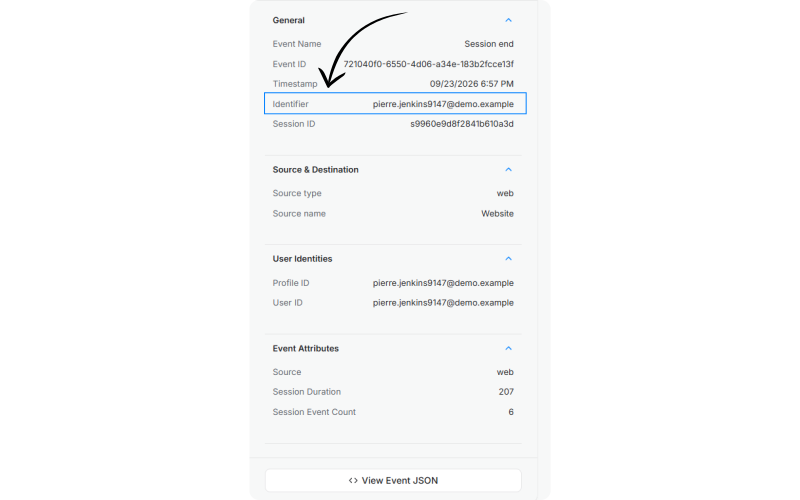
- Live data feed. The Identifier column shows the anonymous or known identifier for the user behind each event. Open an event to see the details below.
- Users list. Each row shows the user's name, or their primary identifier if there's no name.
- Identifier. In the General section, the anonymous or known identifier for the user who triggered the event.
- User Identities. Every identifier the event carried: Profile ID, User ID, and Another User ID when one was sent.
When to call identify and group
Call identify when:
- A person signs up and gets a User ID.
- A person logs in, on any device or app.
- A person shares identifying details, such as their email on a newsletter form.
- A person updates their profile.
Call group when:
- A user creates or joins an account, team, or workspace.
- An account's details change, such as its plan or size.
Where you can, follow identify with a track event for whatever caused it, such as Signed Up. That records why the person became known, not just that they did.
📘 Good to know
The full parameters for identify, alias, group, and logOut are in the JavaScript SDK reference. The iOS and Android references cover the mobile equivalents.
Use cases
- One profile across your tools. Jane is a contact in HubSpot and a customer in Shopify. Both records carry her email, so they land on one profile with the attributes from both. When the same data has different field names in each tool, line them up with Attribute mapping.
- Seeing what led to a signup. Because Jane's anonymous page views join her profile when she signs up, you can see which pages she read before converting, not just what she did afterwards.
- Not messaging people about things they already did. A shopper adds to cart in your iPhone app and checks out on Android. Both apps identify them with the same User ID, so they're one profile, and they don't get an abandoned-cart push on the iPhone.
- Account-level reporting. Every user linked to Acme through
groupcounts toward Acme, so you can see how active the whole account is, not just one person. - Shared devices. A family shares one tablet. Calling
logOut()when one person signs out means the next person's activity starts fresh instead of landing on the previous profile.
Where to go next
- Users & Accounts: what's on a user and account profile.
- Events: the events that identity resolution attaches to profiles.
- JavaScript SDK:
identify,alias,group, andlogOutin full. - Live data feed: check which identifiers your events carry.
- Data import: bring in existing users with the right identifier mapped.
Users & Accounts
Users are major building blocks alongside events within the Intempt data model. Each event is related to the user who is performing it. User profiles are joined to your events based on their Master...
The Glossary
A reference of terms used across Intempt. Terms are defined as they behave in Intempt specifically.