
Poses Library Overview
Every field a pose record carries in Intempt's Poses library: identity fields, composition anatomy, compatibility fields, and how presets differ from custom poses.
Overview
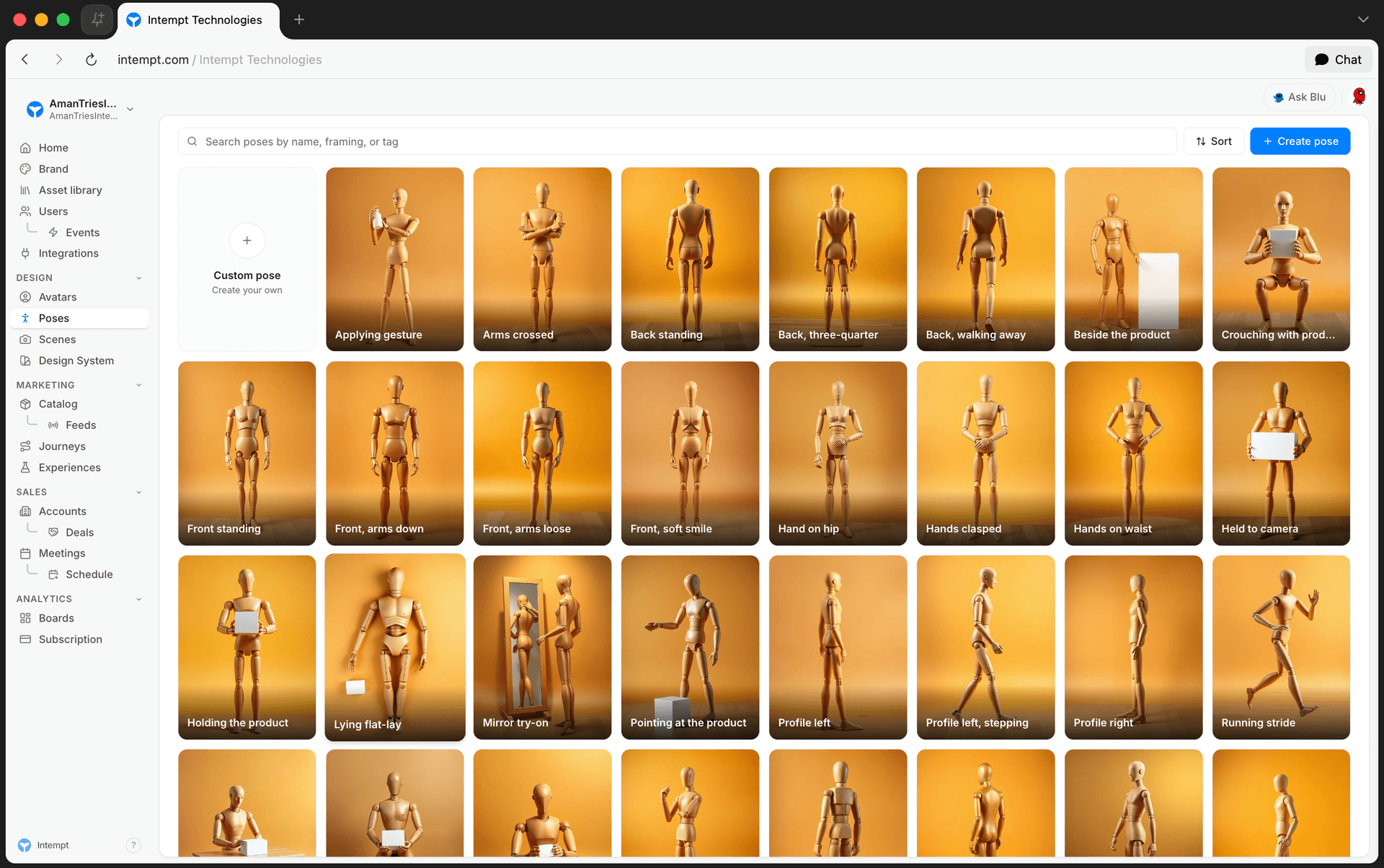
Poses lives under Design in the console sidebar, at /poses. It's Intempt's library of reference body poses: a set of built-in presets plus any custom poses your team creates, all in one list. You render an avatar against a pose to lock a specific body position, camera framing, and energy for a photoshoot.
This article is the field reference for a pose record. For the step-by-step creation and editing flow, see Creating Custom Poses.
Identity fields
Set on the pose itself, editable only on custom poses:
| Field | Description |
|---|---|
| Name | The pose's display name. |
| Category | One of: Standing, Action, Editorial, Sitting, Product interaction. |
| Framing | One of: Full-body, Three-quarter, Profile, Back. |
| Direction | One of: Front, 3Q-L, 3Q-R, Profile-L, Profile-R, Back. |
| Energy | One of: still, calm, dynamic, mid-motion. |
| Tags | Free-text labels. Used by search; there's no Tag filter on the list page. |
| Why it works | A free-text explanation of why the pose suits its intended use. Shown on both presets and custom poses. |
| Prompt hint | The prompt text used to render the pose's reference image. Shown (read-only) on presets, editable on custom poses. |
| Negative cues | A list of things to exclude from the render (for example, "no floating limbs"). |
Composition anatomy
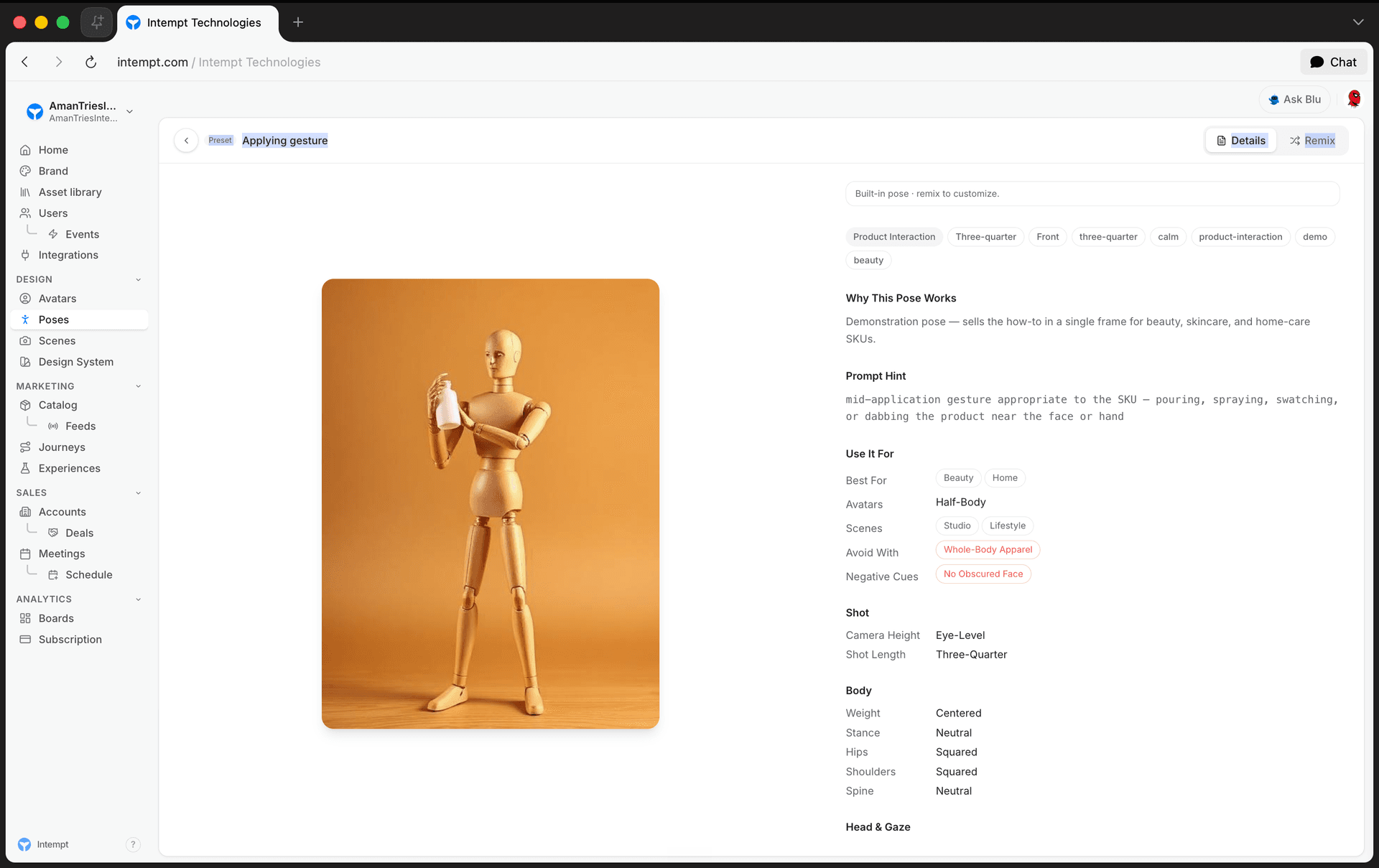
The Composition panel on a pose's detail page breaks the pose down into exact body mechanics, grouped into five sections. Every field is editable on custom poses and read-only on presets.
| Group | Field | Options |
|---|---|---|
| Shot | Camera height | eye-level, low, hip, high, overhead |
| Shot | Shot length | full-body, three-quarter, waist-up, cowboy, close-up |
| Body | Weight | centered, contrapposto-L, contrapposto-R, leaning-fwd, leaning-back, mid-motion |
| Body | Stance | narrow, neutral, wide, walking |
| Body | Hips | squared, 3Q-L, 3Q-R, profile-L, profile-R, back |
| Body | Shoulders | squared, 3Q-L, 3Q-R, profile-L, profile-R, back |
| Body | Spine | neutral, s-curve, arched, twisted |
| Head & gaze | Head | to-camera, away, down, up, over-shoulder |
| Head & gaze | Gaze | to-camera, off-camera, down, at-product |
| Head & gaze | Expression | neutral, soft-smile, laughing, focused, pensive |
| Limbs | Left arm / Right arm | relaxed, on-hip, raised, holding-product, in-pocket, behind-back, gesturing, crossed |
| Limbs | Left leg / Right leg | planted, popped, crossed, kicked-back, walking, seated |
| Product | Interaction | none, holding, wearing, applying, pointing-to, using, unboxing, presenting, mirror-tryon, flatlay |
| Product | Placement | camera-side, far-side, both-hands, on-body |
📘 Good to know
Hips and Shoulders share the same option list, but they're independent fields. You can twist the shoulders relative to the hips to build a more dynamic stance.
Compatibility fields ("Use it for")
Shown on every pose, editable only on custom poses. These describe when to reach for the pose, not how it renders:
| Field | Description |
|---|---|
| Best for | Verticals the pose suits: apparel, beauty, accessories, lifestyle, fitness, food, home. |
| Avatars | Which avatar body type the pose expects: any, full-body, half-body. |
| Scenes | Scene kinds the pose works well in: studio, lifestyle, outdoor, editorial. |
| Avoid with | A free-text list of things this pose doesn't work with, such as a garment cut it conflicts with. |
Presets vs. custom poses
| Preset | Custom pose | |
|---|---|---|
| Badge on detail page | Preset | Custom |
| Identity section (Name, Category, Framing, Direction, Energy, Tags) | Hidden | Shown and editable |
| Prompt hint and Notes | Read-only, hidden if empty | Editable |
| Composition and "Use it for" fields | Read-only | Editable, every change saves immediately |
| Generate/Regenerate image | Not available | Available on the hero image |
| Delete | Not available | Available |
| Remix | Available — hands off to Blu chat with a pre-filled remix instruction; no new pose exists until the conversation produces one | Not applicable |
Searching and sorting
| Control | Options |
|---|---|
| Search | Matches name, category, framing, direction, prompt hint, or tags. |
| Sort | My poses first, Presets first, Recently updated, A → Z. |
There's no filter option or view switcher on this page currently — every pose, preset and custom alike, shows in the same card grid, and values like Category, Framing, and Direction are only visible once you open a pose's detail page.
Use cases
- Auditing what a pose actually locks down. Check the Composition table to see exactly which body mechanics (weight, stance, spine, limbs) a pose fixes before applying it to a shoot.
- Deciding whether to remix or start fresh. Compare the Presets vs. custom poses table to confirm a preset can't be edited directly, only remixed into a copy.
- Restricting a pose to the right avatar type. Check the Avatars compatibility field before applying a pose built for full-body avatars to a half-body character.
- Finding poses for a single vertical. Check each pose's Best for field on its detail page, or search by category name, since there's no Category filter on the list page currently.
- Avoiding a wardrobe mismatch. Check a pose's Avoid with field before pairing it with a garment or product the pose's stance doesn't suit.
- Building a full set of camera angles. Use the Direction field's options (Front, 3Q-L, 3Q-R, Profile-L, Profile-R, Back) as a checklist when a shoot needs coverage from multiple angles.
- Separating your team's poses from the built-in library. Sort by "My poses first" or "Presets first" to group them, since there's no separate Source filter on the list page currently.
Where to go next
- Creating Custom Poses - generate, edit, remix, and delete poses step by step.
- Generating Brand Assets - the chat mechanics behind creating and editing every brand asset, including poses.
- Avatars Overview - the character library poses are rendered onto.
Creating Custom Poses
Poses is Intempt's library of reference body poses for on-model photoshoots. Create your own by generating with AI, starting from scratch, or remixing a built-in preset.
Remixing a Scene
Remix turns one of Intempt's built-in Scene presets into a custom scene you can edit, by handing off to a Blu chat conversation that creates the copy for you.