
GDPR & CCPA Compliance Guide
How Intempt supports GDPR and CCPA compliance: reviewing and managing a customer's consent on their Privacy tab, and handling data subject requests under the OpenDSR framework.
Overview
GDPR and CCPA both give people rights over data collected about them, and both distinguish the business that decides what to collect (data controller under GDPR, business under CCPA) from the service that processes it on the business's behalf (data processor under GDPR, service provider under CCPA). Intempt acts as your data processor: you decide what to collect and how long to keep it, and Intempt gives you the tools to act on the two things regulators actually check: consent and data subject requests (DSRs).
This guide covers both from one place: reviewing and changing a customer's consent on their Privacy tab, and how DSRs (erasure, access, export) work under the OpenDSR framework Intempt implements.
📘 Good to know
This guide covers the compliance workflow end to end. For the full consent category taxonomy and SDK tracking reference, see Managing consents. For DSR request types and how each is processed, see Managing DSR.
How it works
Consent
Every consent or rejection your app tracks is recorded as an event through the SDK's consent() method, with a category (which policy the event applies to, like "newsletter"), an action (accept or reject), and a timestamp. That record is what builds the consent status you see per customer.
Legitimate interest
Some processing doesn't need active consent. If your lawful basis is legitimate interest (for example, subscription communication), Intempt still gives customers a way to object, per GDPR Article 21. Legitimate interest categories are managed with the same toggle mechanic as consent categories, just under a separate section so the two lawful bases aren't confused with each other.
Data subject requests
Both GDPR and CCPA give people the right to have their data erased, accessed, or exported. Intempt implements this through OpenDSR (formerly OpenGDPR, renamed in 2020 to add CCPA support), which defines three request types:
| Request type | What happens |
|---|---|
| Erasure | Deletion begins immediately on receipt |
| Accessibility | Intempt compiles the user's data (attributes and events) into a file |
| Export | Same compilation as Accessibility; the download goes through an authenticated endpoint that doesn't expire |
See Managing DSR for the full request workflow.
Getting started
Use the customer's own record to check and change their consent. This is the day-to-day compliance workflow for a single customer, for example after they email support asking to be opted out.
- Open the customer's record from the Users list and click the Privacy tab.
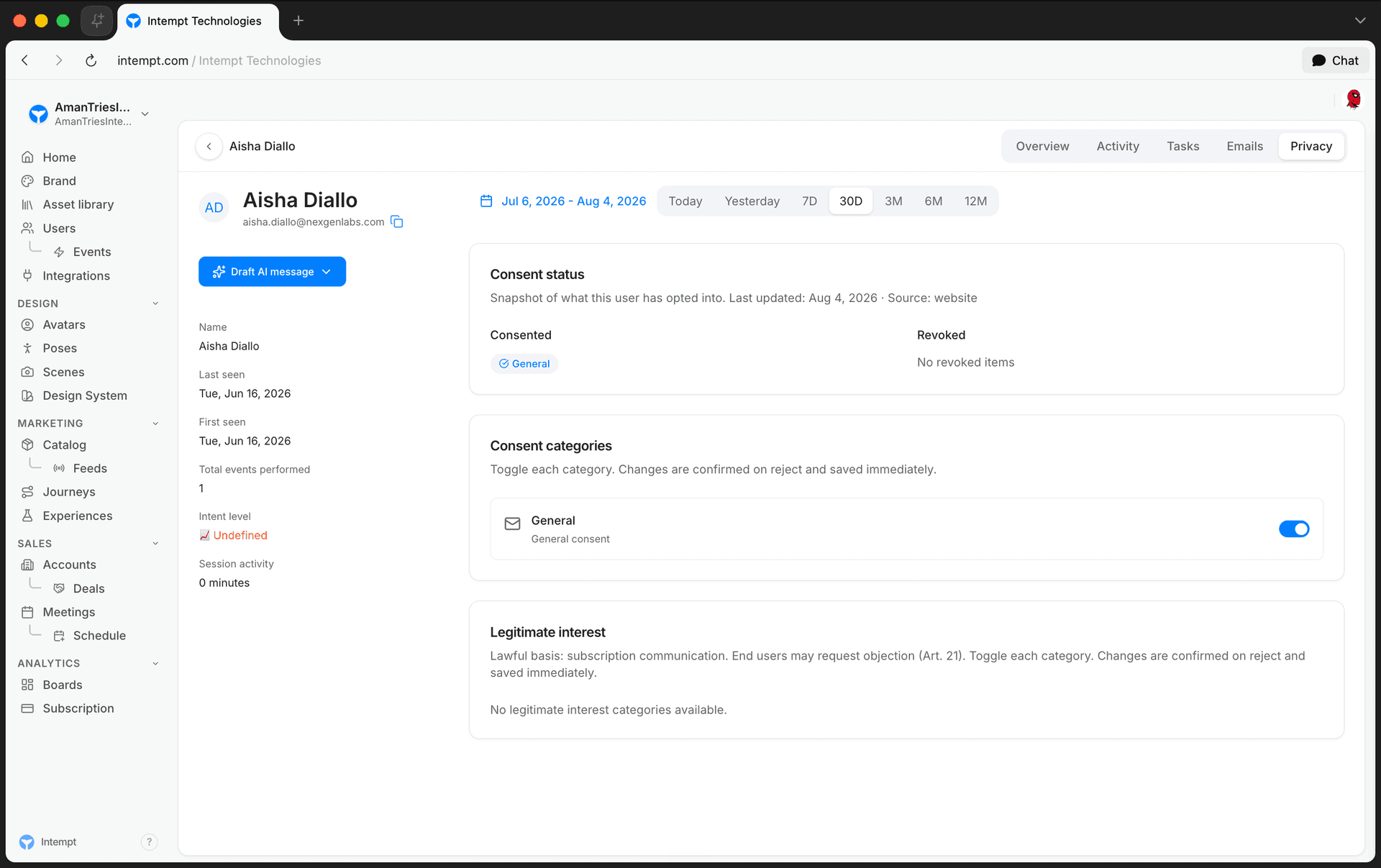
- Consent status. The top card shows every category the customer has been asked about, split into Consented and Revoked, with the date it was last updated.
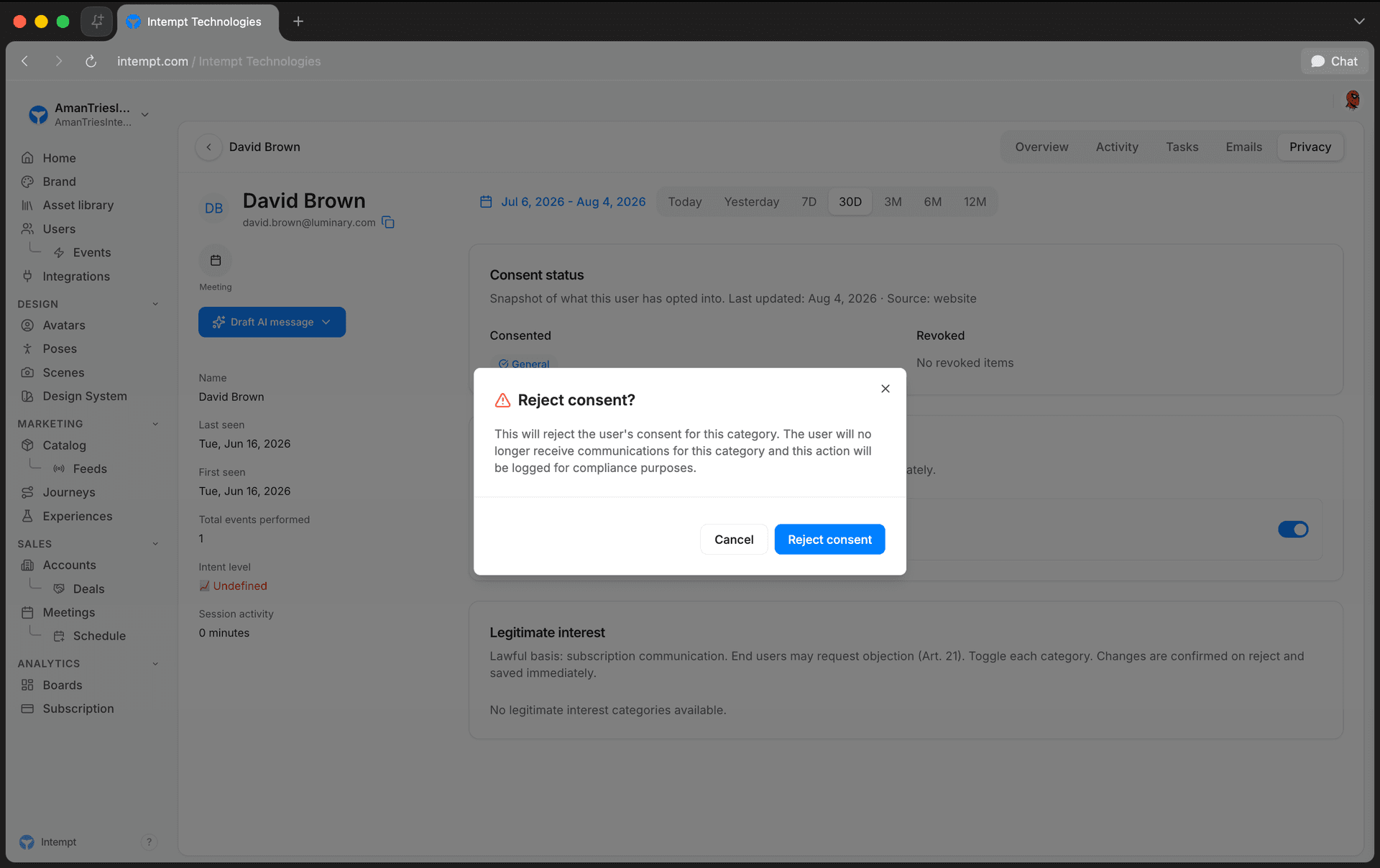
- Consent categories. Each active consent category is listed with a toggle. Switching one on takes effect immediately. Switching one off opens a confirmation dialog titled Reject consent?, reading: "This will reject the user's consent for this category. The user will no longer receive communications for this category and this action will be logged for compliance purposes." Click Reject consent to confirm, or Cancel to back out.
- Legitimate interest. Below the consent categories, this section lists any categories processed under legitimate interest rather than active consent, with the same toggle-and-confirm mechanic. Use this section when a customer objects to legitimate-interest processing under Article 21.
- To act on a full erasure, access, or export request instead of a single category change, follow Managing DSR. DSRs go through Intempt directly rather than the Privacy tab.
Use cases
- A customer emails support asking to stop receiving marketing emails. Reject their "Newsletter" consent category on their Privacy tab.
- Confirm a customer's current consent status before adding them to a new campaign.
- Process a right-to-erasure request. Deletion begins immediately on receipt.
- Fulfill a CCPA access request by exporting a customer's data.
- A customer objects to legitimate-interest processing under Article 21. Reject the relevant category in the Legitimate interest section.
- Audit a customer's consent history as evidence of consent if a regulator or the customer disputes it.
- Distinguish customers who gave active consent from those processed under legitimate interest, so you don't ask them to consent to something they don't need to.
- Apply the same DSR workflow to CCPA consumer requests as GDPR data subject requests: Intempt's OpenDSR implementation covers both.
Where to go next
Privacy overview
How privacy responsibilities split between you and Intempt, and where each control lives: consent, data subject requests, opt-out, access control, and retention.
Data Processing Agreement (DPA)
How Intempt's Data Processing Addendum works: it applies automatically to every account with no signature, what it covers, and how to download it or get a countersigned copy for procurement.