
How to use product feeds and recommendations
Product feeds rank and recommend products using one of Intempt's built-in algorithms, plus optional filters, then serve that ranked list to your site, emails, and push notifications.
Overview
A product feed picks which products to recommend by combining one recommendation algorithm with optional filters. In the console, go to Catalog -> Feeds to create and manage them.
📘 Good to know
The Feeds page has two feed types: Merchandising feed and Ad feed. This article covers merchandising feeds, the algorithm-driven recommendations you show on your site, in emails, and in push notifications. Ad feeds render per-SKU recipes as a CSV that ad networks pull on a schedule, a separate feature not covered here.
Choosing an algorithm
Algorithms determine which items a feed recommends, such as the best sellers, items the user viewed in the past, or items frequently bought together. Every algorithm can also take one or more filters on top.
Recommendation algorithms
Catalog-based
These don't need a specific user or product to recommend from, they rank the whole catalog.
| Recommendation Type | Example Copy | Feed Input Required | Best Page Placement | Fallback Behavior |
|---|---|---|---|---|
| Recently Added to Cart | "Products you have added to cart and have not removed, not purchased." | User ID or profile ID | Emails, Cart page | None |
| New Arrivals (Newest Products) | "Just added. Discover what's new." | None, works catalog-wide | Homepage | None |
| Your Recently Viewed Items (Click History) | "Here are the items you recently viewed." | User ID or profile ID | Product Page, Homepage | None |
| Popular Right Now | "Popular right now: widely explored at the moment." | None, works catalog-wide | Homepage, Category Page, Trending Page | Fills with Newest |
Purchase-based
| Recommendation Type | Example Copy | Feed Input Required | Best Page Placement | Fallback Behavior |
|---|---|---|---|---|
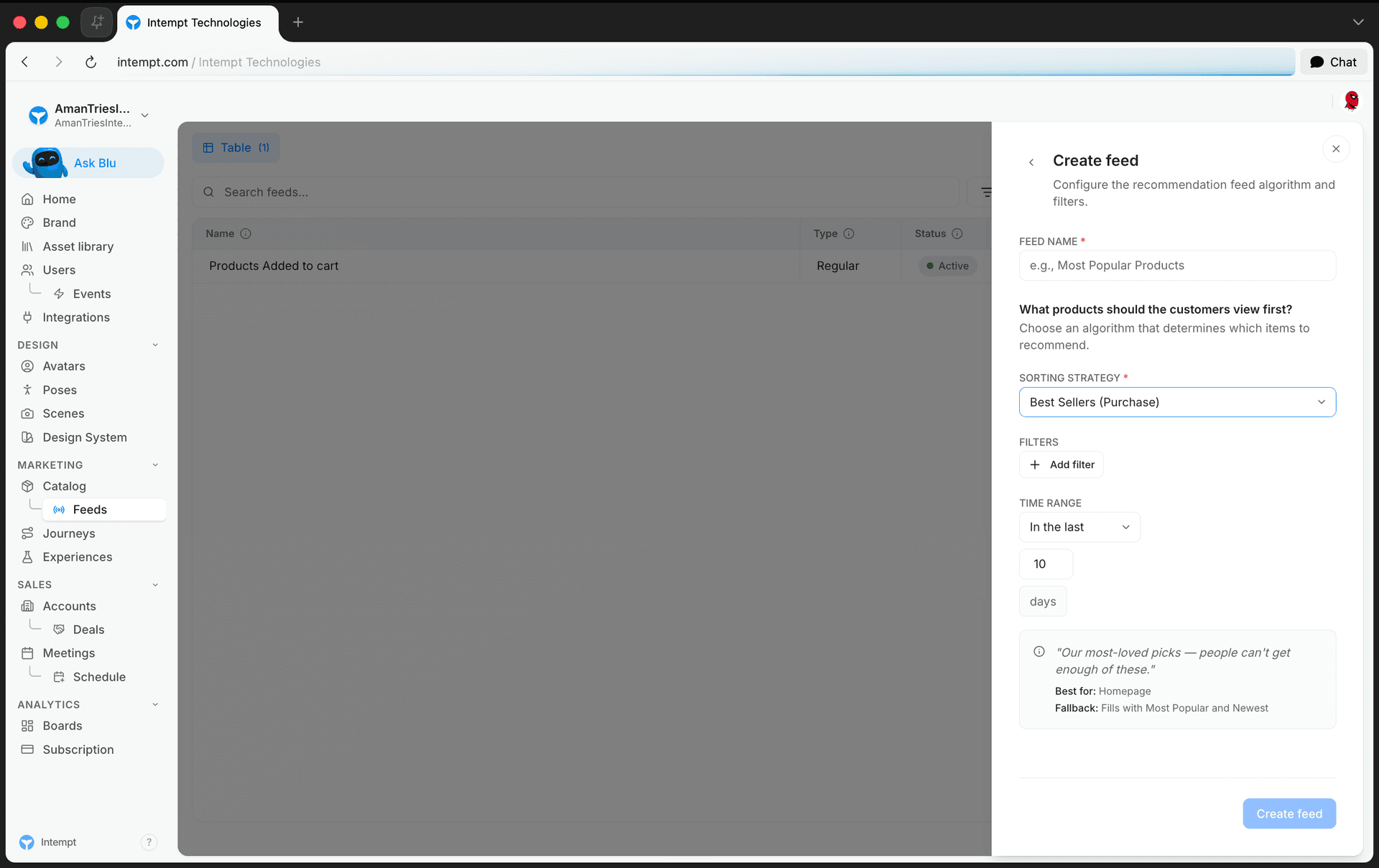
| Best Sellers (Purchase) | "Our most-loved picks: people can't get enough of these." | None, works catalog-wide | Homepage | Fills with Most Popular and Newest |
| Co-Purchase (Often Purchased With) | "People often pair this with the following options." | Product ID | Product Page, Cart Page | Fills with Viewed Together, Most Popular and Newest |
| Just Purchased (Recently Purchased) | "Recently viewed or selected: happening now." | User ID or profile ID | Homepage, Product Page | None |
| Recommended Based on Your Orders (Session) | "Suggestions based on what you viewed today." | Product ID | Not specified | Fills with Purchased Together, Most Popular and Newest |
📘 Good to know
Best Sellers is the one algorithm with a configurable time range. When you create the feed, choose In the last (e.g. 10 days) or Between two specific dates to control the purchase window it ranks against.
View-based
| Recommendation Type | Example Copy | Feed Input Required | Best Page Placement | Fallback Behavior |
|---|---|---|---|---|
| What People Are Viewing Right Now | "Popular right now: see what people are exploring today." | Product ID | Homepage | Fills with Most Popular and Newest |
| People Also Viewed | "People who viewed this also explored these options." | Product ID | Stock Detail Page (PDP), Homepage | Fills with Viewed Together, Most Popular and Newest |
Affinity-based
| Recommendation Type | Example Copy | Feed Input Required | Best Page Placement | Fallback Behavior |
|---|---|---|---|---|
| Top Picks in Your Favorite Categories | "Since you explore this category often, here are recommended picks." | Product ID | Homepage, Category Pages, Screener | Fills with Viewed with Recently Viewed, Most Popular and Newest |
| Similar to What You Bought Before | "New items that fit well with your past favorites." | Product ID | Homepage, Product Page | Fills with Viewed with Recently Viewed, Most Popular and Newest |
| Recommended for You (Visitor Recommendations) | "Recommended for you based on what you've been exploring." | User ID or profile ID | Homepage, Product Page | Fills with Most Popular and Newest |
| Recommended for You (Based on Similar Users) | "People with similar interests also spent time with these options." | User ID or profile ID | Homepage, Product Detail Page, Watchlist Page | Fills with Most Popular and Newest |
📘 Good to know
- For Similar to What You Bought Before, you also pick which product attributes drive the match, using the Attributes selector when creating the feed.
- For Recommended for You (Visitor Recommendations) and Recommended for You (Based on Similar Users), you also pick which events feed the model: Added to cart, Viewed, Purchased.
Similarity-based
| Recommendation Type | Example Copy | Feed Input Required | Best Page Placement | Fallback Behavior |
|---|---|---|---|---|
| Visually Similar Items | "Here are visually similar options you may find interesting." | Product ID | Product Detail Page | Fills with Most Popular and Newest |
| Similar to This Item | "Options with similar attributes you might like." | Product ID | Product Detail Page, Screener, Watchlist Page | Fills with Most Popular and Newest |
| You May Also Like (Best Alternatives) | "You may also like these similar options." | Product ID | Product Page | Fills with Most Popular and Newest |
📘 Good to know
You May Also Like also lets you pick which events feed the model (Added to cart, Viewed, Purchased), the same as the two Affinity-based algorithms above.
Fallback logic
When an algorithm can't find enough products, its feed falls back to another algorithm to fill the gaps, so a shopper never sees an empty recommendation block. For example, Category Affinity falls back to Viewed with Recently Viewed, then to Most Popular, then to Newest.
Four algorithms have no fallback, since they either always have data to work with or intentionally return nothing rather than an unrelated fallback: New Arrivals, Your Recently Viewed Items, Just Purchased, and Recently Added to Cart.
Recommendation filters
Add filters on top of any algorithm to control which products it's allowed to recommend, based on product attributes.
| Filter | What it does |
|---|---|
| Include | Only products matching the conditions you set are eligible for the feed. |
| Exclude | Products matching the conditions you set are removed from the feed. |
| Pin | Products matching the conditions you set are pinned to the top of the feed, ahead of the algorithm's own ranking. |
Retrieving recommendations via the API
Call the Recommendations Feed API with a feed's ID to get its ranked products back as JSON. See the Recommendations Feed API reference for the full parameter table, request example, and response shape.
📘 Good to know
For any algorithm whose Feed Input Required is Product ID in the tables above, pass productId in the request body so the feed knows which product to base the recommendation on.
To build up the behavioral data these algorithms recommend from (views, cart adds, purchases), send events with a productId using the Track Events API for Recommendations, or through Intempt's JavaScript, iOS, or Android SDKs.
Where to go next
Creating a product feed
Set up a merchandising feed that combines your product catalog and customer behavior into ranked product recommendations.
Recommendations overview
Recommendations combines your product catalog and customer behavior into ranked feeds you can show in email, the visual editor, and push notifications.