
August 21, 2026
New PHP and Python SDKs, plus a Runs tab for journeys, per-meter usage pricing, and a long list of SDK reliability fixes.
Highlights
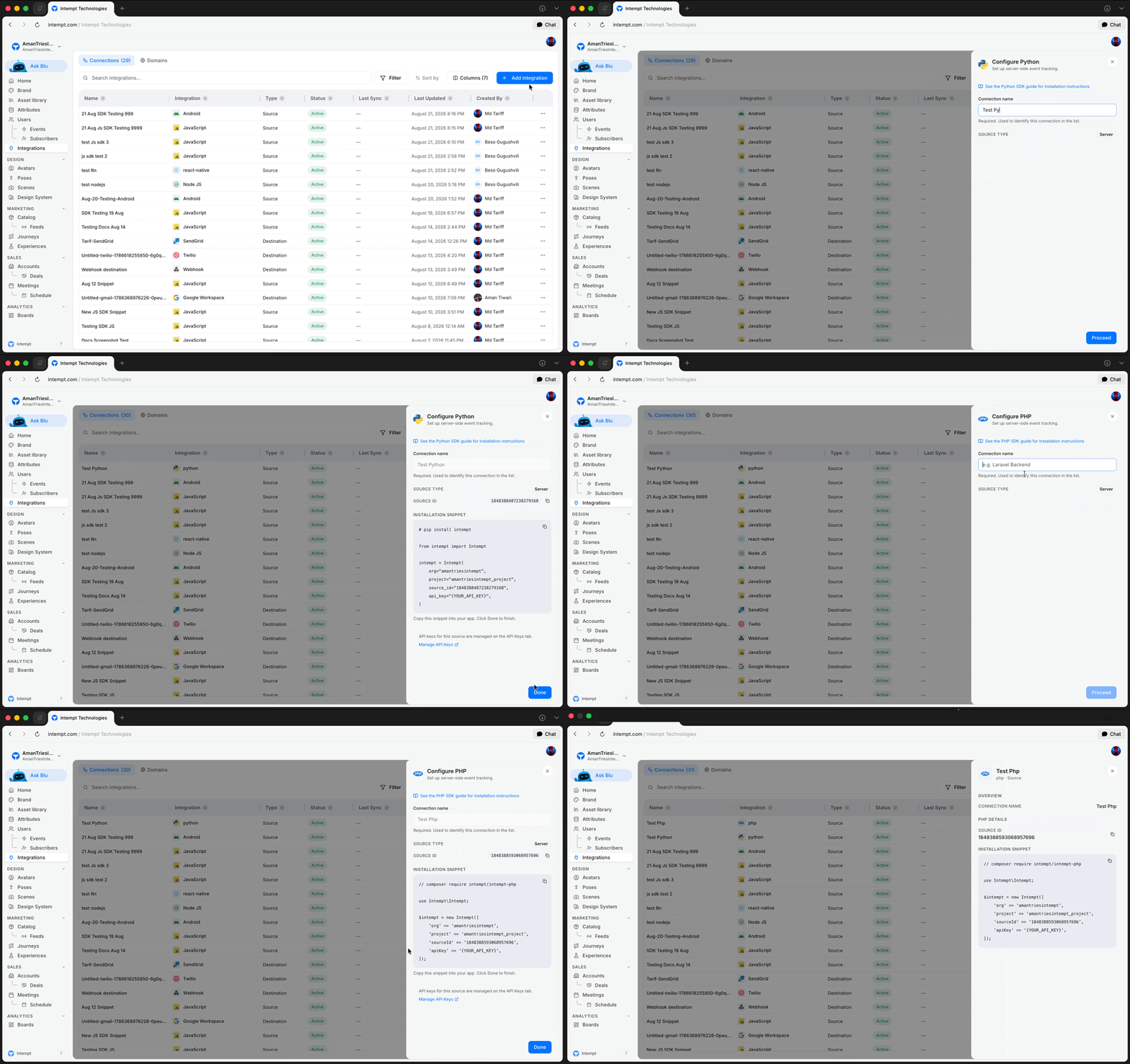
New PHP and Python Server-Side SDKs
You can integrate Intempt into PHP and Python backends the same way you already could with Node: track events, identify users, manage consent, and trigger recommendations, with the same delivery behavior across all three languages.
Journeys & Workflows
New: Journey and workflow details now include a Runs tab where you can search and filter every run, see pass/fail counts at a glance, and see which step is failing across your recent runs — not just which runs failed overall.
- Filtering runs to one step shows the rows: Narrowing a journey's runs to a single step now shows the matching rows, instead of sometimes showing a matching count above an empty table.
- Publishing a journey tells you it worked: Publishing, pausing, or resuming a journey now shows a success message, rather than only speaking up when something fails.
- Connections between steps no longer block publishing: Dragging a new connection onto a step that already had one could leave a broken leftover link and fail publishing with a missing-next-step error. Connecting steps works reliably now.
SDKs
- Android keeps your data through a dropped connection: The Android SDK now holds and retries data that fails to send because of a lost network or the app closing, instead of losing it, and identity protections around shared-device sign-out were strengthened. It also supports phones back to Android 6.0 (previously 12+), asks for one fewer permission, and ships smaller in apps that do not use push.
- Reading an ID right after startup returns the current one: Several timing issues where a user's profile ID or session ID could briefly come back stale — right after the SDK starts, or right after resetting identity — are resolved.
- iOS installs the standard way: The iOS SDK now installs through CocoaPods without a manual workaround.
- React Native no longer crashes on an unsupported platform: Also fixed two bugs that could attribute activity to the wrong person or hide a failed delivery.
- Web tracking survives a flaky connection: Duplicate and dropped events on a website are fixed, a visitor's opt-out choice now survives a page reload, and the tracking script is about 65% smaller.
- The JavaScript snippet points at a file that exists: The old snippet referenced a file that had been removed, which could silently stop a site sending events. If you copied that snippet before this week, copy it again.
- Opening a Node.js connection shows its snippet again: It previously showed nothing at all.
Developer Docs & Tooling
New: All six SDK platforms — Android, iOS, Node.js, Python, PHP and React Native — now have a full setup guide covering installation, sending events, consent and troubleshooting, in the same layout.
- The Intempt CLI is on npm: Install it as
@intempt-technologies/cli, so generating starter integration code no longer means building from source. - Starter code from the CLI compiles: Generated code now builds and runs on every platform it is offered for (web, iOS, Android, Python, PHP, React Native) and installs the right package automatically, instead of sometimes handing you broken imports.
- The Claude Code plugin is published: Available as
@intempt-technologies/plugin, which also brought every skill it ships up to date. - A Next.js example that works with the App Router: Including how to avoid calling tracking from a server-only part of the app, where it cannot work.
- Install instructions across the SDK docs are correct: Outdated commands and broken links in the Android, Python, PHP and iOS documentation are fixed.
- The Android SDK docs match the 3.0 release: Autocapture, automatic events and error handling are all corrected.
- Blu's Data Engineer agent has a page: Blu's eighth agent is now documented, and every place that lists the agents shows the same count.
Integrations & Destinations
New: PHP, Python and React Native apps can now be connected as a data source, each with its own install snippet when you add it as an integration.
- Kafka messages can carry a format definition: Publish steps can include one alongside each half of the message, with a toggle to turn it on when the receiving system expects one.
- Webhook destinations stay fast: A webhook destination no longer slows down the longer it runs — long sends used to degrade through the day and eventually fail.
Users & Attributes
- Permission checks cover editing and deleting attributes: They previously only covered creating one, so some accounts could change or delete a custom attribute they were not meant to touch.
- The name-taken check matches the rule used on save: Two attribute names differing only in case or punctuation used to pass the check and then fail when saved.
- Creating a data source no longer collides with an attribute name: This could previously leave an account permanently stuck.
- A segment-scoped attribute shows its real scope: Opening an RFM or Qualify attribute scoped to one segment showed it as "All users", and saving it in that state silently widened it to everyone.
Meetings & Scheduling
- A shared meeting link opens for anyone: A publicly shared link no longer shows an error page when the person opening it is not logged in.
- A meeting flips to In Progress on its own: It now updates the moment the notetaker bot joins the call, without a manual refresh.
- Meeting settings stick on mobile: Recording quality, auto-delete and recap visibility choices were being lost when the app restarted.
- "Email settings" opens the settings screen: Tapping it on the mobile AI Scheduling Assistant card previously did nothing.
Analytics & Reports
- Going back returns you where you were: Backing out of an item on Boards returns you to the panel you were viewing, and backing out of a report returns you to the dashboard it came from, instead of resetting to the top of the list.
- Saving an Insights report works: An intermittent error that could block saving changes is fixed.
- Report categories translate: In the mobile app, category headers like Insights, Funnels and Retention now follow the active language instead of always showing English.
Segments
- Build a segment on "any event at all": You no longer have to list every event type by hand.
- The API returns who is in a segment: It now gives the full membership list, not just a count, so you do not have to guess.
Recommendations & Models
- Scores refresh every 3 days: Predictive scores and recommendations retrain twice as often as before, so they pick up recent activity faster.
- A worse model cannot go live on its own: A routine retrain is now blocked from replacing the current model if it would make your recommendations worse.
- View-only users cannot retrain a model: They were blocked from every other edit, but could still change a Likelihood or Next Best Product model's goal or features, or start a retrain.
- A hiccup no longer strands an experiment: Checking an experiment's status now retries automatically before giving up, instead of leaving the status stuck.
Billing & Pricing
- Usage is priced per meter: The single flat usage rate is replaced by separate pricing for each way you use Intempt — real-time events, batch exports, email, SMS, push, analytics, experiences and recommendations.
- Retention terms are stated plainly: The pricing and legal pages now say how long data is kept — 30 days after cancellation on the free plan, no limit on any paid plan.
- Professional Services comes in three levels: Consult, Done With You, and Done For You, across 19 supported areas, so you choose how hands-on our team is.
- The CDP Data Plane pricing page is accurate: It no longer lists a one-time setup fee and monthly platform charges that do not apply on top of the $99,000-a-year minimum commitment.
- Settings stops showing errors it should not: The desktop app's Settings page displayed auto-reload, invoice, payment method, wallet and billing status errors the moment it opened.
Localization
- Hindi covers the places it missed: A Settings sidebar section header, a task's priority badge, and a half-translated Stages page header in the desktop app.
- A French sidebar label fits: It was being clipped at the edge instead of fitting or truncating cleanly.
Also fixed
- Creating an Urgent deal works on mobile: Selecting "Urgent" priority raised an error and blocked the deal from being created.