
July 3, 2026
This week brings live stream enhancements and new filter controls for the Events page, duplicate connection prevention for Integrations, direct email editing from Journeys, and broad bug fixes across Email, Events, Experiences, and Journeys.
What's New
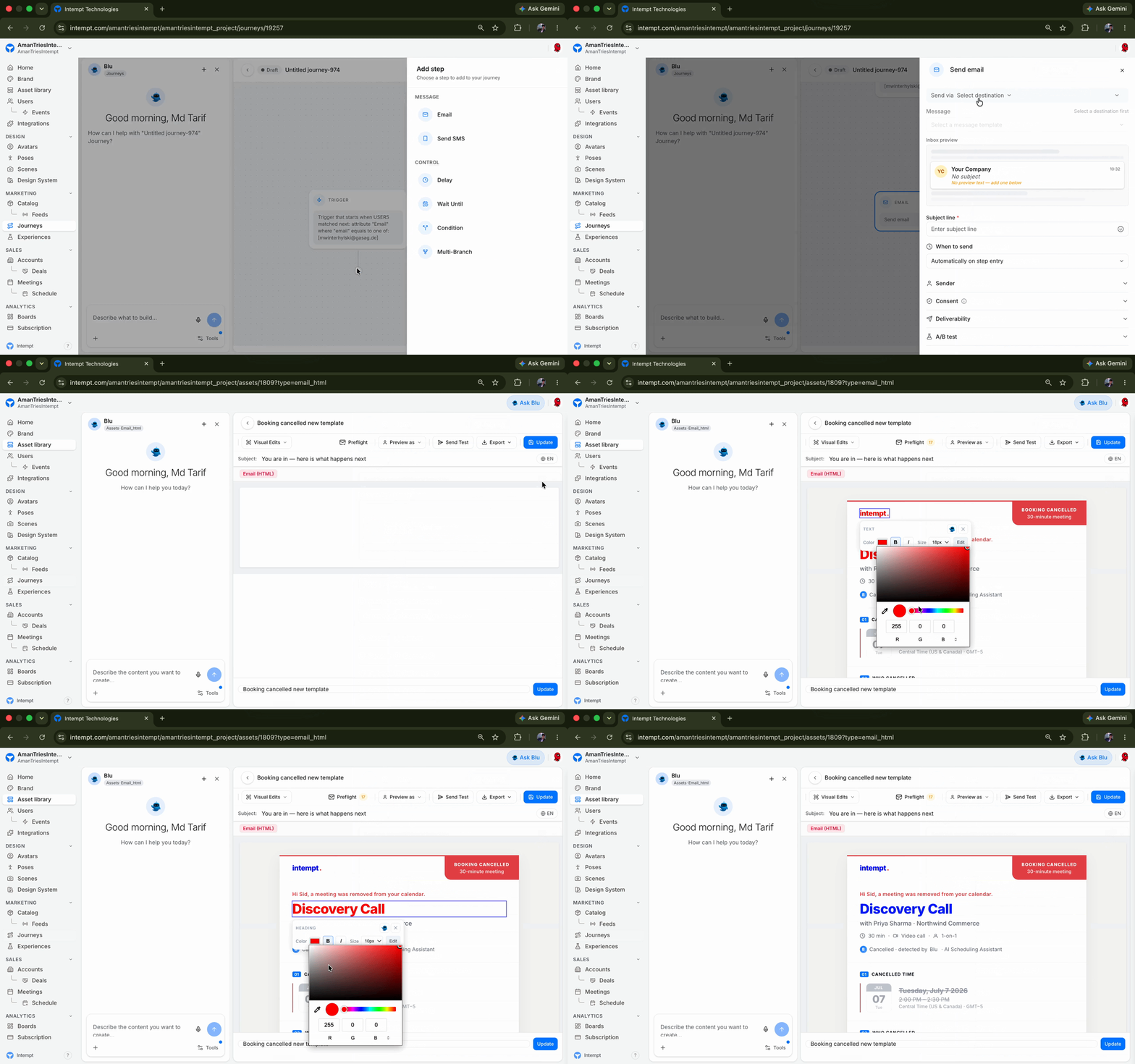
Email Template Quick Edit from Journeys
You can now edit email templates directly from within a Journey. Clicking the edit option on an email step opens the template in the designer without leaving your workflow.
Improvements
- Duplicate Connection Prevention: Integrations now blocks duplicate destination connections and shows a clear error when you try to connect an account that's already linked.
- Integration Naming: You can now name JavaScript integrations when creating them and rename connections afterward, replacing the generic "Untitled" default.
- Filter & Column Controls: Events filter and column controls now include a column search bar, Select All/Deselect All, a Clear All button, and autosave, so manual Save/Cancel steps are no longer needed.
- Live Stream Feedback: The Events live stream now shows a clearer paused-state indicator, a placeholder when no events have arrived, and a persistent highlight for the selected row.
- Mobile Table Layout: The Events table toolbar now wraps correctly on smaller screens so all controls stay accessible.
- iOS Visual Polish: The iOS app received a round of visual polish, including consistent card styling, improved spacing, and a cleaner Reports page grouped by type.
- Documentation Updates: Developer docs across the Track Events API, Revenue & Refund Tracking, Product Catalog Ingestion, and other guides have been clarified and corrected.
Bug Fixes
Events:
- Value Selector Fixed: Fixed the conditions builder value selector, which was stuck showing "No results" and could not accept input.
- Rename Persistence: Fixed event name rename in the drawer header, which showed a saving indicator but did not persist the updated name.
- Row Jump Fixed: Fixed the Intent event toggle causing rows to jump to a different position in the table.
- Save Button Validation: Fixed the Save button in the Create Event drawer being active before a name and event type were entered.
- Filter Default Fixed: Fixed the filter row opening with a pre-filled condition instead of starting empty.
- Deleted Sources Fixed: Fixed deleted sources appearing incorrectly in the events table.
Experiences:
- Rename Button Fixed: Fixed the rename button in the Experience details view, which was not working reliably.
- Color Picker Fixed: Fixed the color picker and highlight controls in the Experience editor, which stopped responding after the first use.
- Pause Button Visibility: Fixed a translucent pause button in the Experience detail view on iOS.
Content Builder:
- Targeted AI Edits: Fixed an issue where asking the AI to make a small edit changed the entire email content instead of just the targeted section.
- Chat Error Loop: Fixed an AI chat error that triggered a repeated error message loop.
Journeys:
- Sidebar Click Fixed: Fixed an issue where clicking a sidebar element after opening a Journey via a link closed the entire browser tab.
- Project Switch Fixed: Fixed an issue where switching projects while viewing an Experience details page incorrectly redirected you to a different project.
Email Editor:
- Template Save Fixed: Fixed an issue where changes to an email template were not saved after exiting and returning to the designer.
July 10, 2026
A redesigned Settings experience and new meeting notification controls headline this week, alongside HTML template imports in Blu Chat and fixes to Email Editor stability, Blu Chat item creation, and the Create Journey button.
June 26, 2026
A rebuilt Events page headlines this week, along with project-wide timezone settings, clickable meeting summary timestamps, and broad improvements and bug fixes across Events, Meetings, Content Builder, and Journeys.