
June 26, 2026
A rebuilt Events page headlines this week, along with project-wide timezone settings, clickable meeting summary timestamps, and broad improvements and bug fixes across Events, Meetings, Content Builder, and Journeys.
What's New
Events Management
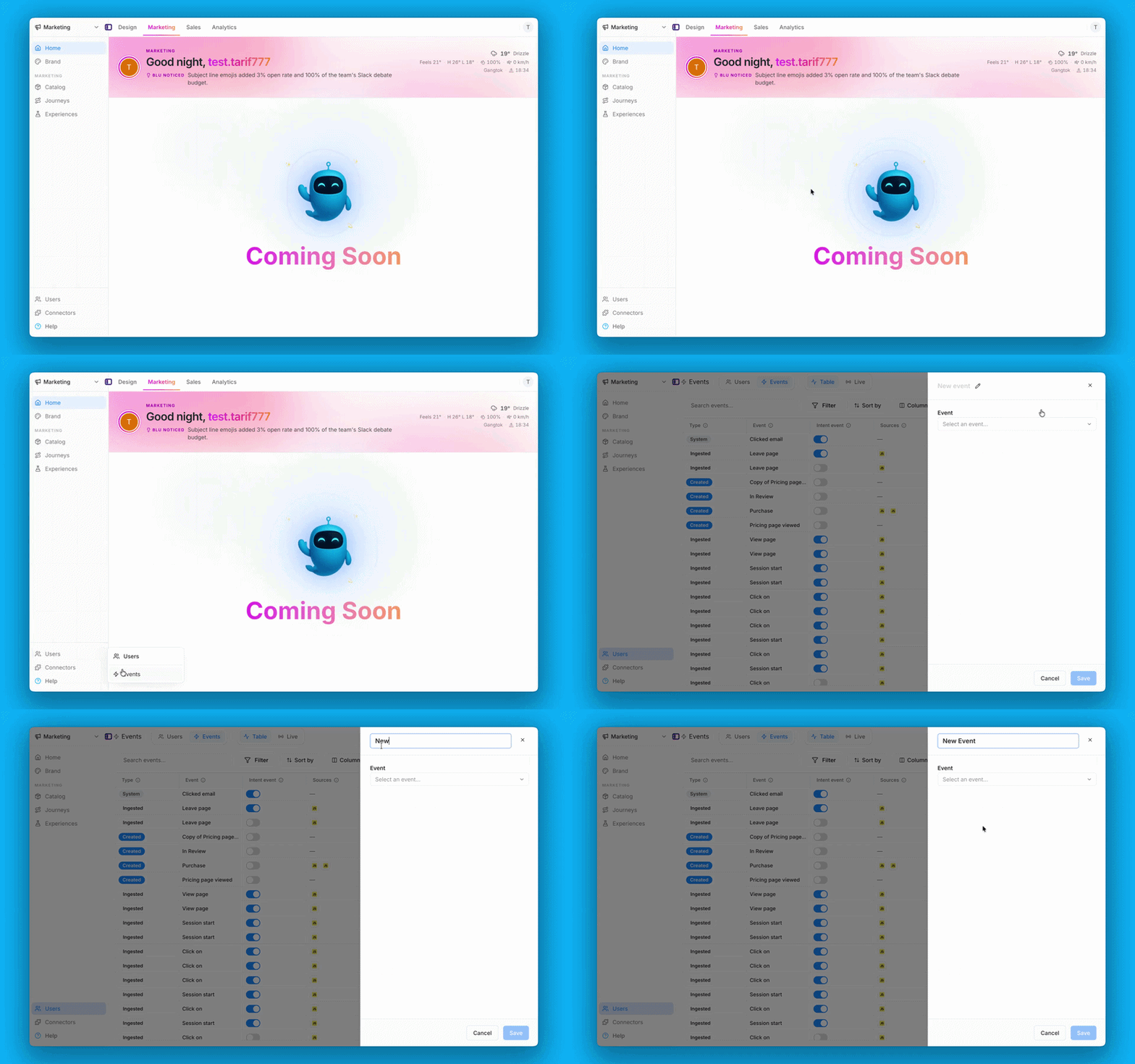
The Events page has been rebuilt with a powerful new table experience, giving you complete control over your event data. Browse system events, create and manage custom events, and take action with inline row options — all from a single, unified view. A new live stream tab lets you monitor incoming events in real time, with clear visual indicators, pause controls, and an interactive details drawer.
Project Timezone Settings
Admins can now configure a project-wide timezone directly from Project Settings. Meeting times, scheduled content, and reporting data now display consistently for every team member without per-user workarounds.
Clickable Timestamps in Meeting Summaries
Action items in post-meeting summaries now include clickable timestamps. Click any action item to jump directly to that moment in the transcript or recording, making it easier to review context and follow up accurately.
Improvements
- Filter & Column Controls: Events filter and column controls now include a "Clear all" button, autosave, a column search bar, and a "Select all / Deselect all" toggle.
- Live Stream Experience: The live stream now shows a clear empty state, a paused-state indicator with a live event count, an animated progress pulse, and a persistent highlight for the selected row.
- Source Visibility: Data sources now appear as a dedicated column in the events table and in the event configuration panel.
- Event Creation Validation: Event creation now validates required fields before submission, supports Enter-key input, and shows a clear inline error for missing fields.
- Summary Accuracy: Meeting summaries and action items are now more reliably grounded in what was actually discussed on the call.
- Summary Template: Post-meeting summaries now follow a structured format — Action Items, Meeting Purpose, Key Takeaways, and Topics — making them easier to scan.
- Speaker Labeling: Transcripts now correctly keep a single speaker's dialogue together instead of splitting it across multiple labels.
- Documentation Updates: Developer docs across several guides, including auto-tracked events, product catalog ingestion, and revenue & refund tracking, have been corrected and clarified.
- iOS Visual Polish: The iOS app received a round of visual polish, including a unified settings layout, standardized typography, a taller home tab switcher, refined card corners, and a consistent workspace switcher screen.
Bug Fixes
Content Builder:
- Image Zoom Cursor: Fixed the cursor not switching to a grab cursor when zooming into an image, so you can now click and drag to pan instead of using scrollbars.
- Real-Time Updates: Fixed AI-generated image edits and new chat responses only becoming visible after a page reload.
- Chat Box Collapse: Fixed the chat bar collapsing when the config icon was opened, which previously left no way to recover without starting a new session.
- Targeted AI Edits: Fixed an issue where requesting a targeted AI edit, such as removing em dashes, caused the entire email copy to be rewritten.
- Image Removal Added: Added a delete option for placeholder images in the email editor so images can be removed without editing raw HTML.
- Broken Links Fixed: Fixed broken links appearing in AI-generated emails.
- Preview Rendering: Fixed the email preview, visual edit, and code edit views not displaying the actual email content.
- Multiple Scrollbars: Fixed the product drawer appearing incorrectly over the page, which caused multiple nested scrollbars to appear.
- Project Switch Refresh: Fixed the content table not updating when switching between projects without a manual page reload.
- Upload Option Removed: Removed a confusing "Upload image" option that had no functional purpose.
Events:
- Row Jump Fixed: Fixed an issue where toggling the Intent event switch on a row caused it to unexpectedly change position in the table.
- System Events Visibility: Fixed system events not appearing in the events table list.
- Save Validation: Fixed the save action silently failing when a filter condition was added without a value — the Save button is now disabled until all required fields are complete.
- Delete Option Fixed: Fixed certain auto-tracked events showing a delete option but failing silently on click; delete is now only shown for events that support it.
- Unsaved Changes Guard: Fixed the event configuration tab not preventing navigation to other event rows while unsaved changes were in progress.
- Filter Default Fixed: Fixed the filter row pre-filling with a default condition when first opened — it now opens empty.
- Toggle Confirmation: Fixed missing confirmation toasts when toggling an event's intent status on or off.
- Operator Dropdown Fixed: Fixed undocumented operator options appearing in the string filter dropdown, and operator names being truncated due to a narrow dropdown width.
Journeys:
- Duplicate Error Fixed: Fixed a persistent error pop-up that appeared when opening and duplicating a journey.
- Details Screen Spacing: Fixed visual spacing inconsistencies on the journey details screen so headings, sections, and delivery health layout are now visually consistent.
Auth:
- Invite Onboarding Fixed: Fixed an issue where inviting a brand-new user to a project resulted in a broken onboarding screen with no organization or project context.
Design:
- Paste Fixed: Fixed an issue where pasting copied text into the H1 heading field in Homepage Personalization did not work.
Meetings:
- Expand Button Fixed: Fixed the AI expand button continuing to appear after content had already been fully expanded, which incorrectly implied more detail was available.