
July 31, 2026
This week introduces self-serve plan upgrades across Pro, Organization, and Enterprise, plus sign-up and sign-in fixes, mobile report management, and bug fixes across accounts, payments, and scheduling.
What's New
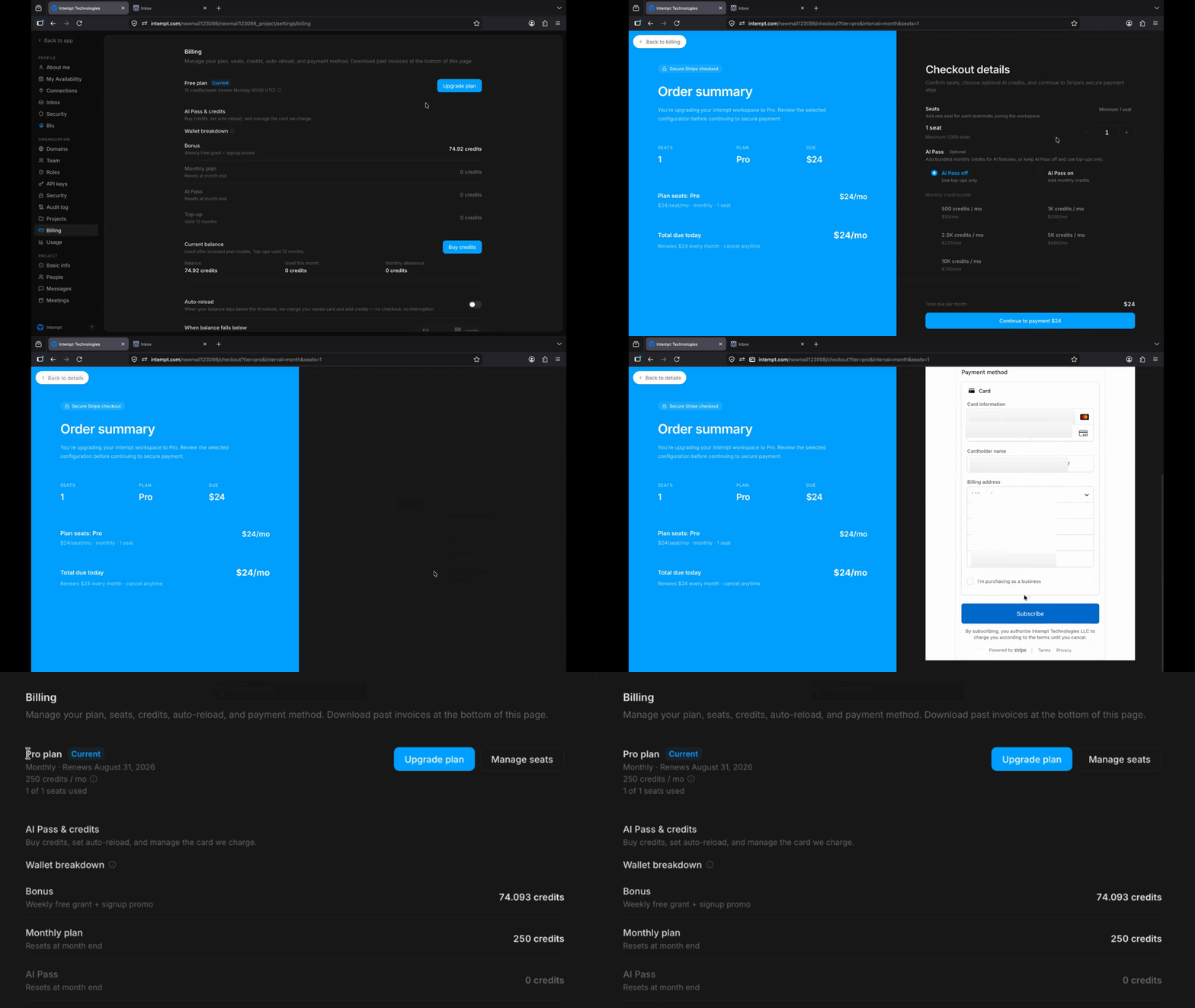
Self-Serve Plan & Billing Management
You can now move between Pro, Organization, and Enterprise plans anytime, directly from Settings → Billing — no need to contact support. Each tier unlocks a higher monthly credit allowance, and upgrading takes effect immediately, with billing automatically prorated for the rest of your current cycle. Seats, credits, and tax are all calculated and shown clearly before you confirm, based on your organization's real billing location.
Bug Fixes
Sign-Up / Sign-In:
- Sign-Up Errors Fixed: Fixed an issue that was blocking most new sign-ups due to an account-creation error.
- New Account Onboarding Fixed: Fixed an issue in the mobile app where signing up with a new email skipped the sign-up flow and showed placeholder organization data instead of a real onboarding setup.
- Web Sign-Up Error Fixed: Fixed a server error that blocked users from completing sign-up after entering their verification code on the web.
- Google Sign-In Account Picker Fixed: Fixed an issue in the mobile app where signing in with Google skipped the account picker and signed in with the wrong account automatically.
Reports:
- Report Deletion Added: Deleting a report in the mobile app now actually removes it instead of showing a "Coming Soon" message.
- Report Duplication Added: Duplicating a report in the mobile app now actually creates a copy instead of showing a "Coming Soon" message.
- Report Renaming Fixed: Fixed the mobile app's report rename screen so typed text and the save button are visible and the new name is saved.
Accounts:
- Account Creation Fixed: Fixed an issue in the mobile app where creating a new account failed to save even with valid details.
- User Count Fixed: Fixed an issue in the desktop app where an account group's user count kept increasing every time "Load more" was clicked.
AI Assistant:
- AI Draft Response Fixed: Fixed an issue in the mobile app where the AI draft assistant produced no response, even after tapping Regenerate.
Contacts:
- Contact Creation Fixed: Fixed an issue in the mobile app where creating a new contact with an email address returned an error.
Dashboards:
- Dashboard Renaming Fixed: Fixed the mobile app's dashboard rename screen so the save button and typed text are visible and changes save correctly.
Deals:
- Deal Deletion Fixed: Fixed an issue in the mobile app where deleting a deal showed a success message but didn't actually remove it.
Experiences:
- Experience Status Sync Fixed: Fixed an issue where pausing an experience on the web made it disappear from the mobile app instead of showing as paused.
Meetings:
- Recording Upload Fixed: Fixed an issue in the mobile app where uploading a meeting recording file failed.
Payments:
- Plan Upgrade Fixed: Fixed an issue where completing checkout didn't upgrade the account's plan even though payment succeeded.
Scheduling:
- Booking Type Selection Fixed: Fixed an issue in the desktop app where a booking type couldn't be reselected on the Scheduling screen after restarting the app.
Settings:
- Project Settings Banner Fixed: Fixed the desktop app's Project Settings banner incorrectly showing the organization name instead of the project name.
Tasks:
- Task Detail Loading Fixed: Fixed an issue in the mobile app where a newly created task's detail screen failed to load.
Tracking API:
- Event Tracking Fixed: Fixed an issue where valid event tracking requests could be rejected with an error.