
Intempt Docs
GuidesAgents

Blu for Meetings: Reactive (Summaries, Chat, Relabeling)

How Blu responds when you ask it something on a meeting's Details page: grounded Q&A about that one call, on-demand summaries, and speaker relabeling.

Overview

Blu works with meetings in two modes: proactive, where it surfaces coaching on its own during a live call, and reactive, where it responds to something you asked for. This guide covers reactive mode: opening Blu Chat on a meeting's Details page to ask a question, generating or customizing an AI summary, and relabeling a transcript's speakers.

📘 Media pending

Screenshot for this section hasn't been captured yet.

How it works

Asking Blu about a meeting

Open Blu Chat from the toggle button in the console header while you're on a meeting's Details page. The panel's composer switches to "Ask about this meeting...", and every answer is grounded in that one call: its transcript, its participants (name, email, country, job title), and their companies (industry, revenue, tech stack, website).

Blu will name and attribute what was actually said, include the owner and due date for any action item it lists, and ask a clarifying question instead of guessing when your question is ambiguous. For example, if two participants share a first name, it names both along with their role before asking which one you meant.

📘 Good to know

This chat can't perform actions. It won't update, edit, regenerate, book, reschedule, link, or mark anything on your behalf. Asked to do one of those, it tells you to make the change from the main Blu chat instead. It's also scoped to this one meeting: for a cross-meeting search, scheduling, or a live-meeting request, it redirects you to the main Blu chat rather than answering from this panel.

Requesting and regenerating a summary

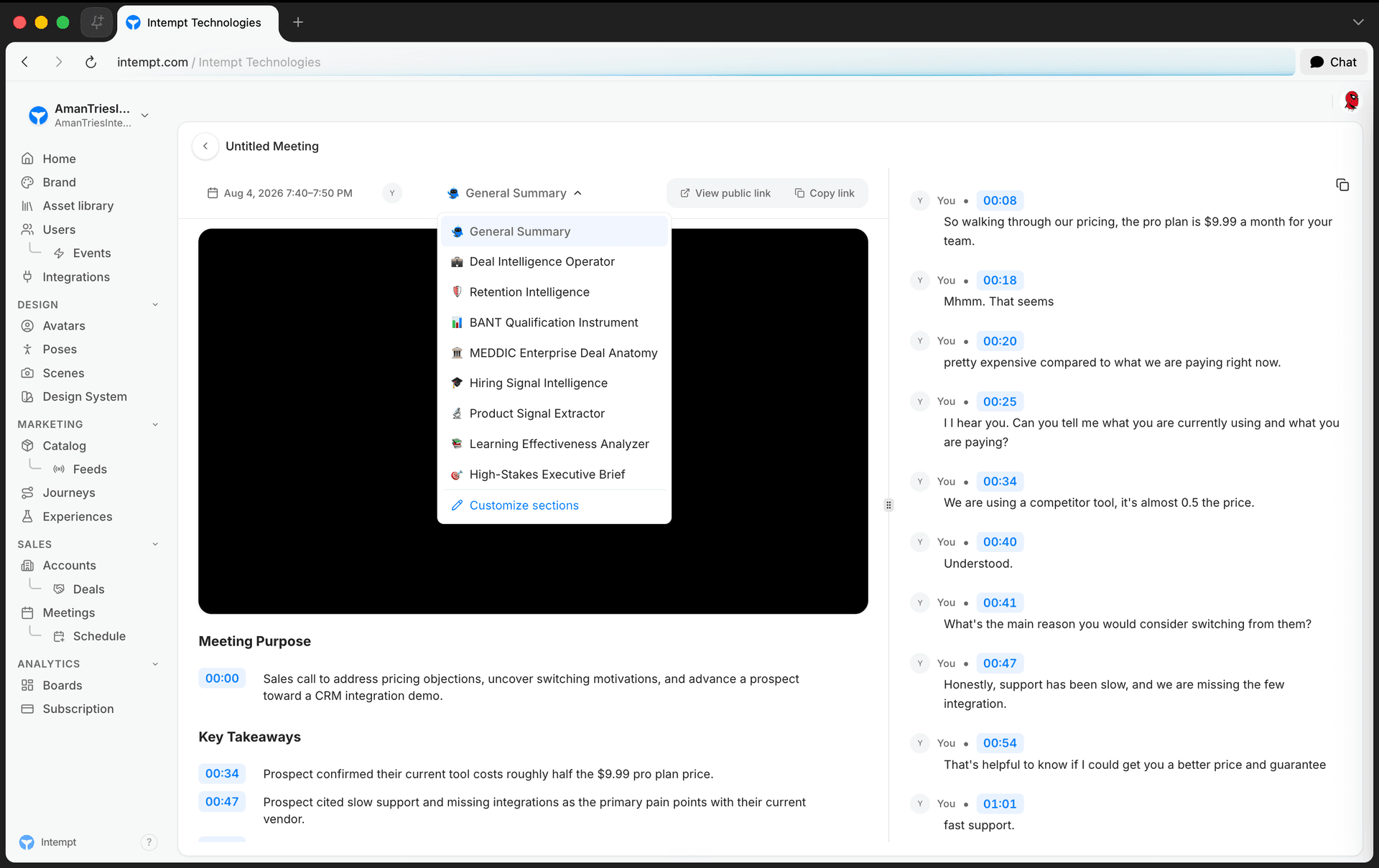
Every meeting gets an AI-generated summary, organized into sectioned bullets. Switch the summary type from the dropdown above the summary. If that type hasn't been generated for this meeting yet, selecting it asks Blu to generate it on the spot. Choose Customize sections from the same dropdown to pick which sections a type includes before it generates.

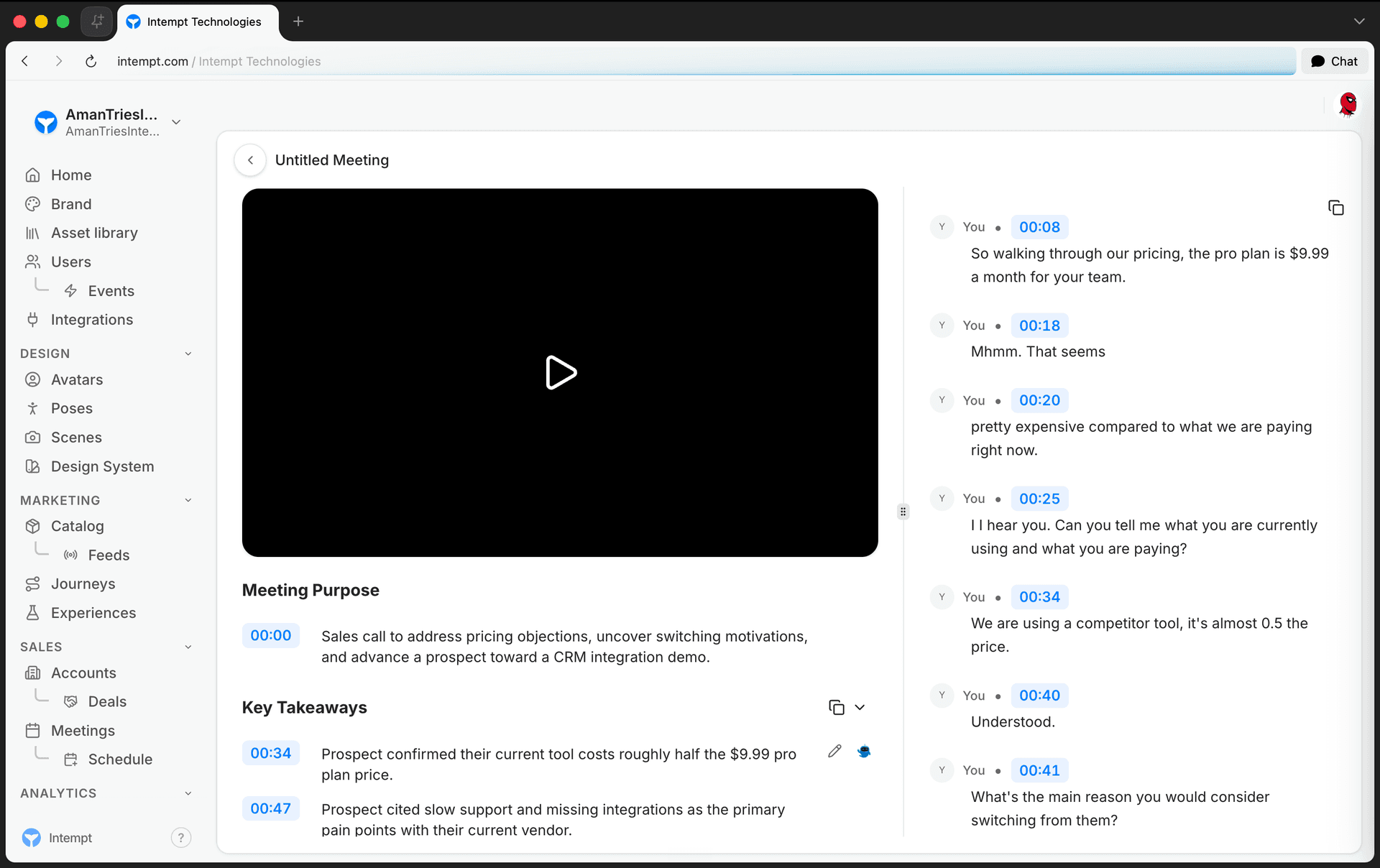
Click the small Blu icon next to any summary bullet to expand just that point. Blu pulls more supporting detail for it from the full transcript without regenerating the rest of the summary.
📘 Media pending

Screenshot for this section hasn't been captured yet.

Relabeling speakers

A meeting's transcript is diarized automatically as it's captured, so a speaker who isn't yet a named participant shows up as a generic label like "Speaker 2." Relabeling replaces those raw labels with real names across the whole transcript, using a name map, as a permissioned action scoped to that one meeting.

📘 Good to know

This capability is confirmed in Intempt's meeting platform, but the exact place to trigger it from a meeting's Details page couldn't be confirmed while writing this guide. It's flagged here rather than described with invented steps.

Use cases

  1. Catching up on a call you missed. Ask Blu for this meeting's action items instead of reading the whole transcript.
  2. Qualifying a lead mid-review. Ask what a participant's company does or what tech stack it runs, without leaving the meeting's Details page.
  3. Resolving who said what. Ask a specific question about a statement; if two people share a name, Blu asks which one before answering.
  4. Pulling a structured read on a deal. Switch the summary to a sales-specific type instead of reading the general one.
  5. Scoping a summary to what you need. Use Customize sections to drop sections you don't want before Blu generates a type for the first time.
  6. Going deeper on one point. Expand a single bullet with AI instead of asking Blu to regenerate the entire summary.
  7. Fixing an unnamed speaker. Look up the real name behind a generic "Speaker N" label so the transcript reads correctly for whoever reviews it later.
  8. Handing off an out-of-scope request. Ask this panel to reschedule or search across meetings and get redirected to the main Blu chat, which can actually do it.

Where to go next

On this page