
Amazon S3
Write typed Parquet files or an Iceberg table to a bucket you own: add the connection, configure the export node, and read what lands.
Overview
Intempt writes event and user data into an S3 bucket you own, either as plain Parquet files or as an Apache Iceberg table. Nothing is read back out of the bucket, and nothing outside the prefix you set is touched.
| Format | What you get | Extra setup |
|---|---|---|
| Parquet files | Typed Parquet files in a folder layout, appended to on every batch | None |
| Iceberg table | A table registered in your own catalog, committed to on every batch | A catalog on the connection: AWS Glue or a Hive Metastore |
Iceberg is the only one of the two that needs a catalog. Everything else on this page applies to both, so the Parquet path is documented first and the Iceberg section covers only what changes.
There are three distinct jobs, and this page is organised around them.
| Part | Where you do it | What it decides |
|---|---|---|
| 1. Add the connection | Integrations, Connections tab | Which bucket, which region, how Intempt authenticates, how objects are encrypted |
| 2. Configure the export | The Write Parquet to S3 node in a workflow | Which columns, which types, how often a batch is written, where files land |
| 3. Observe the output | The node's own preview, then the bucket itself | What a file is called, what the schema is, what a row holds |
Credentials and the bucket live on the connection. What gets written, and when, lives on the node.
📘 Good to know
The export node is the end of the line. Nothing continues after it, so anything that has to happen as well as the export goes before it.
Before you start
- A bucket you own, and its region.
- Either an IAM role Intempt can assume, or an access key pair.
- The attributes you want as columns, already in your project.
Part 1: Add the connection
Go to Integrations, open the Connections tab, click + Add integration, and pick Amazon S3 under Destinations. The panel is titled Configure Amazon S3.
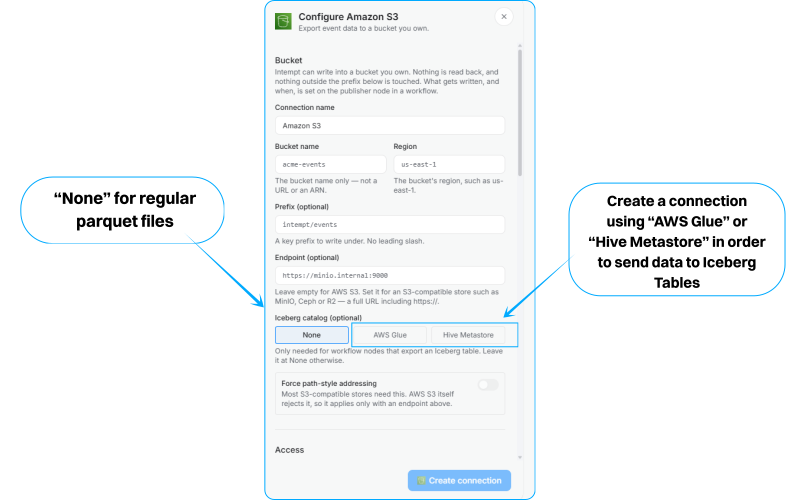
The panel opens on Bucket and scrolls through Access and Encryption to the Create connection button.
Bucket
| Field | Required | Notes |
|---|---|---|
| Connection name | Yes | Shown wherever the connection is picked. |
| Bucket name | Yes | The bucket name only, not a URL and not an ARN. |
| Region | Yes | The bucket's region, such as us-east-1. An availability zone is rejected. |
| Prefix | No | A key prefix to write under. No leading slash. |
| Endpoint | No | Leave empty for AWS S3. Set it for an S3-compatible store such as MinIO, Ceph or R2, as a full URL including https://. |
| Force path-style addressing | No | Most S3-compatible stores need this. AWS S3 itself rejects it, so it only applies alongside an endpoint. |
Access
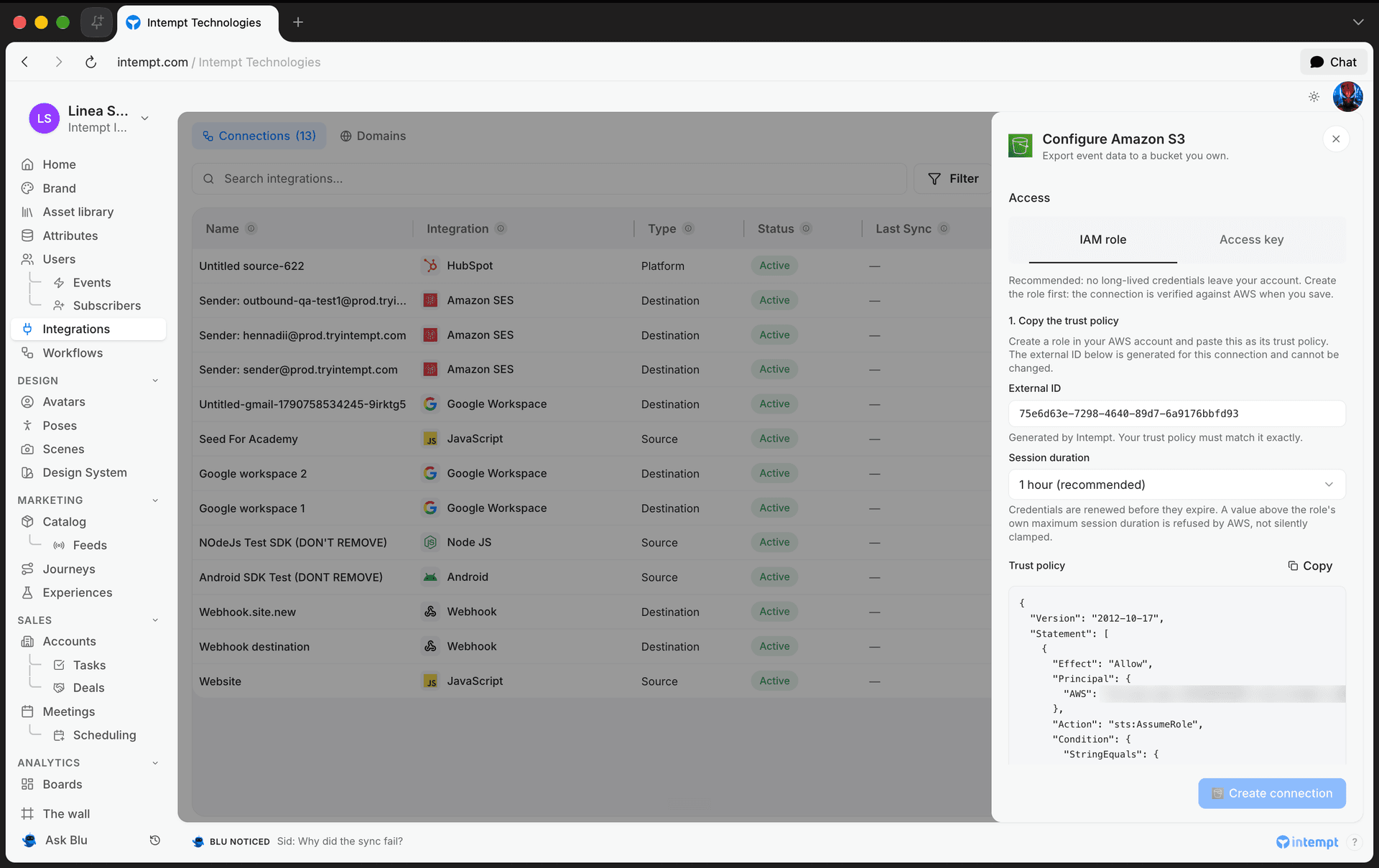
Two modes, and you pick one. IAM role is recommended: no long-lived credentials leave your AWS account.
IAM role
The panel walks you through three steps and generates the policies for you.
- Copy the trust policy. Create a role in your AWS account and paste this as its trust policy. The panel shows an External ID generated for this connection. Your trust policy has to match it exactly, and it cannot be changed afterwards.
- Attach the permission policy. Attach it to the same role.
ListBucketis on the bucket and the writes are on its contents, so a policy missing either one fails partway through an upload. - Paste the role ARN. It has to be a role ARN. A user ARN does not work.
Session duration sets how long each assumed-role session lasts: 15 minutes, 1 hour (recommended), 3 hours, or 12 hours. Credentials are renewed before they expire. A value above the role's own maximum session duration is refused by AWS rather than quietly clamped.
Access key
A static key pair for the bucket. Attach the same permission policy to the IAM user it belongs to, then enter the Access key ID and Secret access key.
📘 Good to know
The secret access key is write-only. Reopening the connection shows the access key ID, so you can see which key is set, but never the secret. Leave the field blank to keep the stored key, or enter a new one to rotate it. Because Intempt keeps no copy it can send back, testing the connection again requires re-entering the secret.
Encryption
| Option | What it does |
|---|---|
| Use the bucket's default | Leaves encryption to the bucket. Usually the right answer, since a bucket with default encryption already applies it to everything written. |
| SSE-S3 (AES256) | Amazon-managed keys. |
| SSE-KMS (your KMS key) | Your KMS key. Requires a full KMS key ARN, not an alias and not a key ID. |
Test connection
Test writes a small probe object to the bucket and deletes it again. On success the panel reports that AWS accepted the write. If AWS rejects the configuration, you find out here rather than on the first scheduled batch.
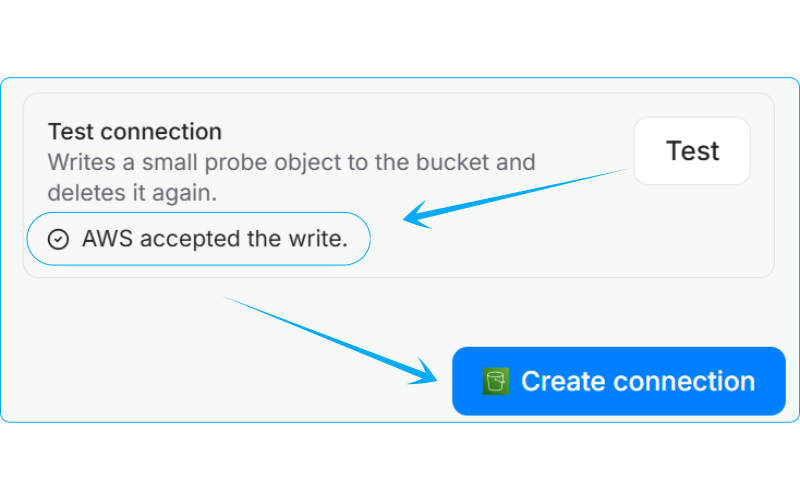
Click Create connection to save.
Part 2: Configure the export
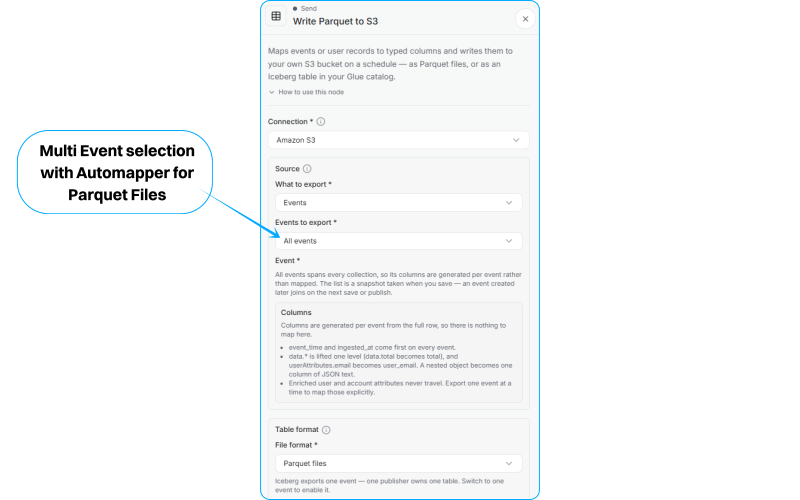
Open Workflows, open or create a workflow, and add a node. Write Parquet to S3 is in the Send group.
It maps events or user records to typed Parquet columns and writes them to your bucket on a schedule. Everything below the connection picker stays greyed out until a connection is chosen.
Connection
Pick a saved S3 connection. Only S3 connections appear. If the list is empty, create one under Integrations first.
What to export
| Source | What it exports |
|---|---|
| Events | Event rows. Pick one named event, or All events. |
| Records | A per-user snapshot taken from each user's last enriched event. |
| Failed events | Tracked events the ingestion pipeline rejected. See Failed events. |
A new node opens on Events with All events selected.
All events spans every collection, so there is no single schema to map from. The columns you can pick are the event envelope plus user and account attributes, which every event carries regardless of its name. Narrow to one event to map that event's own properties.
Records exports user records only. Account records are refused today.
Failed events has a fixed shape. The columns are exported as they stand: source, event, payload, message and times. There's no mapping editor and no event selection. Instead, two pickers narrow it:
| Picker | What it does |
|---|---|
| Sources | Export only failures from these sources. |
| Events | Export only failures on these events. |
Leave both empty to export every failed event. Pick values in both, and the export covers failures from those sources on those events. A failed-events export writes Parquet files only. Split by source is available on it too: each source writes into its own folder ahead of the path you set.
Narrow the events
Optional, and only on the Events source. Only events matching the filter are exported. A records export carrying a filter is rejected rather than ignored.
Columns
One row per Parquet column. Each row has three parts:
| Part | What it is |
|---|---|
| Source attribute | Where the value comes from. Picked from a list, not typed freely. |
| Parquet column | The column name written to the file. Letters, digits and underscores only, not starting with a digit, up to 128 characters. |
| Type | The Parquet column type. Declared here, never guessed from the data. |
The source list is closed, and it changes with what you are exporting:
| Group | Available on | Contains |
|---|---|---|
| Event envelope | Events | eventId, timestamp, userId, accountId, profileId, sessionId, pageId |
| Event properties | Events, one named event only | That event's own properties |
| User attributes | Events and Records | Your project's user attributes |
| Account attributes | Events | Your project's account attributes |
Column names default from the attribute label, and you can edit them. Two columns cannot write to the same name, and the check ignores case.
Five column types are available: String, Long, Double, Boolean and Timestamp. There is no JSON or array type, so a composite attribute lands as a string.
📘 Types are fixed at save time, and that is the point
Parquet is a typed format, and every file of one export has to share one schema or query engines break on the drift. That is why the type is declared on the mapping row rather than inferred per batch. Changing a type after files exist makes the older files disagree with the newer ones, so treat a type change the way you would a schema migration.
Where it lands
| Field | Notes |
|---|---|
| Path prefix | Optional. Sits under the connection's own prefix. Up to 512 characters. |
| File prefix | Optional. The leading part of every filename. Up to 128 characters. |
Batching
| Setting | Default | What it does |
|---|---|---|
| Write a batch every | Hour | The cadence. Each run covers from the end of the last sync, rounded down to this boundary, up to the trigger time. One batch per step. |
| Cover at most | Day | How far back one run may reach. An older starting point is moved forward instead of backfilling further. Has to be at least as long as the cadence. |
| Roll a new file at (MB) | 256 | Between 1 and 5120. 5 GB is the S3 single-PUT ceiling. |
| Or after this many rows | 5,000,000 | Between 1,000 and 1,000,000,000. Whichever limit is hit first, size or rows, closes the file. |
| Compression | Snappy | Snappy is fastest to decode. Gzip has the widest reader support. Zstd gives the smallest files. None is also available. |
Both the cadence and the coverage period offer the same nine values: 15 minutes, 30 minutes, hour, 2 hours, 6 hours, 12 hours, day, 3 days, 7 days.
📘 Good to know
A short cadence with a large roll size does not produce large files. It produces many small ones, and every query pays for opening each. A 15-minute cadence writes 96 batches a day, so the panel warns when the interval is short and the roll size is high. It is a cost warning, not a refusal.
Writes always append
Every write appends, so the node can never delete a file it did not write. The cost is that replaying a window adds its rows again instead of replacing them.
What the panel refuses to save
| Message | What to do |
|---|---|
| Pick a source attribute. | Every mapping row needs a source. |
| This attribute cannot be exported from the selected source. | A records export accepts user attributes only. Switch the source, or pick a different attribute. |
| Name the Parquet column. | Give the row a target column name. |
| Letters, digits and underscores only, not starting with a digit, up to 128 characters. | Rename the column. |
| Another column already writes to this name. | Rename one of them. The check ignores case. |
| Map at least one column. | An export with no columns writes nothing. |
| Pick an event, or export all of them. | Name an event, or select All events. |
| This must be at least as long as the batch interval. | Raise the coverage period, or shorten the cadence. |
| Between 1 and 5120 MB. | Bring the roll size into range. |
| Between 1,000 and 1,000,000,000 rows. | Bring the row limit into range. |
| A failed-events export has a fixed shape and takes no field mappings. | Remove the mapping rows. |
| A failed-events export covers every rejected record; narrow it by source or event instead. | Clear the event selection and use the Sources and Events pickers. |
| Record type applies only when the source is records. | Clear the record type, or switch the source to Records. |
| Failed events cannot be written as Iceberg. Switch the format to Parquet, or export events. | Switch the format to Parquet. |
Part 3: Observe the output
There are two places to check what an export produces: the node itself, before anything runs, and the bucket afterwards.
In the console, before it runs
The node's config panel has two preview blocks.
Where a file lands shows the full S3 URI a file will be written to, built from the bucket, the connection prefix, the path prefix, the event's own stream folder and the dated folders:
s3://your-bucket/exports/events/addtocart/dt=2026-09-02/hour=14/events-.01.parquetFiles land in a folder per day, plus one per hour when the batch interval is shorter than a day, and are named <prefix>.NN.parquet starting at .01. The event's own folder name is filled in when the node is saved. Compression never appears in the filename, because it is Parquet metadata rather than a filename suffix.
The row that will be written shows one row in the shape your column mapping describes, so you can check names and types before a batch exists.
In the bucket, after it runs
The layout follows the preview: a folder per event, a folder per day inside it, and a folder per hour inside that when the batch interval is shorter than a day.
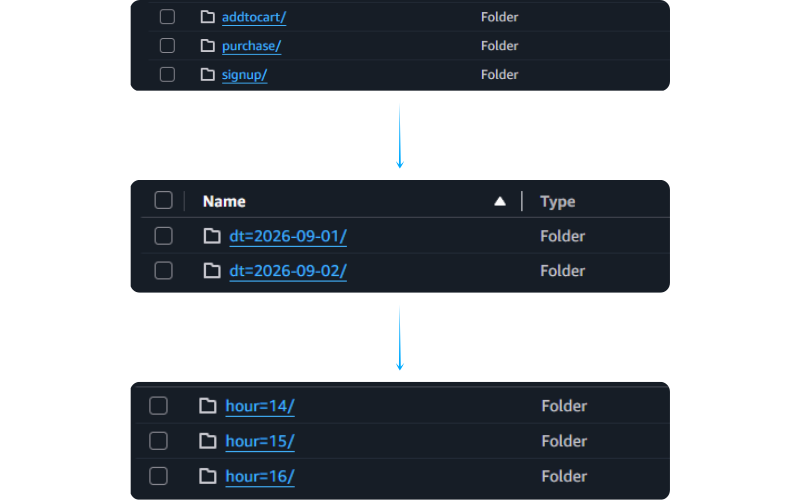
A real file from a running export is a good way to check your reader. The rest of this section walks through one.
File and metadata
| Property | Value |
|---|---|
| Filename | part.53913abd.01.parquet |
| Size | 90,558 bytes |
| Rows | 696 |
| Row groups | 2 |
| Columns | 17 |
| Compression | Snappy, on every column |
| Writer | parquet-cpp-arrow version 25.0.1 |
The .01 suffix is the file counter within its batch window, as described above.
Schema
event_time:    timestamp[ms, tz=UTC]  not null
ingested_at:   timestamp[ms, tz=UTC]  not null
eventId:       string
userId:        string
cartId:        string
productId:     string
productName:   string
category:      string
brand:         string
quantity:      double
unitPrice:     double
currency:      string
user_name:     string
user_email:    string
profileId:     string
sourceId:      int64
timestamp:     timestamp[ms, tz=UTC]
Two columns in this file are non-nullable, event_time and ingested_at. The other fifteen are nullable, which is what a mapped column is.
📘 Two columns you did not map
Every events export carries event_time and ingested_at whether or not you map them. event_time is the event's own timestamp; ingested_at is the moment it arrived at Intempt. They are also reserved as column names, so a mapping row cannot write to either. A records export carries neither.
The distinction matters more than it looks. Batching, the folder dates and the export window all run on arrival time, not on the event's own timestamp. A late-arriving event lands in the batch that received it, carrying its real event_time.
Reading the same schema at the Parquet level, the string columns are BYTE_ARRAY annotated String, the timestamps are INT64 annotated Timestamp(isAdjustedToUTC=true, timeUnit=milliseconds), and sourceId is a plain INT64.
A row
{
  "event_time": "2026-09-02T10:20:47.683Z",
  "ingested_at": "2026-09-02T10:29:03.000Z",
  "eventId": "6f605b84-b43a-41ff-8768-061c0774b032",
  "userId": "bilal.kovacs.8594@demo.example",
  "cartId": "CART-731386",
  "productId": "SKU-72640",
  "productName": "Solace Espresso Machine",
  "category": "Home",
  "brand": "Solace",
  "quantity": 4.0,
  "unitPrice": 127.01,
  "currency": "USD",
  "user_name": "Bilal Kovacs",
  "user_email": "bilal.kovacs.8594@demo.example",
  "profileId": "bilal.kovacs.8594@demo.example",
  "sourceId": 1497883051600838656,
  "timestamp": "2026-09-02T10:20:47.683Z"
}
📘 Numbers stay numbers here
quantity is 4.0 and unitPrice is 127.01, as doubles. This is the practical difference between the S3 export and publishing to Kafka, where a message field is a Liquid template and every value arrives as a string. Here the type is declared on the mapping row, so a consumer reads a typed column and casts nothing.
Try it yourself
This is the file walked through above, exactly as a live export wrote it. Point your reader at it before you build against a schema.
Download the sample export: AddToCart Sample Payload
Query it in place with DuckDB, no import step:
SELECT brand, category,
       count(*)                   AS events,
       sum(quantity * unitPrice)  AS revenue
FROM 'intempt-addtocart-sample.parquet'
GROUP BY brand, category
ORDER BY revenue DESC;
That multiplication works because quantity and unitPrice arrive as doubles. Over Kafka the same two fields are strings and the query needs casts.
Reading a file
import pyarrow.parquet as pq

f = pq.ParquetFile("part.53913abd.01.parquet")
print(f.metadata.num_rows)
print(f.schema_arrow)

table = pq.read_table("part.53913abd.01.parquet")
Apache Iceberg
An Iceberg export writes into a table registered in your own catalog instead of writing bare files into a folder. Everything in Parts 1 to 3 still applies. This section covers the two places it differs.
Tables are written at Iceberg format version 2. A reader that only opens v1 tables cannot read them.
Step 1: add a catalog to the connection
This is the step a plain Parquet export skips entirely. Without a catalog on the connection, the Iceberg format cannot be selected on any node using it.
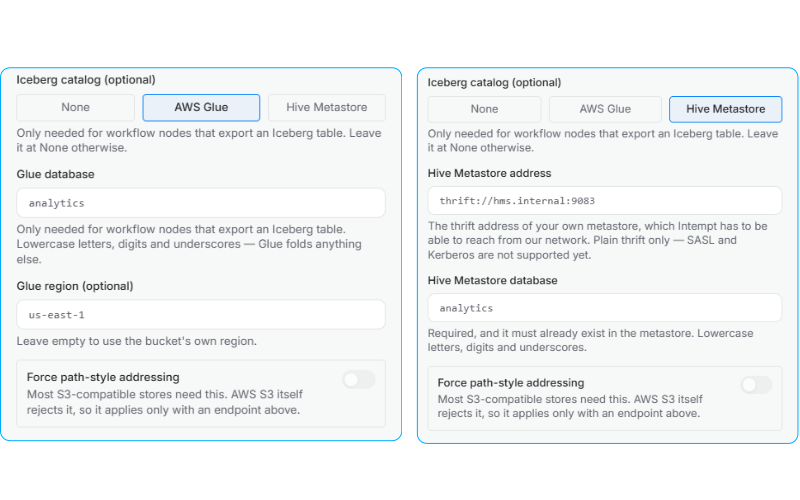
In the Configure Amazon S3 panel, set Iceberg catalog. It defaults to None, which is correct for a connection that only writes Parquet.
AWS Glue
| Field | Required | Notes |
|---|---|---|
| Glue database | Yes | Lowercase letters, digits and underscores, up to 255 characters. Glue folds anything else. |
| Glue region | No | Leave empty to use the bucket's own region. |
Glue works only with AWS S3, so it cannot be combined with a custom endpoint. A connection pointing at MinIO, Ceph or R2 cannot carry a Glue catalog.
If the connection uses IAM role access, the permission policy the panel generates grows a second statement with the Glue actions the runner needs:
{
  "Sid": "IntemptGlueCatalog",
  "Effect": "Allow",
  "Action": [
    "glue:GetDatabase",
    "glue:GetTable",
    "glue:CreateTable",
    "glue:UpdateTable",
    "glue:GetPartitions",
    "glue:BatchCreatePartition"
  ],
  "Resource": "*"
}
Copy the policy again after choosing Glue. A role holding only the S3 actions fails with an AccessDenied naming a service you were never told to grant. Note that glue:GetTable is singular, and a different IAM action from glue:GetTables.
Hive Metastore
| Field | Required | Notes |
|---|---|---|
| Hive Metastore address | Yes | The thrift address of your own metastore, such as thrift://hms.internal:9083. Intempt has to be able to reach it from our network. |
| Hive Metastore database | Yes | Must already exist in the metastore. Lowercase letters, digits and underscores. |
Plain thrift only. SASL and Kerberos are not supported yet.
Unlike Glue, a Hive Metastore is endpoint-agnostic. It is your own service reached over thrift, so IAM has nothing to say about it and no policy changes. MinIO plus a self-run metastore is a supported combination.
📘 Good to know
The two catalogs are not symmetric. Glue's region is optional and defaults to the bucket's; the metastore's database is required alongside its address, and a save without it is refused.
The Iceberg catalog selector is the row second from the bottom of the Bucket section, pictured in Part 1.
Step 2: configure the node for Iceberg
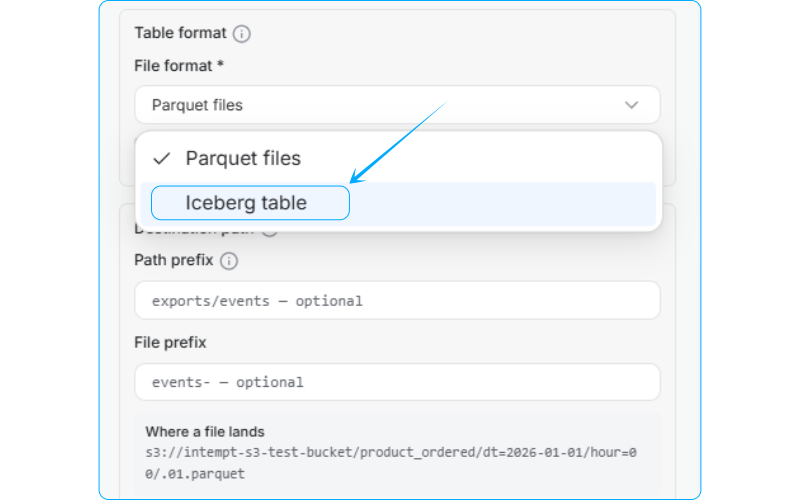
On the export node, set File format to Iceberg table.
The option is disabled until three things are true:
| Requirement | Why |
|---|---|
| The connection carries a catalog | There is nowhere to register the table. |
| The source is Events | A user-records export writes Parquet files. |
| Exactly one named event is selected | One publisher owns one table. |
Changing the format starts a new table. Files already written stay where they are, so history does not move.
Selecting Iceberg replaces the Parquet layout and sizing controls with the table controls. Path prefix, File prefix, Roll a new file at and Or after this many rows are all refused on Iceberg, because the table owns its own layout, file naming and file sizing.
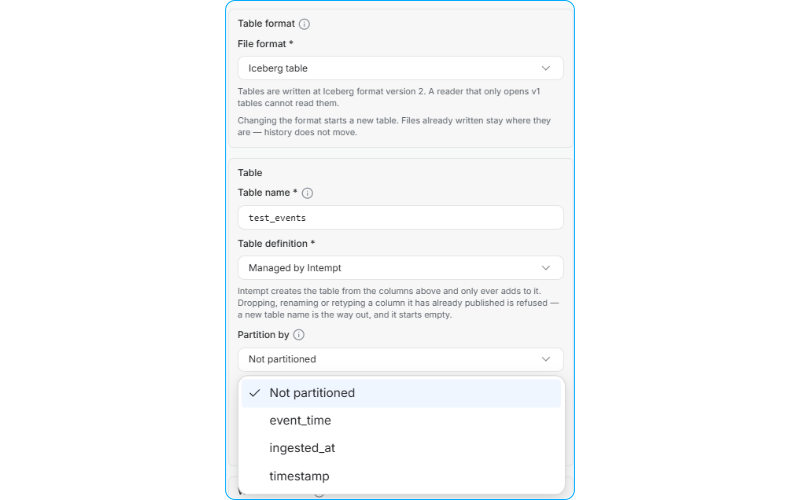
Table name
Required. Lowercase letters, digits and underscores only, not starting with a digit, up to 255 characters. Lowercase because Glue folds anything else, which is why this is stricter than a Parquet column name.
The node owns this table in the connection's catalog database. One node owns one table, so a table another export already writes to is refused at publish.
Table definition
| Option | What it means |
|---|---|
| Managed by Intempt (default) | Intempt creates the table from your mapped columns and only ever adds to it. Dropping, renaming or retyping a column it has already published is refused. A new table name is the way out, and it starts empty. |
| Defined by you | You define the table and control its schema. Intempt only appends rows. |
The choice is explicit rather than defaulted silently, because an Intempt commit against a table you own would otherwise look like an unrequested migration.
Partition by
Optional, and defaults to Not partitioned. Only a timestamp column can partition a table, so the picker offers:
event_timeandingested_at, the two clocks every events export carries. Both are legal here without being mapped, because they are timestamp-typed by construction.- Any mapped column whose type is Timestamp.
Picking a field reveals Partition granularity, either By day (default) or By hour. These are the same two granularities the Parquet layout encodes as folders. An Iceberg partition column gives you the same pruning with no prefix to glob.
Step 3: observe an Iceberg output
The node's Where rows land block names the table rather than a path, because there is no path to preview. Rows go into the table in the connection's catalog database.
A verified connection proves the catalog database can be read. It does not prove this table can be created, and that only shows up on the first run.
Two Parquet problems do not apply here:
| Parquet | Iceberg |
|---|---|
| Replaying a window appends its rows again | A replay swaps a snapshot |
| Changing a column type makes old files disagree with new ones | A schema change is a catalog operation readers survive |
Iceberg is stricter in one direction instead: on a table managed by Intempt, a column that has already published cannot be dropped, renamed or retyped, and a new table name is the only way out.
This is a real Iceberg output, written by a live export. It carries both partition clocks as columns, so you can try event_time and ingested_at against it.
Download the sample Iceberg output: Purchase events
What the panel refuses on Iceberg
| Message | What to do |
|---|---|
| Name the Iceberg table. | Every Iceberg export needs a table name. |
| Lowercase letters, digits and underscores only, not starting with a digit, up to 255 characters. | Rename the table. |
| This column is not a timestamp. Pick a timestamp column, or one of the two clocks. | Partition on a Timestamp-typed column, event_time, or ingested_at. |
| Iceberg exports events. A user-records export writes Parquet files. | Switch the source to Events, or the format to Parquet. |
| Iceberg exports one event. One publisher owns one table. | Narrow to a single named event. |
| Iceberg needs a connection that carries a catalog database. | Add a Glue database or a Hive Metastore to the S3 connection under Integrations. |
Use cases
- Land every event in a project into your own bucket on an hourly cadence, for a warehouse to pick up.
- Export one named event with its own properties as typed columns, so an analyst queries a narrow table rather than a wide one.
- Export a per-user snapshot from the Records source to refresh a dimension table.
- Narrow an event export with a filter so only the subset your model needs is written.
- Write under a path prefix per environment, so staging and production share a bucket without sharing a folder.
- Choose Zstd on a high-volume export to cut storage cost, or Gzip when the reader is older.
- Align the cadence with the partition your query engine expects, so each partition is written once.
- Point the connection at MinIO, Ceph or R2 with an endpoint and path-style addressing, rather than at AWS.
- Use SSE-KMS with your own key where a compliance regime requires customer-managed encryption.
- Write one high-value event to an Iceberg table so replays swap a snapshot instead of duplicating rows.
- Register that table in AWS Glue so Athena queries it without anyone declaring a schema by hand.
- Point at a self-run Hive Metastore instead, when the lakehouse already has one and Glue is not in the picture.
- Partition an Iceberg table by
ingested_atat hour granularity to prune the same way the Parquet folder layout does. - Set the table definition to Defined by you where the schema is already under your own change control.
Where to go next
Apache Kafka
Connect your own Kafka cluster as a destination, then publish one message per record from a workflow with the Publish to Kafka node.
How to migrate from another ESP to Intempt
Migrate subscribers, email templates, automation flows, and engagement data from another ESP to Intempt with minimal data loss.