- Create an Experience for Web or Mobile and set a target page or screen.
Landing page testing throughput is set by how fast a variant can ship, and for most teams that means the developer queue.
Deliver web and mobile experiences that learn fast and feel personal.
Intempt
Overview
Conversion lifts don't come from more banners-they come from clearer tests and timely follow-ups. This guide shows how to use Intempt to run Experiments on web or mobile, pick winners with a stats engine you can trust, turn those winners into targeted personalizations, and add a light activation layer with Journeys. The aim is a steady loop: try → learn → apply → follow up → measure.
Intempt
Start an Experiment with multiple variants (layout, copy, offers, URLs).
Target by audience (returning users, campaign traffic, high-intent segments).
Trust results with Sequential Testing, CUPED variance reduction, and confidence intervals.
Apply the winning variant, then launch personalization for specific segments.
Add a Journey to re-engage drop-offs across email, push, or SMS with simple branching.
Track lift in Experience Analytics and campaign impact in Journey Analytics.
Result: Faster learning, clearer wins, and consistent follow-through.
Intempt
Benefits
Learn faster. Test ideas with a visual editor; ship small, see impact quickly.
- Personalize with purpose. Target segments that actually differ.
- Stay coordinated. Site/app and messaging work from the same audiences.
- Reduce handoffs. Create, test, and apply changes without a long dev queue.
- Prove lift. Use a stats engine designed to avoid false positives and noise.
Intempt
How It Works
Build the variant in the experience layer, target it to a segment, and let the stats engine call the winner.
Step 1: Create Segments to personalize the experiences
Create segments for different users like those who are 'Ready for Upgrade' or 'Haven't logged in for more than 7 days'.
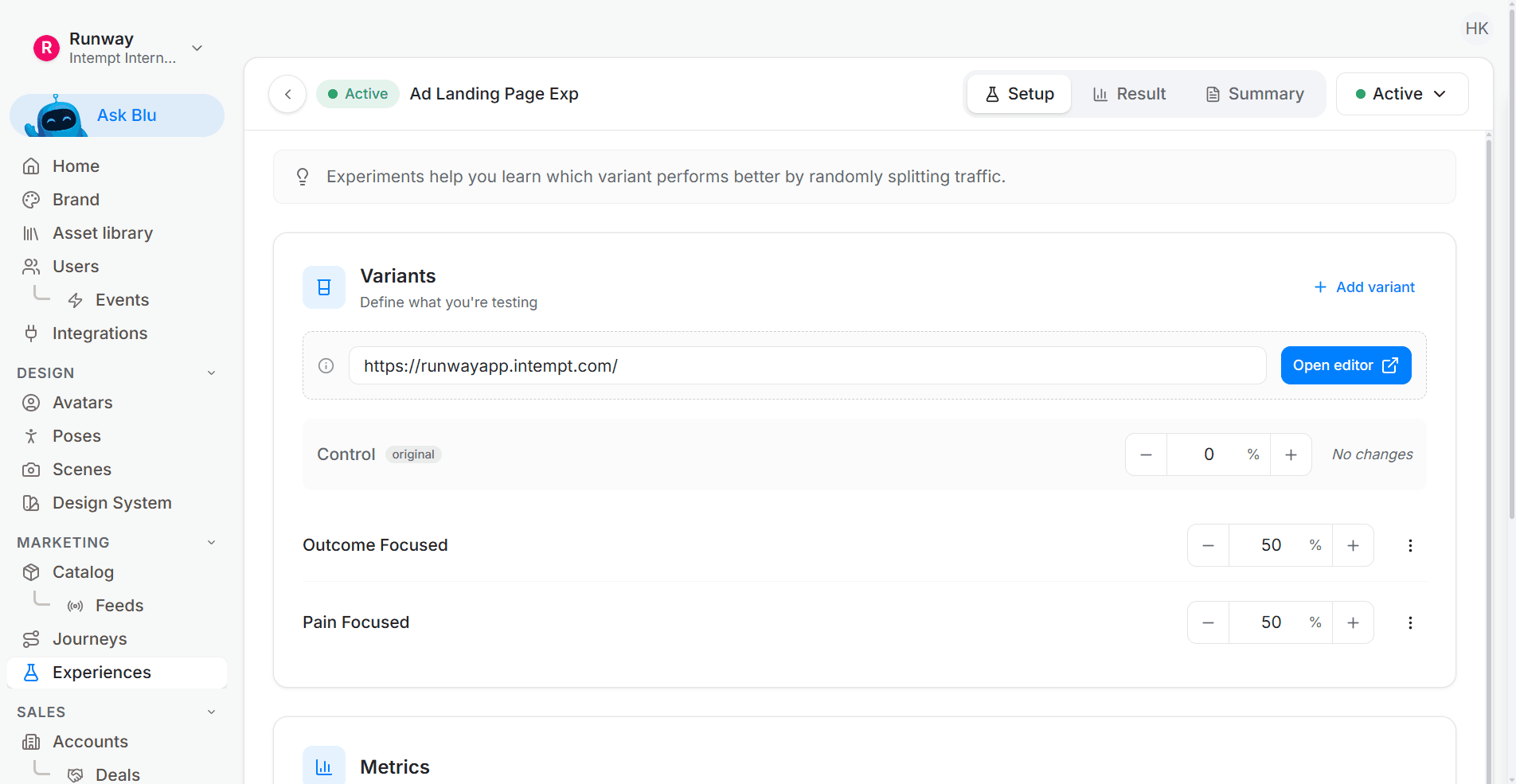
Step 2: Create an Experience (Web or Mobile)
Choose the page or screen, open the visual editor, and outline the change you want to test (layout, copy, offer, or placement).
Add variants with their own display rules, targeting, and success goals. Target returning users, specific campaigns, or a high-intent segment.
Step 3: Start an Experiment with clear targets
Add variants with their own display rules, targeting, and success goals - focused on the audiences you want to examine.
Step 4: Let the Stats Engine do the math
Monitor results with Sequential Testing (safe peeking), speed them up with CUPED, and read confidence intervals to focus on meaningful lift.
Step 5: Apply the winner and personalize by segment
End the test at significance, apply the winning variant, and create a personalization that shows the best version to the audience that benefits most.
Step 6: Add the activation layer
If a variant reveals a drop-off, start a Journey for that audience:
Email first, then push or SMS, with simple delays and outcomes.
Add a Slack alert if a human touch helps.
Step 7: Measure and iterate
Check Experience Analytics for lift and Journey Analytics for engagement and goal conversion. Keep what works; queue the next test.
Good to Know
Define one primary goal per test; keep variants small so you learn what changed.
Use the same Segments for targeting and follow-up to stay consistent.
Keep copy blocks reusable with Smart Snippets so updates stay in sync.
Run fewer, clearer tests; ship winners quickly, then move on to the next question
Start from a working test
Most experimentation programmes are not short of ideas, they are short of deploys. Removing the deploy from the loop is usually worth more than any single test result.
Shipping a variant without a deploy means the experience layer and the analytics have to agree on assignment, which is what the agentic GTM platform guarantees. The sticky CTA test recipe is a complete variant with metrics attached, which beats defining success from nothing.
Landing page testing scales with how easily a variant ships, not with how good the hypothesis was. Start with Intempt.
Frequently asked questions. Answered.
Create an Experience, choose the page or screen you want to test, and open the visual editor. Make your changes directly (layout, copy, offer, placement) and add variants. Set targeting rules, define your success goal, and launch. The whole flow happens in the platform without writing code or submitting dev tickets.