Real-time answers,not a recap.
Blu coaches you live on the call, answers the pricing question from your own docs, and has the summary and follow-up written before you hang up.
Coaching that arrives on its own
Blu adds a card when the conversation earns one. You are not typing a prompt while somebody waits.
Your docs, not the open web
Pricing, contract terms and battlecards you loaded. Blu reads your site on day one and starts there.
No bot in the meeting
Local capture on your own machine. Nothing joins the call, nothing sits in the participant list.
It coaches whilethe call runs.
A small overlay opens when the call starts, with three tabs. Coach is proactive, Ask is yours to drive, and Transcript runs underneath both.
Coach cards, typed Action or Strategy
Action is a thing to say right now. Strategy is how to play the rest of the call. Sentiment sits beside them.
Ask, with five prompts ready
Executive brief, action items, coaching review, follow-up email, deal risk. Or type your own question.
A transcript that knows the room
Every line is speaker-labelled and marked in-room from your mic or virtual from the far side of the call.
It stays out of your screen share
The overlay is excluded from screen shares and recordings, so your notes never land in a deck you are presenting.
Three ways to getthe call in.
Record the call you are on, send a notetaker into one you are not, or upload a file you already have. All three land in the same reviewable meeting.
01
Record this device
You are on the call, so no bot joins. Pick Deepgram, Speechmatics, AssemblyAI or Soniox, choose the language, and hit record. The pill shows the level and the timer, and a double-click opens the HUD.
02
Send the notetaker
Not on the call yourself? Paste a Zoom, Google Meet or Microsoft Teams link and Blu’s notetaker joins it for you.
03
Upload a recording
Already have the file? Drop in MP4, MOV, WEBM, MKV, MP3, WAV, M4A, OGG or FLAC up to 500 MB, and Blu transcribes it and opens the meeting ready to review. The title fills in from the filename.
Hang up and thewrite-up is waiting.
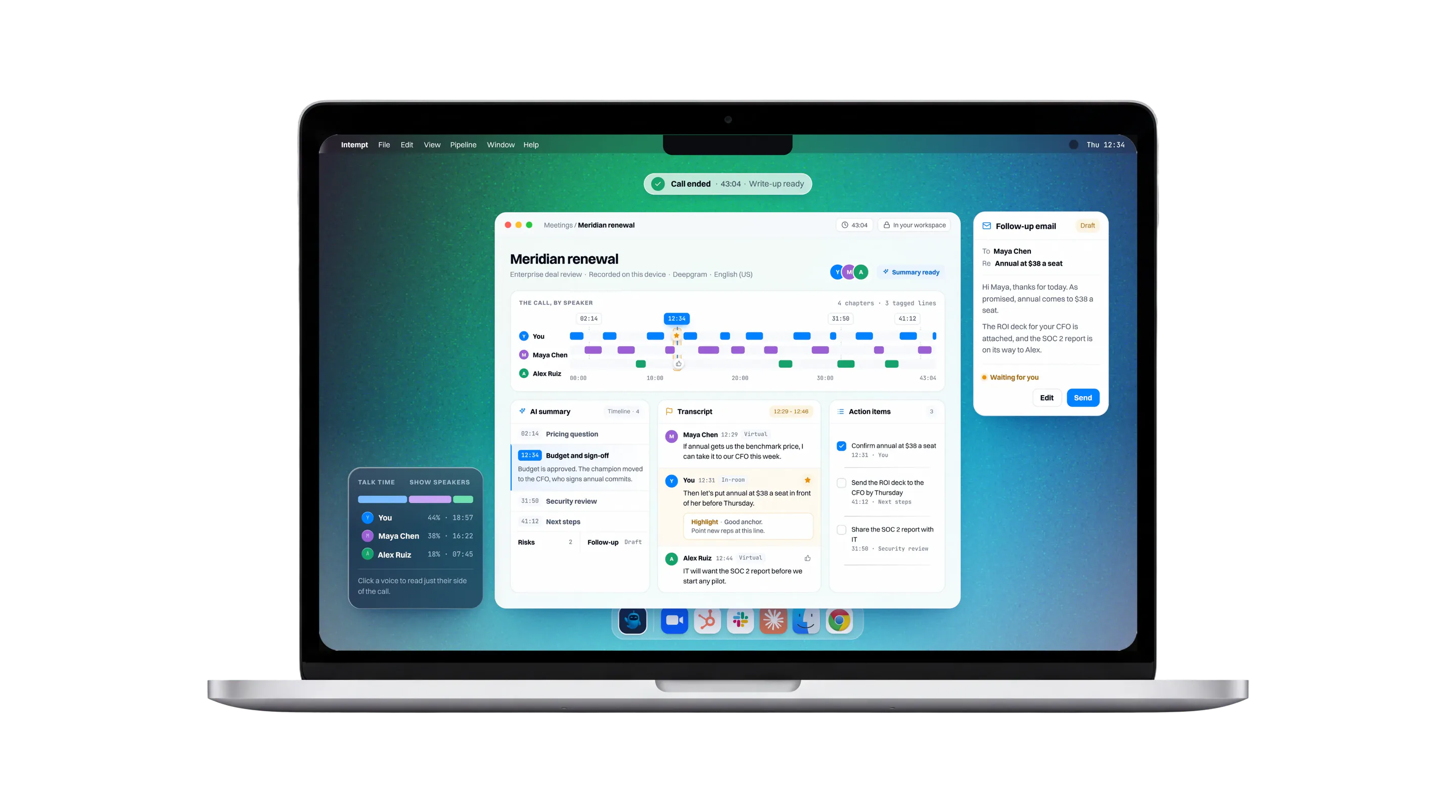
An AI summary, per-speaker talk time, and a transcript you can tag line by line, all on the meeting’s own page before you open the next tab.
A summary that opens as a timeline
Sections stay collapsed until you want them. Each line carries a timestamp, a title and the detail under it.
Talk ratio, per speaker
Show speakers and every voice gets a bar and a talk time. Click one to read just their side of the call.
Flag the line, not the whole call
Star, thumbs up, thumbs down or a note on any line. Each one becomes a note a manager can point a rep straight to.
The rest of the job,same app.
Booking, pipeline and Blu chat live in the same window as the calls, so the work after the call does not need a second tab or a second tool.
Pipeline, not a CRM tab
An 8-stage Kanban with column totals and attention badges. Drag a deal to a new stage and it is a real stage change, not a visual reorder.
Scheduling that books itself
Set your booking types and weekly availability, then CC the Blu Auto-Scheduler on a thread to let Blu book the meeting.
Blu on top of everything else
A floating chat panel over whatever you are working on, with voice input, recipes, tools and history search built in.
Wired into the toolsyou already open.
Blu captures Zoom, Google Meet and Teams from your own machine, and reads the calendar, mail and deal records you already keep in Intempt.
They stopped stitching tools andhired one system.
4.5
rating on G2
10B+
events processed
500M+
user profiles
7+ yrs
profitable
50+
enterprise customers
Frequently askedquestions.
Not when you record your own device. Capture happens locally, so nothing shows up in the participant list and nothing waits in the lobby. If you are not on the call yourself, paste the Zoom, Meet or Teams link and Blu’s notetaker joins it instead.
No. The HUD is a window on your machine, and the operating system keeps it out of screen shares and screen recordings. We tested that on real hardware with a second person watching. It exists so your notes do not leak into a deck you are presenting.
Yes. Recording laws vary by location and getting consent where it is required is on you. Federal law allows one-party consent, but roughly a dozen states require everyone on the call to agree, and legal sources do not agree on the exact list. Say it at the top of the call.
Coach cards arrive on their own as the conversation moves, so you are not typing a prompt and waiting on an answer. They are short on purpose: one thing to say, or one way to play the rest of the call. It is not a script you read aloud.
Only if you use it that way. Cards are one line, and they are there for the pause you already take when someone asks something hard. The honest version of this product is that it replaces “let me get back to you,” not your half of the conversation.
It knows what you gave it. Blu reads your company website during setup, and you can add files, text snippets or more pages any time. Every source shows a status so you can see what is live.
macOS 12 Monterey or later, with separate native builds for Apple Silicon and Intel. It is signed and notarized by Apple, so macOS will not block it. A Windows build is available too. Install takes under five minutes.
You can pause the transcript from updating and resume it when you want. Use the stop button when you actually want the recording to end.
Review is built for coaching, and we would rather be straight about what that means. A manager can open a completed call, read the talk-ratio bars, and tag specific lines as a Concern or a Highlight to point you at the exact moment. Recordings sit in your workspace under your project’s permissions. How your team uses that is a policy question, not a product one.
Pick from Deepgram, Speechmatics, AssemblyAI or Soniox, and set the spoken language before you start. Wear headphones when you record locally, because system audio through open speakers can get mislabelled as your own voice.
No. Blu drafts the follow-up and the reply. Both wait for you.
Yes. Upload MP4, MOV, WEBM, MKV, MP3, WAV, M4A, OGG or FLAC up to 500 MB and Blu transcribes it into a normal, reviewable meeting.

Ready when you are
Install it beforeyour next call.
Signed and notarized builds for Mac and Windows, under five minutes to set up, and a free plan that covers your first calls before you commit.