- We're four people on go-to-market. No analyst, no sales engineer, no ops hire. The admin half of the job - the prep, the pulling, the checking - now runs in Claude.
- Five prompts, all of them copy-pasteable: a morning brief, same-day follow-ups from call notes, a ninety-second account brief, a weekly account watch, and a Friday pipeline read.
- The setting that matters more than any prompt: reads on Always allow, every write on Needs approval. An agent that can read everything and send nothing is useful on day one. An agent that can send is a project.
This is how I use Claude to run GTM at a company that will never have an enterprise GTM team.
We're four people. No analyst, no sales engineer, no ops hire, no SDR bench. I still want what a real GTM org gets: prep before every call, follow-ups that go out the same day, account research that isn't me skimming a homepage five minutes before a Zoom, and a forecast that isn't a guess. It's the same squeeze behind running a GTM team without new hires, and this is the tooling half of it.
Most of that work is admin, not skill. It's the part that eats the evening. I've spent the last few months moving it into Claude, one job at a time. This was an internal doc first. Sharing it because the setup is the same whether you're four people or four hundred, and almost nobody writes down the boring parts.
Getting set up
Connect Claude to what you already use. Go to Customize in the sidebar, then Connectors. Gmail, Google Calendar, Google Drive, Slack, Microsoft 365, Linear and GitHub are all there out of the box, and the full connector reference covers the per-service quirks. Anything else you run - your CRM, your product data, your warehouse - connects through MCP. Most of the tools you already pay for have a server now, and the ones that don't are usually a weekend of work.
Worth saying plainly up front: I run a GTM product and we maintain one of those servers, so when I get to the part about joining CRM and product data, read it knowing I have a horse in that race. Everything before it works the same whatever you use.
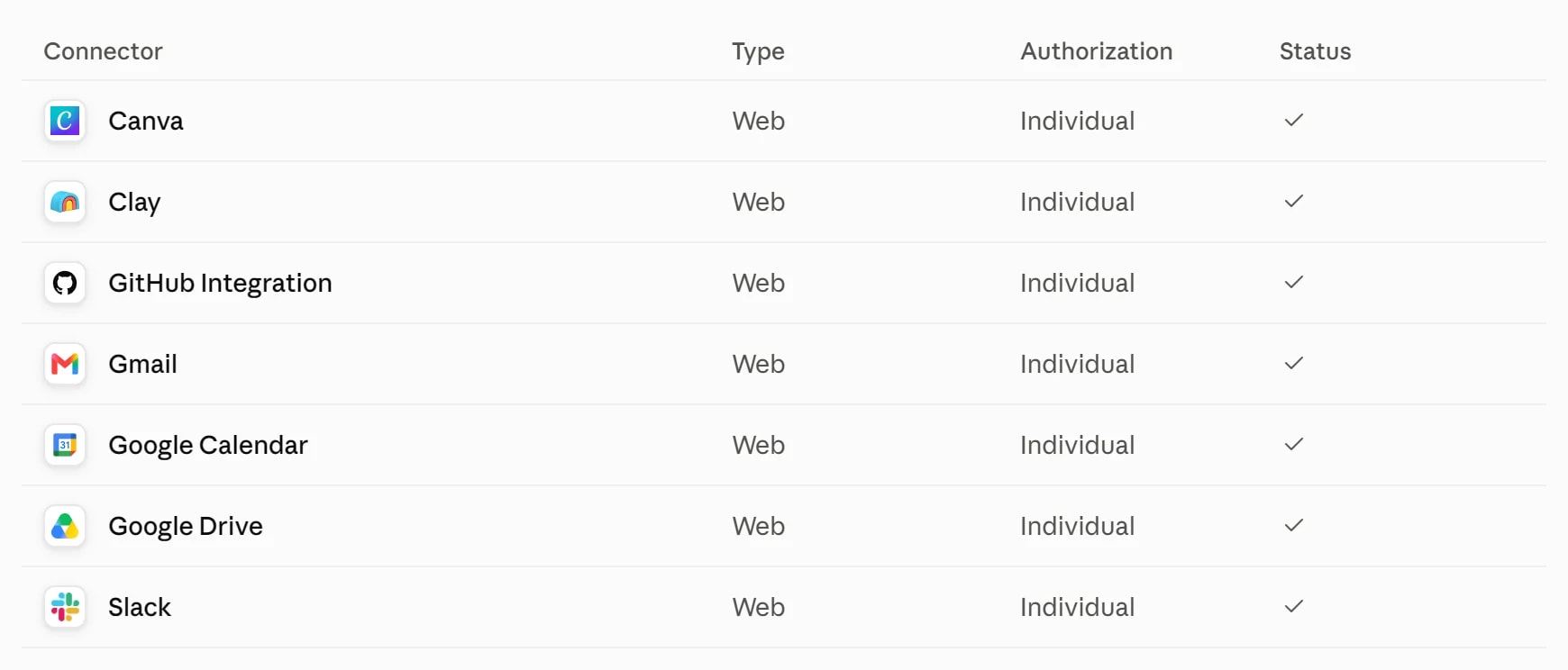
Turn on the ones you use daily and leave the rest off. Claude gets worse as you add sources it doesn't need, not better, because every extra connector is another place a vague question can wander off to.
Set the permissions before anything else
Each connected service can be set to Always allow, Needs approval, or Blocked, per action. I have reads on Always allow and every single write on Needs approval. That one setting is why I can let this thing run unattended. It reads whatever it wants and it cannot send, post, or change anything without me clicking.
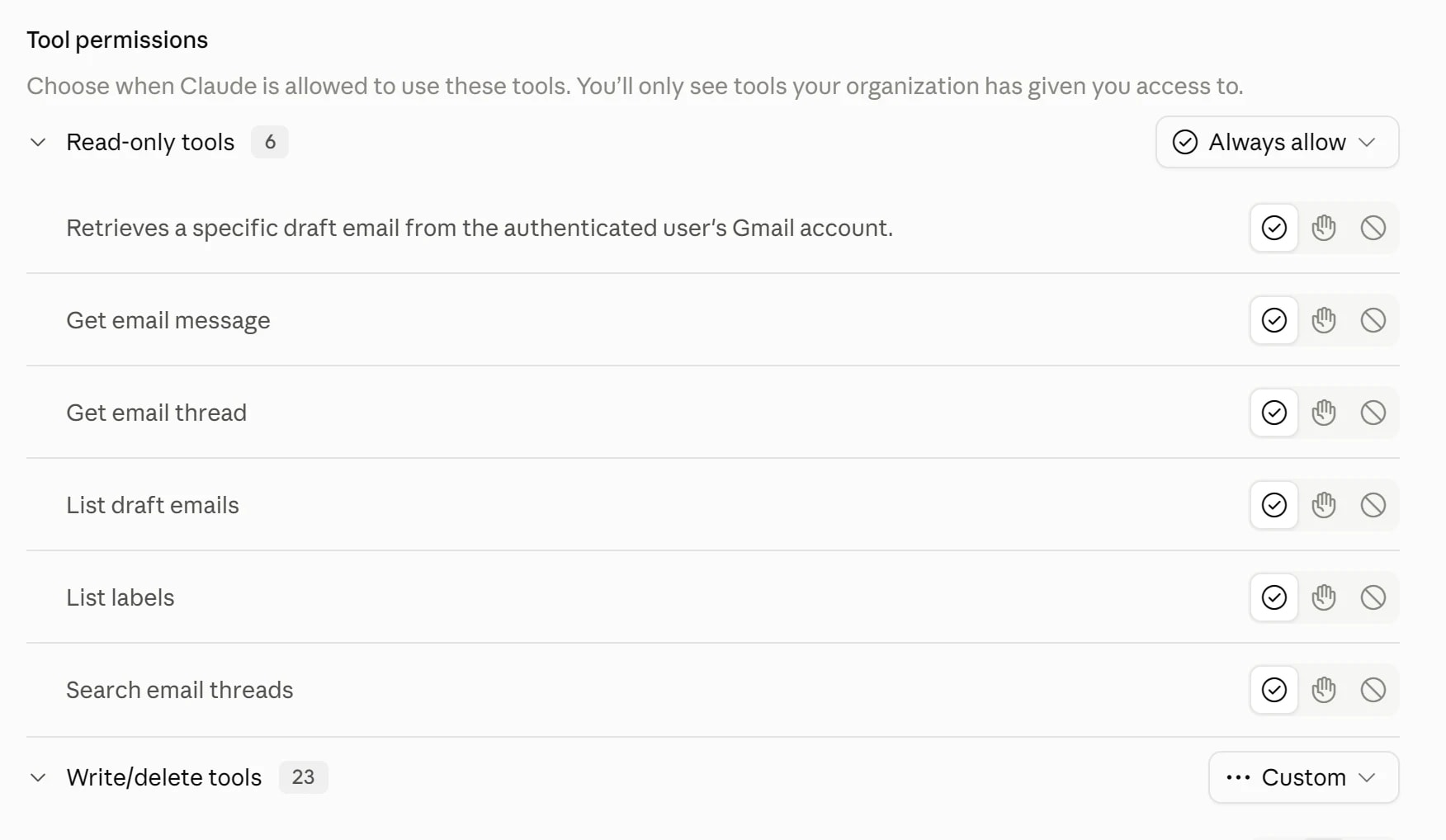
This matters more than any prompt in this article. An agent that can read everything and send nothing is useful on day one. An agent that can send is a project.
Use Cowork for the long jobs. It's the same agentic engine as Claude Code, in the desktop app, without the terminal. It works on your local files directly, splits work across sub-agents, and produces real deliverables - spreadsheets with working formulas and decks you can open. Pair it with Claude in Chrome and it can drive a website that has no API, which covers most of the tools GTM teams are stuck with.
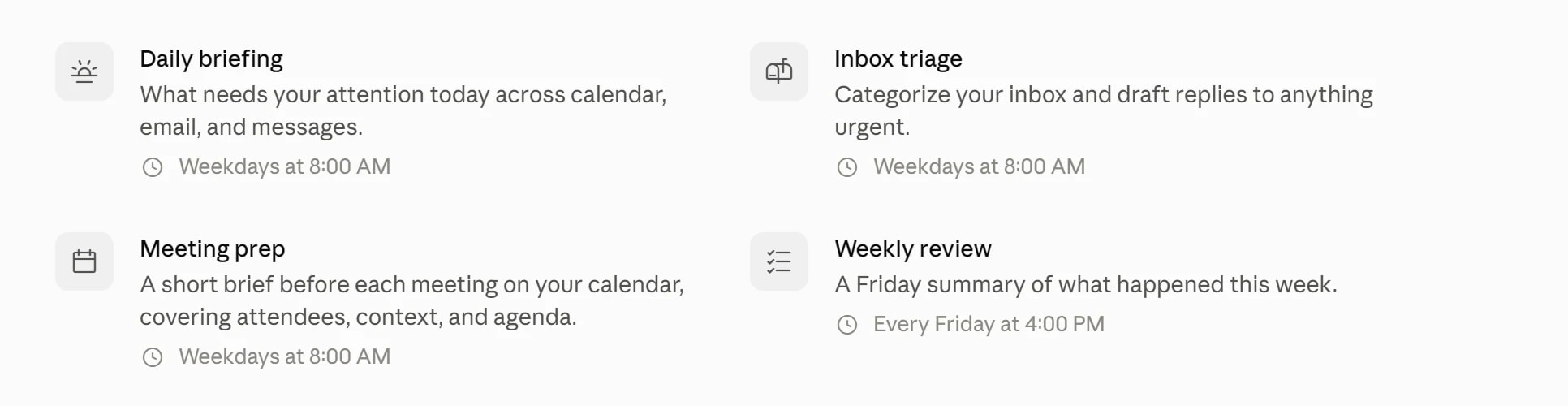
Then schedule the ones you run on a rhythm. Sessions run remotely, so my morning brief and my Friday pipeline job both run with my laptop shut. You don't have to start from an empty schedule either - there are templates already in there for a daily briefing, inbox triage, meeting prep and a Friday review.
Save anything you'll run twice as a Skill
A Skill is a folder with a SKILL.md in it describing a job, and Claude only loads the full thing when a task matches its description, so having thirty of them costs you almost no context. You invoke it by name instead of pasting a wall of text, and when you correct Claude mid-conversation you go fold that correction back into the file. After a couple of months your Skills folder is worth more than any individual prompt in it.
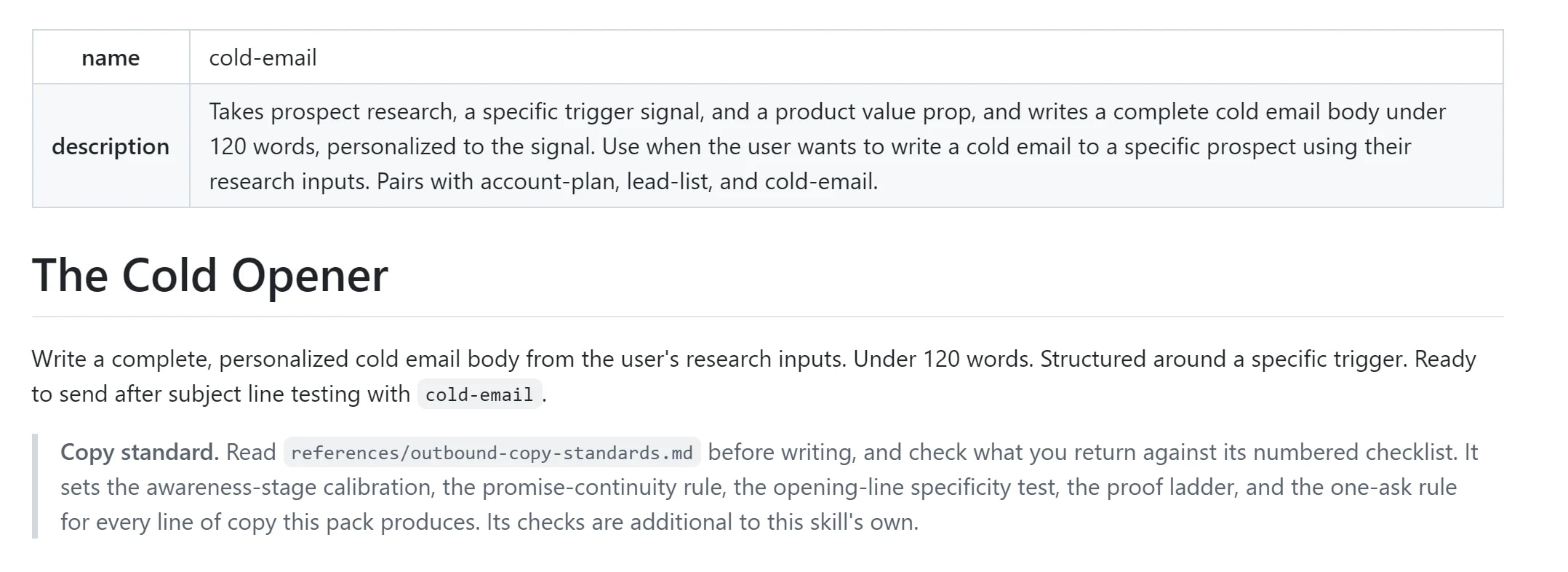
Two things worth knowing before you build on them. Skills need Pro, Max, Team or Enterprise with code execution turned on. And they follow the Agent Skills specification, an open standard, so what you write is portable to any platform that adopts it rather than locked to one vendor. That is the main reason I was willing to put real work into writing them.
If you'd rather start from something than from an empty file, we open-sourced ours. Eighty-eight of them, MIT licensed, grouped by GTM role, and they install the same as any other skill. Take the three that match your job and delete the rest. There are other good libraries too, and the point is only that reading someone else's SKILL.md teaches you the format faster than the docs do.
$npx skills add sidchaudhary/gtm-skills -g --allOne catch that cost me an afternoon: Cowork loads the skills and connectors enabled on your Claude account, synced when the session starts. It does not read the Claude Code CLI's local ~/.claude folder, which has its own skills setup. If you built a skill in the terminal and can't find it in Cowork, that's why. Add it under Customize.
Run your own team of agents
I don't use one chat. I run a handful, each with one standing job and a saved prompt. Naming them matters more than it sounds, because you stop asking "can Claude do this" and start asking "whose job is this."
That question is the whole design, and it is not mine. It is how we ended up shipping nine named agents instead of one assistant, and the naming did more work than any of the underlying models did. A chat called "account research" gets used. A chat called "Claude" gets asked to do everything and then abandoned.
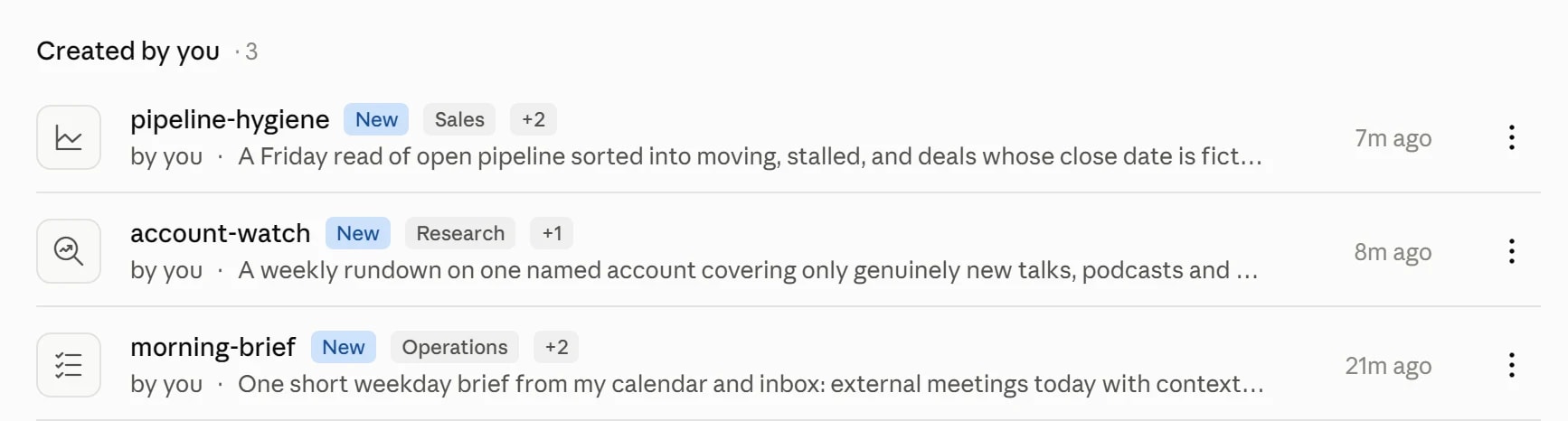
Morning brief
Runs at 7am on a schedule. It's the only one I read on my phone.
Every weekday morning, give me one short brief. Read my calendar for today and my inbox since the last run.

Calendar: list every meeting with someone outside the company. For each, one line on who they are and what the last conversation with them was about, pulled from the actual thread.

Inbox: only the messages that plausibly need me. Customer and prospect threads, pricing and renewal questions, intros, and direct questions addressed to me. Skip newsletters, notifications, receipts, calendar invites, and anything internal that is just noise.

Write it so I can read the whole thing in under ninety seconds standing up. If nothing needs me, say "nothing needs you" and stop. Do not pad it to look useful.

Draft nothing and send nothing in this run.The last two lines are the ones that made it usable. Without "do not pad it to look useful" I got a daily briefing that was always exactly one screen long regardless of whether anything had happened, which trains you to stop reading it.
The inbox half is the weaker half, and it is worth knowing why. Gmail hands Claude raw threads, so "messages that plausibly need me" is a judgment it makes from the text alone, every morning, from scratch. It gets the obvious ones right and misses the quiet renewal thread that matters. If your mail already sits somewhere that knows which deal a thread belongs to, point the prompt there instead and the filter stops being a guess. That is the job our own inbox does, and it is also what any CRM-linked mailbox gives you. The instruction to change is "only the messages that plausibly need me" becoming "only threads on open deals, ranked by deal value".
Follow-ups from call notes
The single highest-value hour I've automated. Follow-ups sent the same day close; follow-ups sent Thursday for a Tuesday call do not.
Find calls that ended since the last run with someone outside our domains on them. Use the meeting notes as the source of truth, not my memory and not the calendar title.

For each one, draft a follow-up: To, Subject, and a body grounded only in what was actually discussed. Include the concrete next step that was agreed, with the owner and the date. If no next step was agreed, say so in one line at the top of the draft instead of inventing one.

Do not mention anything that did not come up on the call. If the notes are thin, write a short draft rather than a padded one.

Leave every one as a draft. I will read and send them."If no next step was agreed, say so instead of inventing one" is doing a lot of work. The default behaviour is to manufacture a plausible next step, which reads fine and is quietly a lie to the person on the other end.
This prompt is only as good as what "the meeting notes" actually contain, which is the part nobody warns you about. A transcript is not notes. Handed a raw transcript, Claude will reconstruct the call from scratch every time and weight whatever was said loudest rather than whatever was agreed. What you want is a record where the summary, the action items and the account are already one object before the agent reads it. Ours is the notetaker; Granola and Gong land in the same place by a different route. The test for whichever you use: ask it for the next step from last Tuesday's call and see whether it quotes or invents.
Account research
The long one. I run it before any first call that matters, and it's the prompt I've rewritten the most.
Research this account and write me a brief I can read in ninety seconds before a call. Before the first run, ask me one round of setup questions: which CRM I use, whether I have product usage data or call notes connected, which titles count as buyers for us, and any writing rules. Save the answers and reuse them every run after that.

Work in four passes and show me the brief only at the end.

First, what the company actually does. Use their own words from their site, their docs, and their pricing page. If they publish pricing, tell me the tiers and where the jump is. If they do not publish pricing, say so, because that tells me how they sell.

Second, what changed recently. Funding, launches, exec hires, layoffs, a new market, a public strategy shift. Last six months only. Cite a link for every claim. If you cannot find a source, leave the line out rather than softening it into "appears to be."

Third, the people. Who is likely in the room, what they own, and anything they have said publicly in the last ninety days about the problem we solve. If someone has a recent talk or podcast, pull the transcript and give me one grounded takeaway with a timestamp, not a summary of the show. Write "no verifiable recent posts found" rather than filling the gap.

Fourth, our side. If my CRM is connected, tell me every prior touch: who spoke to them, when, what was said, and whether there is an open opportunity with a stage and an amount. Never let me walk into a call treating warm pipeline like a cold account. If there is no prior contact, say the account is cold.

If product usage data is connected, add who at this account is actually using the thing, what they have used in the last thirty days, and what they tried once and abandoned. Tell me plainly if usage and CRM records cannot be matched to the same company rather than guessing at the join.

Then the brief. Four short sections, and two questions I should ask, each one tied to something specific from the passes above with the source named.

Rules for the whole thing. Anything you cannot verify, mark unverified or leave it out. Do not fill gaps from what you already know about the company from training. If a section would be empty, say it is empty. I would rather have three solid sections and a hole than four that read well and cannot be trusted on a call.That last paragraph is the difference between a brief and a liability. Without it you get a confident paragraph about their Series B that Claude knew already, sitting in a document that looks like it came from your CRM. I have been embarrassed by exactly that on a live call.
The setup-questions line at the top is worth stealing for every recurring prompt you write. Ask once, save the answers, stop re-explaining your own company every time.
The fourth pass is the one that breaks, and it is worth knowing why before you blame the prompt. Asking an agent to join your CRM to your product data means asking it to decide that the signups from one domain, the company record in the CRM, and the billing account are the same customer. It will attempt that, it will sound certain, and it will be wrong often enough that you stop trusting the section. The fix is not a better prompt. The join has to happen before the agent reads anything, which means either your data already lives somewhere that resolves identity for you, or you accept that pass four is a lead and not a fact.
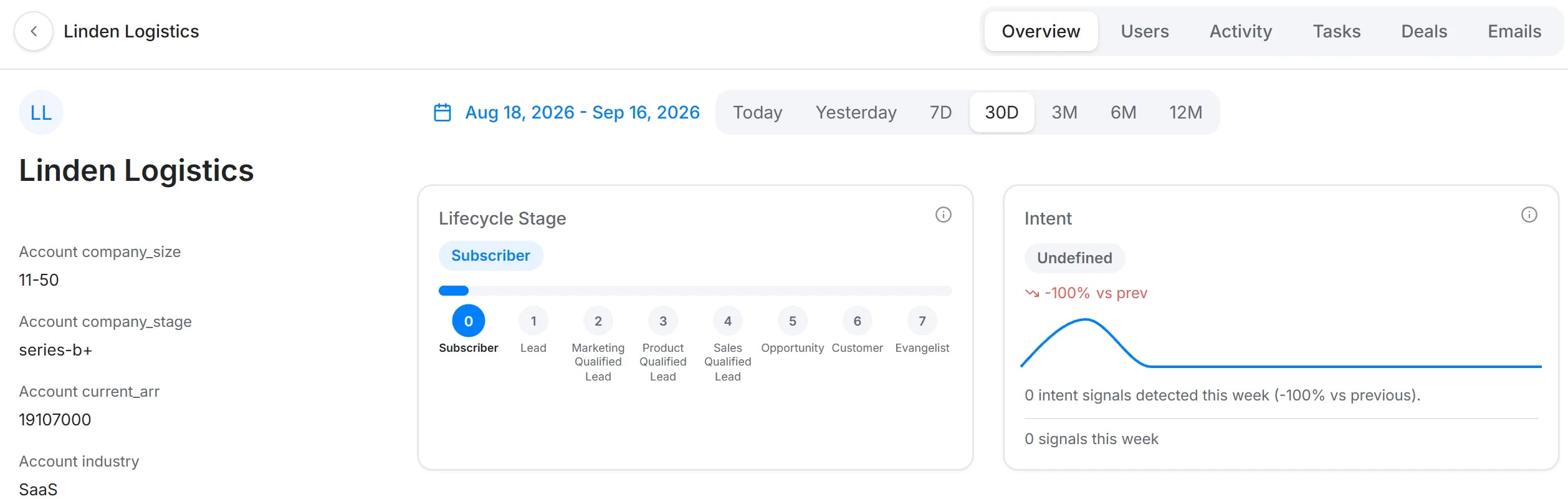
What pass four wants is that shape, whoever builds it: the firmographics, the people, the events and the deals hanging off one company rather than four systems that each think they own the customer. When it is one record the agent reads facts. When it is four, the agent is guessing which Acme is which, in a paragraph that reads exactly as confident either way. That is the problem we ended up building around, which is exactly why I would not take my word for it - add the "tell me if they cannot be matched" line to your own version and watch how often it fires. If it never fires, ignore all of this and keep your stack.
If you'd rather not hand-roll this one, the same four passes exist as a deep account research recipe that runs the scrape, the summary, the ICP score and the opening hypothesis and writes them onto the account record. Same method, less prompt maintenance.
Weekly account watch
One per account that matters. Runs Sunday night.
Weekly rundown for [account]. Before the first run, ask me which topics count as buying signals for us and which roles at this account matter. Save the answers.

Scan for new items only. Webinars, podcasts, recorded talks, and conference sessions featuring anyone at the account, prioritising the roles I named. Plus posts from the company account and from known people there. Keep a running file of everything you have already reported and compare against it, so I never see the same item twice.

For each new item, actually consume it. Pull the transcript or the show notes. Then give me the takeaways that matter to us, any mention of our category or our competitors with the sentiment, a notable quote with a timestamp, and one line on why it matters for this account.

Flag anything that looks like a buying signal or a public statement about how they buy or build in our space.

One message a week. If there is nothing new, send one line saying so. Do not manufacture a roundup out of old items to fill the slot."Do not manufacture a roundup out of old items to fill the slot" exists because a weekly job with nothing to report will, left alone, always find something to report.
Pipeline hygiene
Friday. Not a forecast, a list of what I forgot.
Go through my open pipeline. For every deal, tell me: the last real activity and when, whether the next step has a date and an owner, and whether anyone outside my company has replied in the last fourteen days.

Then sort into three buckets. Moving. Stalled, meaning no inbound reply in two weeks. And deals where the close date is inside thirty days but the last activity is older than the last stage change, which is the pattern that means the date is fiction.

Do not tell me what to do about any of them. Just show me the three lists and the evidence for each, and let me decide.Third bucket catches the thing I am worst at, which is a close date I set optimistically in month one and never moved.
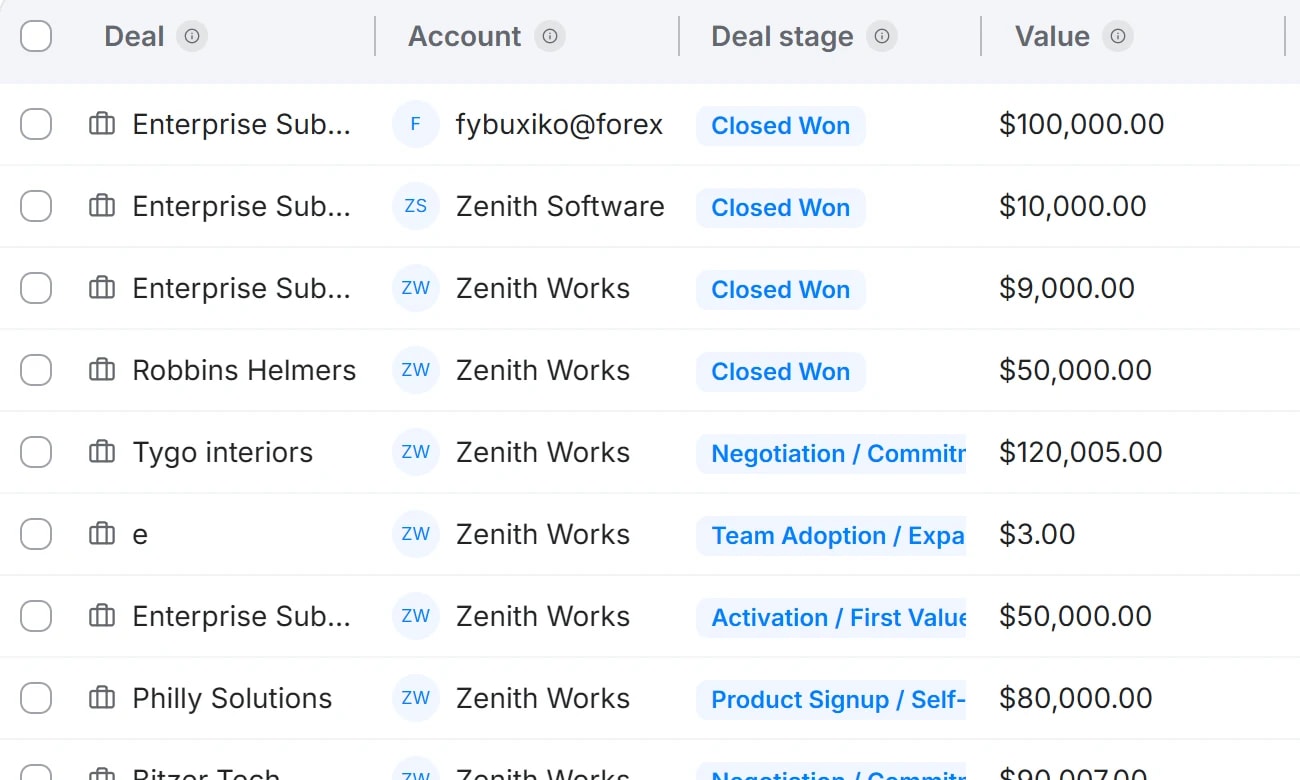
Run this once and you will find the real problem is not the reading, it is that the fields were never filled in. In the board above, most rows have no close date at all. "Last real activity" is only true if somebody logged the activity, and reps do not. Every pipeline review I have sat in was half archaeology. The fix is not a better prompt either: the CRM has to write its own fields from the calls and the emails rather than wait for a human to remember. That is the bet behind our pipeline, and it is the same bet Attio and Clari are making from different directions. Until one of them is in place, read the output of this prompt as "what the CRM believes", not "what is true".
Things that took me a while to figure out
Five habits separate a setup you keep using from one you abandon after a fortnight. None of them are about picking a better model, and all of them are about how the prompt is written.
- Write the guardrail into the prompt, not the follow-up. Every one of mine now carries a version of "say you don't know rather than filling it in." That single instruction is the difference between a briefing and a fluent invention, and it is the only thing that makes output safe to forward to someone else.
- Separate the read from the recommendation. If you ask for analysis and advice in one pass, the analysis quietly bends to justify whichever recommendation it started writing. Two messages, always.
- Use sub-agents for anything that fans out. Researching eight accounts is eight parallel jobs, not one long one. Cowork splits it automatically if you ask for the accounts as a set rather than feeding them one at a time.
- Let it build the deliverable, not a description of the deliverable. It writes real spreadsheets with working formulas and real decks. Asking for "a table I can paste into Sheets" gets you a worse version of something it can just make.
- Say what to do when there is nothing. Every recurring job needs an explicit "if nothing, say nothing" or it will produce output on schedule forever, and you will stop reading all of it.
What I have not automated
Anything that sends. Every write in my setup is on Needs approval, and I have not been tempted to move one.
The reason is not caution about the model. It is that the reading, pulling, prepping and checking is most of the hours and almost none of the judgment, and the sending is the reverse. Moving the first half got me back the better part of a day each week. Moving the second half would save me minutes and cost me the thing I actually want, which is still knowing what is true about my own pipeline.
Four people. That's the play.
If you want the connector side of this on your own customer data, that is the thing we build: agentic GTM software for teams that refuse to hire their way to scale.