


- The best Claude Code skills for SDRs and lead generation do not start at the email. They start at the list, because a specific opener is impossible against a list that is not specific.
- These 8 skills cover the full SDR desk: build and clean the list, score for fit, rank the week by fresh signal, write the opener, repair the sequence, classify replies, and book the call - no-show recovery included.
- Fix the list first, opener second, sequence third, replies last. Run sequence doctor before a sequence fails, not after.
Outbound breaks in a predictable order. The list is wrong, so the opener can't be specific, so the sequence gets longer to compensate, so replies get worse, so nobody classifies them, and the whole thing gets rebuilt from scratch next quarter. Every part of that chain looks like a copy problem. Almost none of it is.
The best Claude Code skills for SDRs attack it in the same order it breaks. Fix the list, then the opener, then the sequence, then the reply handling. Eight skills, MIT-licensed, sequenced so you know which one earns its install first. If you want the broader tour that mixes SDR, AE, and GTM Engineer packs, see best Claude skills for outbound marketing. This post is the SDR desk itself. Once a reply becomes a booked meeting, the deal moves to the AE, and Claude skills for sales deal execution covers that half.
For context on why the list-first order matters: Salesforce's 2024 State of Sales puts manual research at 21 percent of an SDR's week, and LinkedIn's State of Sales reports outbound reps rank prospecting research and data entry ahead of actual selling as their largest time drains. That is one full-time equivalent per five-rep team spent reading LinkedIn profiles and Google News. The skills below don't shrink outbound - they shrink the layer under it. For the primitive-layer explainer covering every pack, see the hub: Claude Code skills: what they are and which ones earn their install.
What is a Claude Code skill
A Claude Code skill is a versioned SKILL.md file with a stated method: the inputs it asks for, the framework it applies, and the shape of the output it returns. You install a pack once with npx skills add sidchaudhary/gtm-skills/skills/sdr, restart Claude Code, and every skill in the folder is available by name. Two SDRs running the same skill get the same output shape - a scored list with evidence per lead, six intent buckets for replies, a three-stage no-show recovery - so the work stops drifting between reps and between sessions.
Why SDR desks need Claude Code skills now
SDR teams spend most of the week on the layer under the outreach - filtering lists, scoring accounts, hunting for the trigger that makes an opener specific - and shrink the actual conversation layer to whatever's left. Woodpecker's cold email benchmarks put average reply rates for un-personalized outbound below 2 percent, while campaigns anchored on a specific trigger signal reach 6 percent or higher. The delta is not the copy. It's whether the list gave the copy something specific to point at.
Claude Code skills fix this at the task level. You don't replace the SDR. You give them a scored list with evidence per lead, a Monday queue built from real intent signals, and a reply classifier that stops positive replies from sitting behind forty neutral ones - so the strategic layer of the job stops taking the whole week.
The skills that move the needle are not the ones that write better copy. They're the ones that answer three questions faster:
- Which of my 300 accounts is worth the next 30 minutes?
- What happened at that account this week that a first line can point at?
- When a reply lands, which bucket does it belong in - and does it need an answer today or Thursday?
Install the SDR pack in about 30 seconds
One command pulls all 8 SDR skills into your project's .claude/skills/ folder. Restart Claude Code afterward - skills load at startup, so a running session won't see them.
npx skills add sidchaudhary/gtm-skills/skills/sdr

# restart Claude Code, then confirm:
# "What SDR skills do you have?"You can install a single skill by appending its folder name, e.g. .../skills/sdr/the-list-cleaner. The pack install is the better default because these skills feed each other - the-list-cleaner runs on the output of the-list-builder, the-call-booker runs on positive replies flagged by the-reply-classifier, and installing them in pieces breaks the handoff.
If installing all 8 at once feels heavy, start with three - the-list-cleaner, the-cold-opener, the-reply-classifier - and add the rest as the motion stabilizes.
8 best Claude Code skills for SDRs and lead generation
1. the-list-builder

Builds and qualifies a prospect list from your stated ICP - every lead scored Hot/Warm/Cold/Skip with evidence for the score, not a black-box number. The step that stops the list from being 300 rows of "maybe" and starts being a queue with an order to work it.
When to use: At the top of a new campaign, or any time the current list is unqualified and reps are burning hours filtering it by hand.
How to run:
You: "Run the-list-builder.
      ICP: B2B SaaS, 50-200 employees, VP Sales present,
      trigger is recent funding or an SDR hiring spree.
      Region: US + Canada."

Claude: -> scored list: Hot / Warm / Cold / Skip
        -> one-line evidence per row (what fired the score)
-> a Skip bucket with reasons, not silent dropsBest used with: A written ICP that names the company size band, the trigger that makes them a buyer now, and the title that owns the problem. "B2B SaaS" alone produces a list nobody wants to work.
Where this skill hits its ceiling: The list is built once against the ICP you pasted. If your ICP shifts mid-quarter, the list doesn't refresh itself.
With Intempt: The SDR agent rebuilds and re-scores the list continuously as new accounts match the ICP, without a re-run step.
2. the-list-cleaner

The skill that pays for the rest of the pack. Runs five hygiene checks on a raw list - duplicates, wrong title, likely-gone, wrong company, broken data - and returns three things: the clean list, a kept-but-flagged table for likely-gone rows it deliberately did not remove, and a removed-rows table with a written reason per removal. Nothing disappears silently.
When to use: On every fresh export before it hits a sequence. A domain burned on a bad list is not quick to win back, and Woodpecker's data shows deliverability damage from stale lists compounds across future campaigns for weeks.
How to run:
You: "Run the-list-cleaner on this Apollo export.
      Target title: VP Sales, Head of Sales, CRO."
      [paste export]

Claude: -> clean list, ready to sequence
        -> kept-but-flagged: likely-gone rows, with why
        -> removed rows: each with a written reason
-> summary: what got dropped, what got flagged, what survivedBest used with: Any Apollo, Clay, ZoomInfo, or LinkedIn Sales Nav export. Also works on old CRM lists that haven't been touched in six months.
Where this skill hits its ceiling: It cleans the export you pasted. It doesn't monitor the source and doesn't re-flag rows as roles change three weeks later.
With Intempt: List hygiene runs continuously against enrichment feeds, so title changes and role departures re-flag automatically instead of waiting for the next export.
3. the-fit-scorer

Scores an account list against your ICP criteria and returns priority tiers with a one-sentence rationale per account. Runs after the-list-builder when your list is too big to work top-down.
When to use: When the list is too large to work in the current week and you need a defensible tiering rather than gut feel.
How to run:
You: "Run the-fit-scorer on this list.
      ICP: B2B SaaS, 50-200 employees, VP Sales present,
      funded in the last 12 months."
      [paste account list]

Claude: -> Tier 1 / Tier 2 / Tier 3 / Skip
        -> one-sentence rationale per account
-> summary of what fired each tierBest used with: A cleaned list (run the-list-cleaner first) and a written ICP. Feeding it a raw export first burns cycles scoring dead rows.
Where this skill hits its ceiling: Static tiering against the criteria you pasted. If a Tier 3 account raises a Series B on Thursday, the tier doesn't update itself.
With Intempt: Fit scoring is re-computed as signals arrive, so a Series B on Thursday moves the account up the queue Thursday, not next Monday.
4. the-monday-list

Takes a batch of intent signals from across the pipeline and returns a ranked outreach list, with the signal, the rationale, and a suggested channel per account. It ranks by how fresh the signal is and how fast it decays, not by an evergreen fit score, so the week starts with outreach instead of reading dashboards.
When to use: Monday morning, before anyone opens the queue. Also any time a batch of signals lands and the team is arguing about priority.
How to run:
You: "Run the-monday-list for this week."
      [paste: batch of intent signals + account context]

Claude: -> ranked outreach list, freshest signal first
        -> the signal per account
        -> the rationale for the ranking
        -> suggested channel per account
-> the signals it deprioritized, and whyBest used with: Real intent signals from your CRM or tools, run against a list that has already been through the-fit-scorer. Fit tells you who. Signal tells you who this week.
Where this skill hits its ceiling: It ranks the batch you pasted. A signal that fires on Wednesday waits for the next run, and the SDR still owns the first message.
With Intempt: The SDR agent re-ranks the queue as new signals fire, so a Wednesday signal gets worked Wednesday instead of waiting for next Monday.
5. the-cold-opener

Writes a complete cold email body under 120 words, built on one specific trigger signal rather than generic pain. The 120-word cap isn't arbitrary - Boomerang's analysis of millions of emails found emails between 50 and 125 words get the highest reply rates, with response rates declining sharply above 200 words. The list-building skills tell you who to write to and why. This one writes the email.
When to use: After the-fit-scorer or the-monday-list surfaces the account and you have a specific trigger to point at. The subject line comes out of the same run.
How to run:
You: "Run the-cold-opener.
      Prospect: Marcus, VP Sales at Fieldpath.
      Trigger: posted 2 days ago about onboarding 8 new SDRs
              with a stretched ops team.
      Product: Intempt - agents handle CRM updates, notes, follow-ups.
      Proof point: one team eliminated 312 hours/year of admin per rep."

Claude: -> full email body, under 120 words
        -> anchored on the specific trigger, not generic pain
-> single CTA, no double askBest used with: A trigger signal that's specific, recent, and public. "They're a SaaS company" is not a trigger - a Series B announcement, a new VP hire, a stack migration, or a hiring spree is.
Where this skill hits its ceiling: One email at a time. Running the full chain (list-cleaner, fit-scorer, cold-opener) is three separate sessions before a sendable email exists.
With Intempt: The SDR agent researches the account, picks the strongest trigger, writes the personalized email, and queues it for rep review in a single pipeline action.
6. the-sequence-doctor

Builds a full multi-touch sequence from scratch when there isn't one yet, or audits an existing cold email sequence and returns three things: a gap analysis per email (vague value prop, wrong timing, weak CTA, subject mismatch, feature focus), full rewrites of the three weakest, and a recommendation for any missing step type - a LinkedIn touch, a breakup email, a phone step. Audit mode runs on the sequence's text and send days alone; per-email reply rates are optional and only help it prioritize.
When to use: Before launching a new sequence, not only when an existing one has already broken. Auditing a sequence with no numbers on it is fine - the skill works from the copy.
How to run:
You: "Run the-sequence-doctor on this 5-email sequence.
      Persona: Head of Growth at B2B SaaS, 50-150 employees.
      Product: Intempt (agentic GTM, replaces fragmented tools)."
      [paste full text + send day for every email]

Claude: -> gap analysis per email
        -> full rewrites of the three weakest
        -> missing step type worth adding
-> a note on which single change to ship firstBest used with: Your current active sequence from Outreach, Salesloft, HubSpot, Smartlead, or Intempt Journeys.
Where this skill hits its ceiling: You audit after reply rates have already dropped, retroactively. The skill can catch a weak sequence before launch, but only if you remember to run it before launch.
With Intempt: Journey workflows surface per-step open and reply signals in real time, flagging underperforming emails while the campaign is still running - before the list is burned.
7. the-reply-classifier
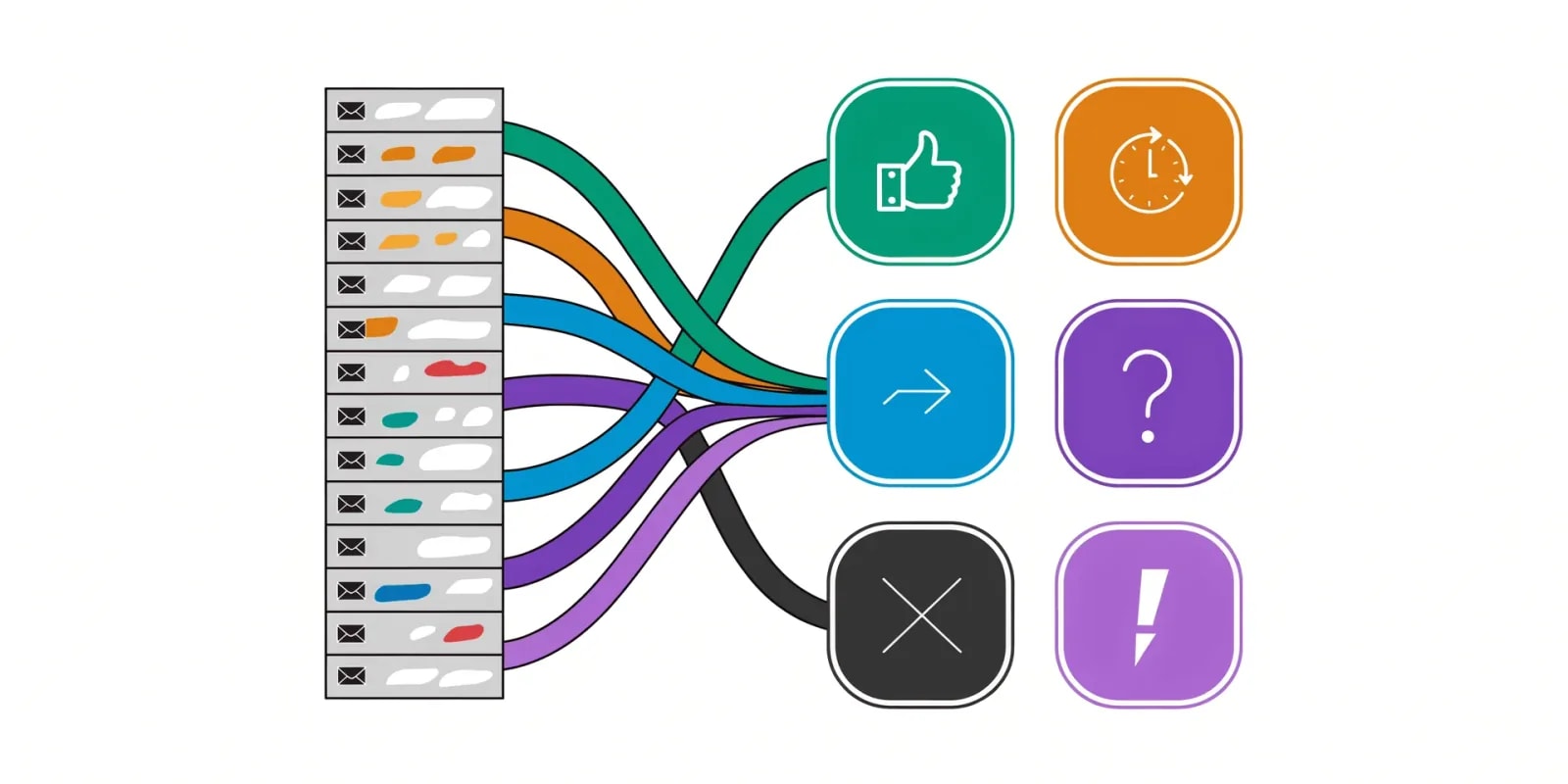
Sorts a batch of replies into six intent buckets - Interested, Later, Referred, Objection, Dead, Angry - with evidence for the bucket and a recommended next action per reply. Speed on the Interested bucket matters more than the wording of the follow-up. Classification exists so a positive reply doesn't sit for a day behind forty neutral ones.
When to use: Daily, or at the end of every batch send. A reply that lands Wednesday and gets triaged Friday is a reply that already cooled.
How to run:
You: "Run the-reply-classifier on this batch of replies."
      [paste raw thread text for each reply]

Claude: -> Interested / Later / Referred / Objection / Dead / Angry
        -> evidence quote per bucket assignment
-> next action per reply (route to AE, book, park until Q2, apologize)Best used with: A shared inbox export or a CRM reply queue. Also useful on a single ambiguous reply when a rep isn't sure whether it's a Later or a Dead.
Where this skill hits its ceiling: You paste replies manually. If new replies land while you're running it, they wait for the next batch.
With Intempt: Reply classification runs continuously against the shared inbox, so Interested replies route to an AE the moment they land instead of Friday afternoon.
8. the-call-booker

Writes the booking message, the reschedule, the confirmation, and the day-before reminder that gets a warm reply onto a calendar - plus the three-stage no-show recovery sequence (same-day nudge, reschedule offer, close-the-loop message) when the meeting gets missed, with guidance on when to stop trying based on the prospect's no-show history. One skill covers the whole booking lifecycle, so the exchange doesn't take four rounds of back-and-forth and a no-show doesn't just go quiet.
When to use: The moment the-reply-classifier flags a reply as Interested.
How to run:
You: "Run the-call-booker.
      Reply from Marcus at Fieldpath: 'happy to chat, next week works'.
      My calendar: Tue/Thu afternoons EST.
      Meeting length: 20 min."

Claude: -> booking message with 2-3 specific slots
        -> reschedule template (in case of reply)
        -> confirmation message
-> day-before reminderBest used with: A calendar link (Calendly, Chili Piper, HubSpot Meetings) or specific times. Ambiguous availability produces ambiguous booking messages.
Where this skill hits its ceiling: It writes the messages. It doesn't hold the calendar or auto-send. Time zone confusion is still on you.
With Intempt: Interested replies trigger the booking flow automatically, with slots pulled from live calendar availability and the reminder sequence queued end-to-end.
Comparison: which skill to run first, per SDR and lead gen problem
| Skill | Run it first when | Best moment to use | What you get |
|---|---|---|---|
| the-list-builder | There's no list at all | Top of a new campaign | Scored list with evidence per lead |
| the-list-cleaner | Reply rate is low | Every fresh export, before sequencing | Clean list + flagged rows + removed-rows table |
| the-fit-scorer | An ABM list or backlog needs an order | When the list is too big to work top-down | Priority tiers + one-line rationale |
| the-monday-list | The Monday queue is a wall of accounts | Monday morning, or when a batch of signals lands | Ranked outreach list + signal, rationale, and channel per account |
| the-cold-opener | The first email needs to name a signal | After the account and a trigger are surfaced | Full email body under 120 words |
| the-sequence-doctor | The sequence feels tired | Before launch, or when replies drop | Gap analysis + rewrites + missing step type |
| the-reply-classifier | The reply pile is scary | Daily or per batch send | Six intent buckets + next action per reply |
| the-call-booker | Good conversation, no booked call | When a reply is flagged Interested, or within the hour of a no-show | Booking + reschedule + confirm + reminder + three-stage no-show recovery |
The pattern: a diagnostic skill goes first in almost every row. Clean the list, then write to it. The sharpest opener still bounces off a contact who left the company in March.
Free Intempt tools that pair with these skills
Browser-based, sit behind a free-plan signup, produce quick outputs you can feed into the skills above.
- AI sales email generator: First-draft email body from a brief. Use as a starting input for
the-cold-openeror a fallback when the trigger signal is thin. - AI sales email & pitch generator: Pitch narrative you can paste into
the-cold-openeras the product context block. - Meeting prep generator: Fast pre-call brief for the calls
the-call-bookergets on the calendar.
What to look for in a Claude Code skill for SDR work
Not every prompt is worth wrapping in a skill file. The ones that stick share four traits.
Fixed input format. You shouldn't have to think about how to structure your data. The skill tells you exactly what to paste - a list export, a LinkedIn about section, a five-email sequence with send days.
Consistent output shape. Every run returns the same shape so downstream skills plug in without reformatting. the-reply-classifier always returns six buckets. the-cold-opener always returns a body under 120 words. The shape is what makes the pack composable.
Single use case. Skills that try to do three things do none of them well. the-list-builder builds. the-list-cleaner cleans. Neither pretends to be the other, which is why chaining them works.
Verifiable output. A rep should be able to evaluate a run in 60 seconds. A cold opener that points at a real trigger reads specific immediately; one that guesses reads generic. If you can't tell either way, the input was probably too thin.
Final thoughts: which SDR skill to install first
Start with these three, in order:
- the-list-cleaner: fixes the layer under the sequence. An outbound problem that looks like a copy problem is usually a list problem wearing a copy costume.
- the-cold-opener: the shortest path from a specific trigger to a sendable email. Once the list is clean, this one earns replies.
- the-reply-classifier: makes speed on Interested replies a default state, not a Friday-afternoon habit.
Add the-sequence-doctor after those three are running, and the-monday-list once there are enough intent signals to rank. Save every output as a file, not a chat: a stored list can be diffed and re-run next week. the-call-booker already covers the no-show recovery sequence, so there's nothing separate to add the first time a rep loses a warm lead to silence. For the broader tour that mixes AE and GTM Engineer skills into the same outbound story, see best Claude skills for outbound marketing.
The 8 best Claude Code skills for SDRs and lead generation aren't about writing better emails. They're about compressing the research, list hygiene, and reply triage that happens on either side of the email, and that's where most SDR desks lose the week. Start for free on Intempt to run this entire layer automatically, without the manual paste per account.